
At a Glance
- Turns habits, recurring routines, and everyday tasks into a role-playing game
- Rewards completed tasks with experience points, gold, equipment, and character progress
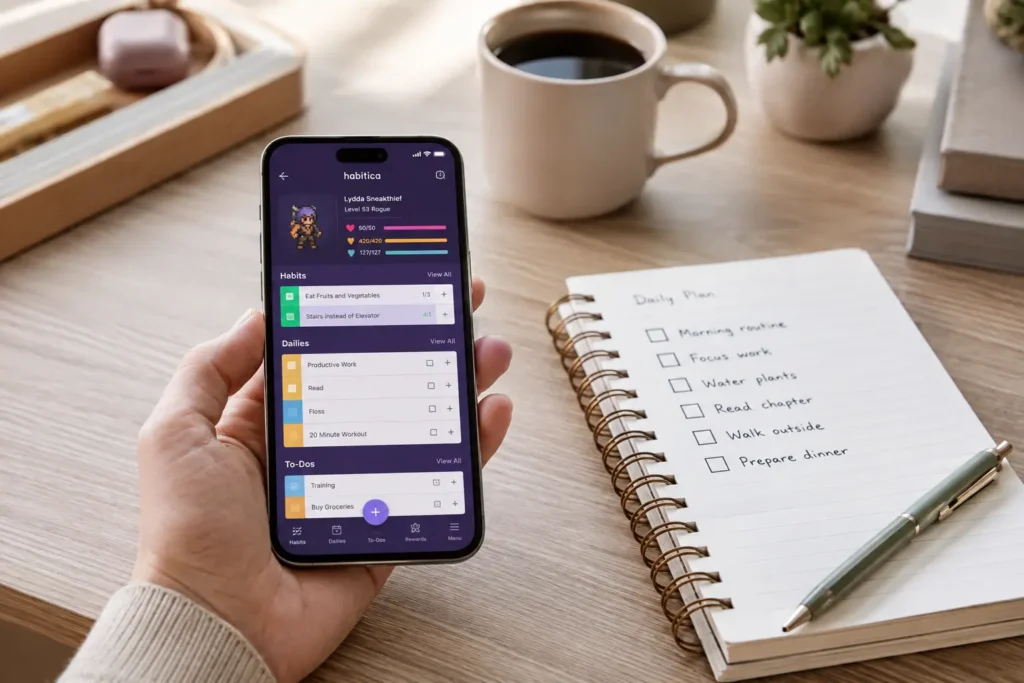
- Separates tasks into Habits, Dailies, and one-off To-Dos
- Includes optional social accountability through Parties, Challenges, and Quests
- Best suited to people who find ordinary task lists dull or difficult to revisit
- Available through a web interface and mobile apps for Android and iOS
Introduction
This Habitica Review for ADHD looks at whether turning everyday responsibilities into a game can make routines and unfinished tasks feel easier to approach. For many adults with ADHD, the problem is not understanding what needs to be done. The harder part is creating enough immediate interest, urgency, or reward to begin something whose benefit may not arrive until much later.
Habitica approaches that problem differently from a traditional productivity app. Instead of relying only on the satisfaction of ticking off a task, it connects real-life actions to character progress, virtual rewards and consequences within the game. This gives an otherwise uninteresting task a more immediate result, which may make it easier to notice and return to.
That combination can make ordinary actions feel more noticeable, particularly when tasks such as drinking water, answering an email, putting laundry away, or starting paperwork do not feel rewarding on their own. Habitica can also form part of a wider setup alongside the tools covered in the ADHD Productivity Tools UK guide, although it works best when its role remains clear and the task system is kept manageable. If you are comparing habit trackers specifically, the Best Habit and Routine Apps for ADHD (UK Guide) looks at Habatica alongside the other main habit and routine apps covered on SB Neuro Focus.
What Stood Out During Use
The most noticeable difference is that checking off a task feels more active than it does in an ordinary list app. You are not simply removing an item from view and hoping that the completed action feels rewarding on its own. Habitica provides an immediate sign of progress, which can make a small or repetitive task feel more noticeable.
This felt most useful with repetitive tasks that are important but naturally uninteresting. A work deadline may already have enough urgency to hold your attention, whereas washing up, preparing items for the next morning, taking a short walk, or completing a daily reset may offer very little stimulation. Habitica gives those smaller actions a clearer sense of consequence and progress.
The separation between Habits, Dailies, and To-Dos also stood out because these categories encourage you to think about the type of behaviour you are tracking. A flexible action such as drinking water can sit under Habits, a morning medication reminder may belong under Dailies, and submitting a particular form can remain a one-off To-Do. That structure is useful once understood, although it takes a little experimentation before it feels natural.
Who This Guide Is For
- Adults with ADHD who quickly lose interest in conventional task lists
- People motivated by games, character progression, rewards, or collecting items
- Users trying to build recurring routines alongside one-off tasks
- Friends, couples, or small groups who want shared accountability
- People who enjoy customising systems rather than using a completely minimal app
- Anyone looking for a playful productivity tool rather than a formal work planner
Key Takeaways
- Habitica is strongest when gamification genuinely affects your motivation
- The three task types offer useful structure for habits, routines, and one-off actions
- Social features can create accountability, but they may also add pressure
- Too many tasks can make the interface feel busy and reduce the value of the rewards
- It is better for personal motivation than detailed project management
- Starting with a small number of meaningful tasks makes the system easier to maintain
How It Works
Habitica begins by asking you to create a character and add real-world activities to your task list. Each completed task can provide experience points and gold, helping your character level up and giving you currency to spend on equipment or rewards.
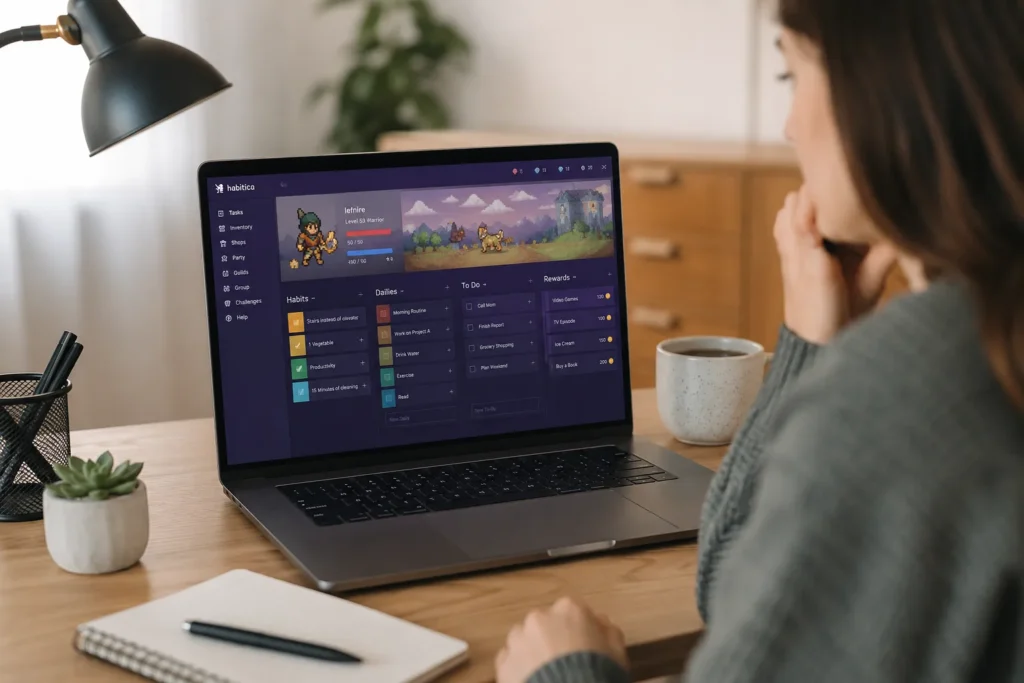
Habitica splits those activities into three main task types: Habits, Dailies and To-Dos. Each works slightly differently, so where you place a task depends on whether it is something flexible, something that repeats on a schedule, or a one-off action you simply need to complete.
Habits are flexible behaviours that can be marked positively or negatively. You might use them for drinking water, taking a movement break or pausing before an impulsive purchase. This makes actions that happen throughout the day easier to notice without forcing them into a fixed schedule. Negative tracking is optional, and it may be better avoided if penalties create guilt rather than useful feedback..
Dailies are recurring responsibilities scheduled for particular days. These work well for routines such as preparing lunch, checking a calendar, taking medication, completing a morning reset, or reviewing tomorrow’s priorities. Missing a due Daily can reduce your character’s health, which creates a stronger consequence than leaving an ordinary recurring task unfinished.
To-Dos are one-off actions that can hold appointments to arrange, forms to complete, items to buy, or individual pieces of work. Custom Rewards allow you to spend the gold you earn on something you define yourself, such as watching an episode of a programme, ordering a favourite coffee, or taking guilt-free gaming time.
As you progress, there are additional layers involving equipment, pets, character classes, Parties, Challenges, and Quests. These features can increase motivation for people who enjoy the game itself, but you do not need to engage deeply with every system for the basic task tracking to be useful.
Why It May Help (ADHD Context)
One of the difficult things about ADHD is that knowing a task is important does not always make it easier to start. Sorting out some household admin today might save you a problem in a few weeks, but that future benefit can feel a long way off when there are more interesting things competing for your attention right now. Habitica tries to make that reward feel more immediate by giving you visible progress as soon as you complete something.
That does not suddenly make boring tasks easy, but it can give you an extra reason to get started. It also gives you somewhere to keep track of the things you need to do, rather than relying on yourself to remember them at the right moment. Recurring jobs, daily routines and one-off tasks can all sit in the same place, ready to check when you need them.
Resources such as ADDitude regularly discuss ADHD difficulties around motivation, routines, time management and following through on intentions. Habitica is not a treatment for any of those things, but the game element may make a task list more engaging if a normal checklist tends to get ignored after a few days.
There is a social side to it as well. If you join a Party, completing your own tasks can contribute towards something the group is working on together. For some people, that little bit of outside accountability can make it easier to follow through. The important thing is that it stays motivating rather than turning into another system that makes you feel bad when you have an off day.
Real-World Use Cases
Morning and evening routines are probably one of the easiest places to see how Habitica could be useful. These routines are often made up of lots of tiny jobs, and it only takes getting distracted by one thing for the whole sequence to disappear. Instead of adding something broad like “do morning routine”, it makes more sense to break it down into the individual things you are most likely to forget, such as taking medication, eating breakfast, checking your calendar or making sure you have everything before leaving the house.
Household jobs are another good example because, for many of us, they are exactly the sort of tasks that are easy to keep putting off. Loading the dishwasher or putting a pile of clothes away is rarely exciting, and there is not much of a reward waiting for you when it is finished. Habitica gives those otherwise boring jobs a small extra payoff. You are not suddenly going to love taking the rubbish out, but watching your character progress afterwards can make actually doing it feel a little more worthwhile.
I would keep things fairly simple for work or study. Habitica is probably not where I would try to organise an entire complicated project, but it can be useful for the smaller actions that are easy to avoid. Sending an email, reviewing a document, completing a chapter or getting started on a focus session all fit quite naturally. Sometimes just having a clear thing to tick off is more helpful than staring at a project that feels far too big to begin.
The same applies to everyday wellbeing. Things like drinking enough water, remembering lunch, getting outside for a few minutes or winding down before bed can easily get pushed aside when the day becomes busy. Adding a few of those things to Habitica can be useful, but I would resist the temptation to track absolutely everything. Once every part of your day becomes another box to tick, the app risks becoming one more thing demanding your attention rather than something that actually helps.
Feature Breakdown Table
| Feature | What It Does | Why It May Matter for ADHD |
|---|---|---|
| Habits | Tracks flexible positive or negative behaviours | Provides immediate feedback for actions that happen throughout the day |
| Dailies | Schedules repeating tasks on selected days | Supports routines that are difficult to remember consistently |
| To-Dos | Stores one-off tasks and actions | Moves unfinished responsibilities out of working memory |
| Experience and gold | Rewards completed real-world tasks | Adds a faster and more visible payoff to low-interest activities |
| Custom Rewards | Allows gold to be exchanged for personal rewards | Connects effort with incentives that feel personally meaningful |
| Parties and Quests | Creates shared progress and accountability | May strengthen follow-through when other people are involved |
| Challenges | Provides themed task collections created by the community or Habitica team | Offers structure when deciding what to track feels overwhelming |
Focus Environment Fit
Habitica probably works best when you dip into it at a few useful points during the day rather than having it open constantly. A quick look in the morning, checking things off as you finish them, and perhaps a short review later on is likely to be enough for most people. There is plenty inside the app to play around with, and it would be very easy to spend more time changing equipment, looking through rewards or reorganising your tasks than actually doing the things you added in the first place.
The game style will also be a big part of whether you enjoy using it. Habitica is colourful, busy and deliberately more playful than a normal task manager. If avatars, progress bars and collecting new items give you that little bit of extra motivation, this may be exactly what makes it work. If you already find busy apps tiring or distracting, though, you may open it and immediately wish there was less going on.
I also found that this is the sort of app that can feel easier to organise on a bigger screen. Setting up routines or having a proper tidy-up of your task list can feel a bit cramped on a phone, particularly once you have been using Habitica for a while. A tablet gives you a bit more room to see what you are doing, and the devices in the Best Digital Tablets for ADHD Productivity guide are worth a look if you prefer managing your planning and routines somewhere other than a small phone screen.
Friction Points to Consider
- The game interface may feel visually busy if you prefer minimal productivity tools
- Initial setup takes longer than writing a basic to-do list
- Too many Dailies can create pressure when several are missed at once
- The rewards may lose their appeal once the novelty wears off
- Social quests can make unfinished tasks feel more consequential
- It is not designed for detailed project planning, documents, or team workflows
- Maintaining the game can become a distraction if you spend too long customising it
Real Use Review
In practice, Habitica felt most useful when I kept things simple. If I added something small and specific, such as “clear the kitchen counter for five minutes”, it felt much easier to act on than something vague like “sort the house”. There was less thinking involved. I knew exactly what I was supposed to do, I could get it done quickly, and then I got the small satisfaction of ticking it off and seeing the game react.
Where I started to lose interest was when the list became too busy. Once there were too many Habits, Dailies and To-Dos sitting there, it began to feel like every other overloaded task manager I have used. Instead of making me want to get started, I found myself looking at the amount of stuff on the screen and wanting to avoid it. Habitica can make tasks more interesting, but it cannot rescue a system that has become unrealistic.
I found Dailies worked better when I was quite strict about what went into them. If something genuinely needed doing every day or on a particular schedule, it made sense there. Things I would like to do, but did not want hanging over me as another missed responsibility, felt better as Habits. To-Dos were then useful for the one-off jobs I simply needed somewhere to remember.
That distinction mattered more than I expected. If I turned everything into a Daily, missing a difficult day started to make the app feel like it was keeping score of what I had failed to do. Keeping the routine smaller made the rewards feel encouraging rather than nagging.
The bigger question is whether the game itself keeps you interested. I can see why the character progression, equipment, Parties and Quests would give some people a reason to keep coming back. I can also imagine the novelty wearing off quite quickly if that side of it does not really appeal to you. Because of that, I would start with a handful of tasks and see whether you are still enjoying the system after a couple of weeks before spending ages building everything into it.
Practical Reality Check
I think Habitica is probably better as something you check in with rather than something you keep open all day. Looking at it in the morning, ticking things off when you remember, and having another look later on feels like enough. There is quite a lot to play around with inside the app, and I can easily see how changing equipment, looking through rewards or reorganising your tasks could become a distraction in its own right. That is probably worth keeping an eye on if you are someone who can spend twenty minutes perfecting a productivity system instead of doing the task you opened it for.
Whether you actually enjoy the look of Habitica will matter as well. It is colourful, busy and very obviously built around the game. For some people, seeing their character improve and unlocking new things could be the little bit of encouragement that keeps you coming back. For others, all of the icons, menus and game elements may just feel like more visual noise. This is one of those areas where I don’t think there is a right answer — it will either click with you or it won’t.
I also found myself thinking that Habitica would be nicer to organise on a bigger screen once you have more than a handful of tasks in there. The phone app is fine for quickly ticking something off, but setting up routines or sorting through a longer list can start to feel a bit cramped. If you already like using a tablet for planning, notes or general organisation, it could be a more comfortable way to manage Habitica as well. The Best Digital Tablets for ADHD Productivity guide covers some of the options if that sounds more like the way you prefer to work.
Before You Commit
I would start with one part of your day that you already know you struggle with, rather than trying to build your whole life into Habitica on day one. Maybe it’s getting started with work, keeping on top of the kitchen, remembering a few self-care jobs or actually winding down properly in the evening. Keeping the focus narrow at first makes it much easier to tell whether the app is helping or whether you are just enjoying setting it up.
A few Dailies, some flexible Habits and a handful of current To-Dos is plenty to begin with. I found the more specific you can make them, the better. “Open the page and work for ten minutes” gives you something you can actually start, whereas “finish project” still leaves your brain having to work out what that means. The same applies at home. “Put five things away” feels far more manageable than looking at “clean bedroom” and immediately wanting to do anything else.
I would also pay attention to how the penalty side of Habitica makes you feel. Some people will find losing character health gives them just enough pressure to follow through. For others, it could turn a missed task into another little reminder that they have fallen behind. You don’t have to use every feature just because it is there. If negative Habits or a long list of Dailies start making the app feel heavy, strip them back. Habitica should be giving you a bit more motivation, not creating another thing you feel guilty about avoiding.
Frequently Asked Questions
Is Habitica good for adults with ADHD?
Habitica may suit adults with ADHD who respond well to games, immediate rewards, visible progress, or social accountability. It is less likely to suit people who want a minimal task list or who find game interfaces distracting.
Can Habitica be used for daily routines?
Yes. Its Dailies section is designed for repeating tasks that occur on selected days. It can be used for morning routines, evening preparation, medication prompts, household resets, work reviews, or other recurring responsibilities.
What is the difference between Habits and Dailies?
Habits are flexible behaviours that may happen several times or without a fixed schedule. Dailies are recurring tasks due on particular days. Choosing the correct type helps prevent optional actions from creating unnecessary pressure.
Does Habitica replace a project management app?
Not usually. It can track individual actions connected to a project, but it is not designed for complex timelines, documents, dependencies, or detailed professional workflows. Its main strength is personal motivation and habit support.
Can Habitica become distracting?
It can. Character customisation, equipment, pets, quests, and community features may encourage engagement, but they can also pull attention away from real tasks. Using the app at planned check-in points can reduce that risk.
Is Habitica free to use?
Habitica offers a free core experience with optional purchases and subscriptions. The basic habit, Daily, To-Do, reward, and gamification system can be explored before deciding whether any paid extras are worthwhile.
Alternatives to Consider
If Habitica’s game mechanics, character progression and reward systems feel too busy, Streaks Review for ADHD (UK Guide) explores a cleaner and more direct habit-tracking experience. Streaks focuses on completing a defined set of habits and keeping consistency visible without adding quests, equipment or social challenges.
For a gentler and more emotionally supportive approach, Finch Review for ADHD (UK Guide) looks at an app that connects small self-care actions with caring for a virtual companion. It still uses rewards and progression, but the experience feels calmer and more encouraging than Habitica’s role-playing structure.
Android users who want a free and straightforward way to record habits may prefer Loop Habit Tracker Review for ADHD (UK Guide). Loop removes characters, shared challenges and elaborate rewards, making it more suitable for people who want a neutral tracking tool with reminders, charts and longer-term progress data.
If the main difficulty is starting a routine and moving through each step in order, Routinery Review for ADHD (UK Guide) covers an app built around timed sequences. Rather than turning individual tasks into a game, Routinery guides you through a morning, evening or work routine one action at a time.
Final Verdict
Habitica won’t make boring jobs suddenly become exciting, but it does give you something a little more immediate for getting them done. If ticking a box on a normal task list does absolutely nothing for you, seeing your character gain experience, earn gold or make progress towards a quest can make completing the task feel slightly more rewarding.
I think it will appeal most to people who already like games and can see themselves becoming invested in the character and progression side of it. If that sounds like you, Habitica has a genuinely interesting way of making everyday jobs feel a bit less dull. If you prefer clean, quiet productivity apps or know that virtual rewards stop interesting you after a few days, it’s probably going to be a harder sell.
The biggest thing I would avoid is trying to put your entire life into it straight away. Start with the jobs you actually struggle to get yourself to do and see whether having that little game reward makes any difference. Keep the Dailies realistic, use Habits for the things that don’t need to happen on a strict schedule, and don’t worry about using every feature.
If you use Habitica in that way it can feel like a fun little nudge rather than feeling like another complicated productivity system you have to maintain.
If you want to bring everything together into one clear setup, this guide shows how tools, apps, and routines can work as one system.