
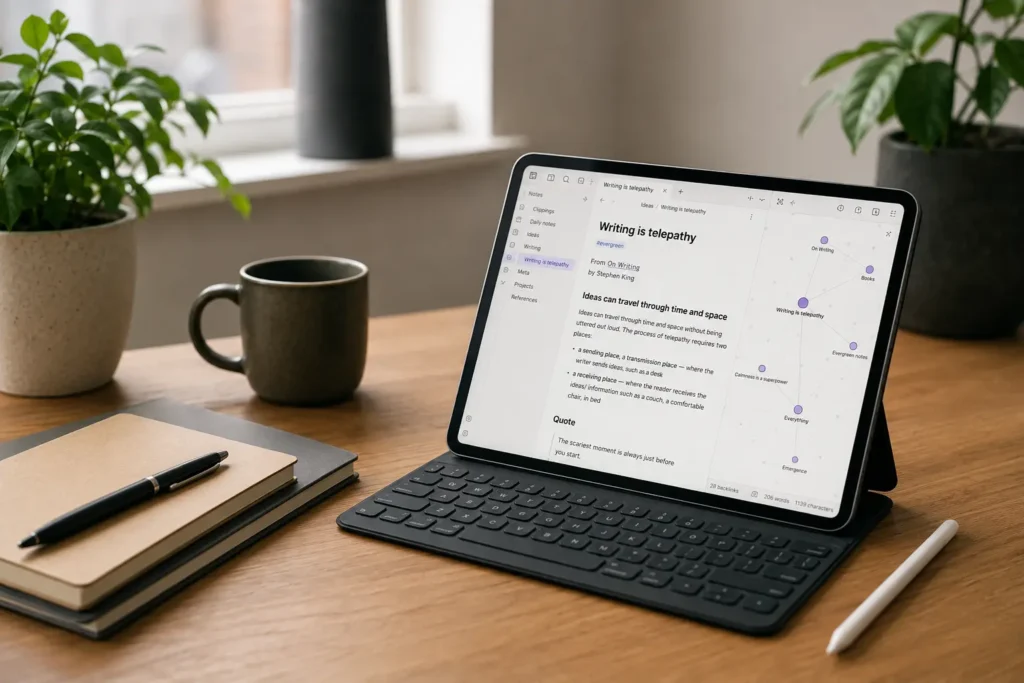
At a Glance
- Best for building a personal knowledge base or second brain.
- Strong option for linked notes, ideas, research, projects, and long-term thinking.
- More flexible than simple notes apps, but that flexibility can create setup overwhelm.
- Works best if you enjoy organising information and can keep the system simple.
- May not suit people who want a very visual, guided, or ready-made planner.
Introduction
This Obsidian Review for ADHD Productivity looks at whether Obsidian is a helpful note-taking tool for adults who struggle with scattered thoughts, forgotten ideas, unfinished plans, and too many separate places for information to live. If you are comparing it with other options, the wider Best Note-Taking Tools for ADHD Productivity (UK Guide) is the best place to see how it fits alongside simpler and more structured alternatives.
Obsidian is not really a standard notes app in the way Apple Notes or OneNote might be. It is closer to a personal knowledge system, where notes can connect to each other through links, tags, folders, backlinks, and visual graph views. For an ADHD brain, that can be genuinely helpful because thoughts rarely arrive in tidy folders. One idea leads to another, a reminder connects to a project, and a random note from three weeks ago suddenly becomes useful when you are trying to finish something today.
The risk is that Obsidian can also become another productivity rabbit hole. It is very customisable, which means you can build something genuinely useful, but you can also spend hours adjusting templates, plugins, folders, and dashboards instead of actually capturing the thing you needed to remember. This review focuses on the practical reality: whether Obsidian can reduce mental clutter without becoming a new source of it.
What Stood Out During Use
What stood out most during use was how naturally Obsidian connected thoughts that would usually stay scattered. Instead of treating each note as a separate item, it made it easier to link ideas, projects, research, and reminders together over time.
For ADHD, that matters because useful thoughts often arrive out of order. One idea might not make sense until days or weeks later, when it connects to something else you have already captured. Obsidian felt strongest when it helped turn loose notes into something that was easier to reconnect with later.
The experience worked best when Obsidian was kept simple. It was most useful as a place to capture ideas, connect related thoughts, and find them again later, rather than as a heavily customised productivity dashboard full of plugins, templates, and extra decisions.
Who This Guide Is For
This guide is for ADHD adults who want somewhere reliable to put thoughts, ideas, plans, research, checklists, reflections, and loose information before it disappears. Obsidian may suit you if your brain regularly produces useful ideas at inconvenient times, but you then struggle to find them again when they matter.
It may also be useful if you are building a broader productivity setup and want your notes to connect with tasks, planning, and project thinking. For a wider overview of tools that can support that kind of setup, the ADHD Productivity Tools UK guide is a useful starting point.
Obsidian is probably less suitable if you want a very simple app where you open it, type a note, and never think about structure again. It can be used simply, but the app almost invites tinkering. If you know that customisation sends you into endless setup mode, you may need very firm boundaries before using it.
Key Takeaways
Obsidian can be excellent for ADHD productivity when it is used as an external memory system rather than a perfect knowledge database. The biggest benefit is not that it makes you more organised overnight, but that it gives your thoughts somewhere to land and somewhere to reconnect later.
The best use of Obsidian is usually simple: quick notes, daily notes, project pages, idea links, and a small number of reliable tags or folders. Once the system becomes too complex, the maintenance can become heavier than the benefit, especially if you already struggle with task initiation and decision fatigue.
For many ADHD users, Obsidian works best when paired with another tool for reminders or time-based planning. It can hold your thinking beautifully, but it is not always the best place to make sure you remember a dentist appointment, medication reminder, or time-sensitive admin task.
How It Works
Obsidian stores your notes inside a vault, which is simply a folder containing your note files. You can create pages for anything: a project, a book, a meeting, a recurring problem, a weekly review, a health note, a content idea, or a list of things you keep forgetting. The difference is that notes can be linked together using simple internal links, so one note can point to another without needing everything to sit neatly in one folder.
That matters because ADHD organisation often breaks down when every piece of information has to be filed perfectly at the moment it is captured. In real life, you may not know whether a note belongs under work, home, health, content, ideas, or admin. Obsidian lets you capture the thought first and connect it later, which can reduce the pressure to make the perfect decision immediately.
Daily notes are often one of the easiest places to start. Instead of opening the app and wondering where something should go, you can drop thoughts into today’s note and move on. Later, if one of those thoughts becomes important, you can link it to a project page, turn it into a checklist, or connect it to a broader topic. This creates a calmer workflow than trying to build a perfect structure before you have even started using the app.
Why It May Help (ADHD Context)
Many ADHD productivity problems are memory problems in disguise. You may remember something clearly when it is emotionally urgent, then lose access to it once the context changes. A tool like Obsidian may help because it gives your working memory less to hold at once. Instead of relying on your brain to keep every idea active, you can place thoughts into a system that is searchable, linkable, and easier to revisit.
Externalising information is a common ADHD support strategy, and resources such as ADDitude often discuss the value of practical tools, structure, and environmental supports. Obsidian fits that idea well when it is treated as a memory aid rather than a productivity performance project.
The linking feature is especially useful for people whose thoughts arrive in associations rather than straight lines. You might write a note about planning, then realise it connects to burnout, routines, unfinished projects, and digital clutter. In a normal folder system, that note might disappear into one category. In Obsidian, it can belong to several ideas at once, which often feels more natural for an ADHD brain.
Real-World Use Cases
One practical use case is capturing thoughts before they turn into mental noise. If you are trying to work and your brain keeps throwing up unrelated ideas, you can open a daily note, write them down quickly, and return to the task. The aim is not to process everything immediately; it is to reassure your brain that the thought has been saved somewhere reliable.
Obsidian can also work well for project thinking. Instead of keeping research in one app, ideas in another, and rough plans in your head, you can create a project note that links to related notes. For example, if you were writing content, planning a home project, managing admin, or building a digital system, Obsidian could hold the background thinking while a task app holds the next actions.
It is also useful for recurring problems. ADHD adults often solve the same issue repeatedly because the previous solution was never stored somewhere visible. A note called “Things That Help When I Feel Overwhelmed” or “My Weekly Reset Checklist” can become more valuable over time because it captures what actually worked, not what you hoped would work in theory.
Feature Breakdown Table
| Feature | ADHD Benefit | Possible Friction |
|---|---|---|
| Linked notes | Helps connect related ideas without perfect folders. | Can become messy if every note is over-linked. |
| Daily notes | Creates a low-friction place for quick capture. | Needs review, or notes may pile up. |
| Graph view | Can make connections feel more visible. | May become distracting or decorative. |
| Plugins | Allows deeper customisation. | Easy to lose time building instead of using. |
| Local Markdown files | Gives ownership and portability. | May feel less simple than cloud-first apps. |
Focus Environment Fit
Obsidian can fit well into a focused work environment because it is not built around social feeds, team chat, or constant notifications. Once you have opened Obsidian, it can feel calmer than many modern productivity tools. That makes it useful for deep thinking, writing, planning, and processing information without being pulled into another busy dashboard.
For some people, the ideal setup may be Obsidian on a laptop or tablet, especially if the goal is longer-form thinking rather than quick reminders. If you are exploring devices for a more focused note-taking or planning setup, the best digital tablets for ADHD productivity roundup may be relevant because the right screen setup can make capture and review feel easier.
Real Use Review
In real use, Obsidian feels strongest when it becomes a quiet thinking space rather than a command centre for everything. It is very good for notes that need to grow over time, such as ideas, plans, reflections, research, and repeated lessons. The more your work involves connecting information, the more valuable it becomes.
The first few days can feel slightly strange if you are used to polished apps with obvious buttons and templates. Obsidian gives you freedom, but freedom means you have to decide how much structure you want. For ADHD users, the safest approach is usually to start with a very small setup: one daily note, one inbox note, a few project notes, and maybe a small number of tags.
Obsidian communities often show impressive dashboards, automation, templates, and graph views, but copying those too early can create a system that looks clever while becoming difficult to maintain. The better ADHD-friendly version is usually much plainer: capture fast, link lightly, review occasionally, and avoid turning every note into a project.
Friction Points to Consider
- The app can feel overwhelming if you try to build a full second brain immediately.
- Markdown may feel unfamiliar if you prefer visual formatting.
- Plugins are useful, but they can become a distraction.
- It does not replace a proper reminder or calendar system for time-sensitive tasks.
- Syncing across devices may require a paid option or extra setup.
Practical Reality Check
Obsidian is not magic, and it will not automatically make notes useful just because they are linked together. The real value comes from reducing the gap between having a thought and being able to find it again. If you make capture easy and review realistic, it can become a very supportive tool. If you expect it to organise your whole life without regular use, it may become another abandoned system.
For ADHD productivity, the question is not whether Obsidian has enough features. It is whether you can keep your version of it simple enough. A plain system that you actually use will beat a beautiful setup that you avoid because opening it feels like work.
Before You Commit
Before choosing Obsidian, it is worth asking whether your main problem is capturing thoughts quickly or connecting ideas over time.
If your notes are mostly quick reminders, shopping lists, or simple checklists, Obsidian may be more than you need. A lighter notes app may feel easier to maintain, especially if you want something you can open and use without setup.
Obsidian becomes more useful when your notes often turn into projects, research, ideas, systems, or long-term reference material. If you enjoy connecting thoughts and want more control over how your knowledge base grows, it can be a strong ADHD-friendly option when kept simple.
Frequently Asked Questions
Is Obsidian good for ADHD?
Obsidian can be good for ADHD if you need an external memory system for thoughts, ideas, research, and project notes. It is less useful if you need a simple reminder app or a fully guided planner.
Is Obsidian difficult to learn?
Obsidian can feel difficult if you try to use every feature at once. A simple setup with daily notes, project notes, and basic links is much easier to maintain.
Can Obsidian replace a task manager?
Obsidian can hold task lists, but it is usually better as a thinking and note system than a dedicated task manager. Time-sensitive reminders may be better handled in a calendar or task app.
Is Obsidian better than Evernote or OneNote?
Obsidian is better if you want linked notes, local files, and a more flexible personal knowledge system. Evernote or OneNote may feel easier if you prefer a more traditional notes layout with less setup.
Alternatives to Consider
Obsidian offers one of the most flexible note-taking systems available, but that flexibility is not always the right fit. The best alternative usually depends on whether your biggest challenge is capturing ideas quickly, organising information, or building a long-term knowledge system.
If you prefer a more traditional note-taking experience with notebooks, search, and straightforward organisation, Evernote Review for ADHD Productivity (UK Guide) may be a better choice. It provides a familiar structure without the learning curve that often comes with Obsidian.
For Apple users who simply want the fastest possible way to capture thoughts before they disappear, Apple Notes Review for ADHD Productivity (UK Guide) keeps everything simple and requires very little setup. It is often the better option if reducing friction matters more than building an advanced second brain.
Those who like working with notebooks, sections, and a more structured workspace may find OneNote Review for ADHD Productivity (UK Guide) easier to manage. Its familiar layout works well for study, work, and larger collections of notes without relying on linked thinking.
If your biggest struggle is getting thoughts out of your head before they disappear, Brain Dumps for ADHD: How to Get Thoughts Out of Your Head is a useful companion guide. Once capturing ideas becomes a habit, Building an ADHD Second Brain System shows how Obsidian can help organise that information into something more connected over time.
Ultimately, the best note-taking system is the one that still feels easy to return to when life gets busy. If you enjoy connecting ideas, building long-term knowledge, and creating your own workflows, Obsidian remains one of the strongest options. If you need something quicker or more structured, one of these alternatives may prove a better fit.
Final Verdict
This Obsidian Review for ADHD Productivity comes down to one practical point: Obsidian can be excellent for ADHD adults who need a flexible external memory system, but it works best when kept simple. It suits people who want to connect ideas, store long-term notes, build project knowledge, and reduce the pressure on working memory. It may not suit people who need a very guided, visual, or low-maintenance app from day one.
If you are willing to start small and avoid overbuilding, Obsidian can become a calm, reliable place for thoughts that would otherwise disappear. The key is to use it as a support system, not another productivity project to perfect.
Build a Simple ADHD Productivity System
If you want to bring everything together into one clear setup, this guide shows how tools, apps, and routines can work as one system.