
At a Glance
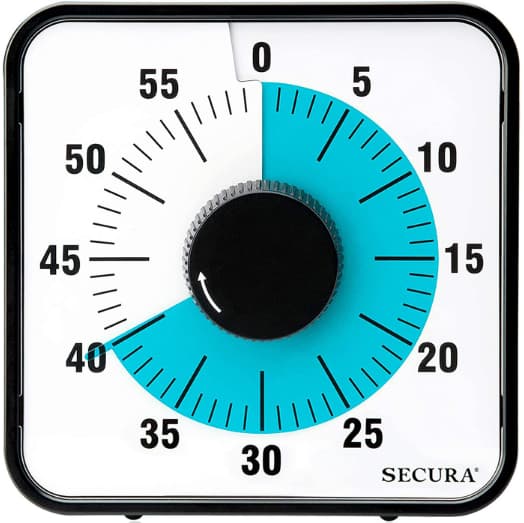
- Simple 60-minute visual countdown with a clear coloured disk
- Works well for people who want less screen time and fewer app distractions
- Easy to understand at a glance, which can help with time awareness
- Most useful for desk work, homework, revision, and short household tasks where you can keep it in sight
- Not perfect if you need silent use, ultra-portability, or highly precise scheduling
Check price and available options on Amazon
Introduction
If time tends to disappear while you’re working, tidying or trying to get out of the house, another timer app isn’t always the most helpful answer. The Secura 60-Minute Visual Timer takes a much simpler approach: put the countdown somewhere you can actually see it. For people who struggle with time blindness, that visible reminder may be easier to notice and respond to than a timer sitting behind everything else on a phone screen.
What often makes visual timers appealing is that they show time passing in a physical way. Instead of seeing numbers count down, you see a coloured section shrink. That sounds small, but in day-to-day use it can make starting work, sticking with a task, and noticing how much time is left feel much more concrete.
This review looks at how the Secura timer works in real life, where it fits best, what might annoy you, and whether it feels genuinely useful for ADHD-friendly routines rather than just looking good on a desk. If you want a broader comparison first, you can also look at the Best ADHD Focus Timers (UK Guide).
Secura 60-Minute Visual Timer Review for ADHD (UK Guide): Key Features
The Secura 60-Minute Visual Timer is built around one main idea: make time visible. It is not trying to be a smart device, and that is part of the appeal.
- 60-minute visual countdown display
- Simple twist setting for quick use
- Clear coloured time disk that gets smaller as time passes
- Audible alert at the end of the session
- No app, account, pairing, or screen needed
- Useful for desks, kitchens, revision spaces, and workstations
Who This Guide Is For
- Adults with ADHD who lose track of time during work or chores
- Students who need a visible countdown during revision or homework
- Parents looking for a straightforward timer for routines or transitions
- People who get distracted the moment they unlock their phone
- Anyone who wants a lower-tech focus tool with almost no learning curve
Key Takeaways
- The biggest strength is simplicity
- It can make short focus blocks feel more real and easier to stick to
- It is usually better for awareness than for detailed planning
- The visual countdown is more helpful than a standard digital timer for many people
- It works best when left somewhere visible rather than tucked away
How It Works
The Secura 60-Minute Visual Timer uses a coloured disk to show how much time is left in a session. You set the timer by turning the dial to the number of minutes you want. Once set, the coloured section slowly disappears as time passes. When the countdown ends, the timer gives an alert.
That sounds basic, and it is. In this case, basic is the point. You are not opening an app, swiping through menus, changing modes, or getting tempted to check messages while setting it up. You decide on a block of time, set it, put it where you can see it, and get on with the task.
One of the useful things about this style of timer is how little you have to do before it starts helping. When you’re already putting off a task, opening an app, choosing a mode and adjusting settings can become another excuse not to begin. Here, you turn the dial and start. That simplicity matters on the days when even a small amount of setup feels like too much.
It can also make time passing easier to notice. A digital countdown gives you an exact number, but you still have to look at that number and make sense of what it means for the task you’re doing. With the Secura, the shrinking coloured section gives you a much quicker visual impression of whether you’ve only just started, you’re somewhere around halfway through, or the session is nearly over. That can be useful during writing, admin, studying or housework, especially when you’ve become absorbed in what you’re doing and stopped noticing the clock. If you’d rather have an exact numerical countdown, a digital countdown timer may suit you better.
Why It May Help (ADHD Context)
For many people with ADHD, the issue is not only remembering what to do. It is noticing time properly while doing it. Tasks can either feel endless or disappear into a blur, especially when focus is patchy or when you keep switching between jobs. A visible timer can help anchor the session so it feels more defined.
The benefit here is not magic. The timer does not create motivation on its own. What it can do is make a task feel more contained. Twenty minutes of admin can feel easier to start than a vague instruction to “sort paperwork.” Ten minutes of tidying feels different from “clean the kitchen.”
This matters because ADHD-friendly tools often work best when they lower the mental effort needed to begin. A visual timer can also help with transitions, which are another common sticking point. Seeing the final few minutes disappear can make it easier to prepare to stop, switch tasks, or wrap something up.
Resources such as ADDitude discuss ADHD challenges around time awareness and routines, which is where a simple tool like this starts to make sense. You aren’t asking the timer to make you more productive or somehow create motivation. Its job is much smaller: keep the passing time somewhere you can see it without having to remember to check.
That is probably the most convincing reason to consider this sort of timer. It isn’t flashy, but that’s part of the point. If time regularly seems to disappear while you’re doing something, having the countdown sitting visibly beside you can make the session feel less vague.
Real-World Use Cases
One of the best uses for the Secura timer is a short focus sprint. If you need to answer emails, pay a bill, write for 25 minutes, or clear a small admin task, setting a visible countdown can stop the session from feeling open-ended.
It also works well for transition tasks. That might mean giving yourself 10 minutes to get ready to leave the house, 15 minutes to tidy one room, or 20 minutes to reset your desk before starting work again.
Students may find it helpful during revision blocks, particularly when an entire evening of studying feels too big to start. Seeing 20 or 30 minutes on the timer can feel much more approachable than thinking about everything that still needs covering. When that block ends, you can decide whether to continue, take a break or switch subjects rather than trying to commit to the whole evening in advance.
It can also suit home routines. You might use it for getting through washing up, prompting children through a homework block, or limiting how long you spend on one task before moving on. Because the display is so easy to understand, you do not need to keep explaining it once everyone knows what it does.
The timer is less convincing for highly detailed scheduling. If your day depends on layered reminders, exact minute-by-minute planning, or portable prompts while you move around, a smartwatch, phone, or app-based setup will probably do more. If you prefer a phone-based timer system for structured work blocks, Focus To-Do may be worth comparing too.
How to Use a Visual Timer for ADHD Focus
You don’t need to build a complicated routine around the Secura. If there’s a task you’ve been avoiding, a short 10- or 15-minute block can be enough to make starting feel less daunting. Keeping the timer somewhere within your normal line of sight means you can see the coloured section getting smaller without having to think too much about the clock. If getting going is the difficult part, having a visible end point can make the task feel much less open-ended.
For work or study, a longer 20- or 30-minute block may feel more useful. There isn’t a perfect session length to aim for. What matters more is whether the block feels realistic enough to begin and whether you can keep the countdown visible without constantly interrupting yourself to check it.
It also helps to decide what happens when the timer finishes. You might take a break, switch tasks, carry on for another block or simply stop and see what you managed to get done. The timer is there to give the session some boundaries, rather than turn every task into a race against the clock.
Feature Breakdown Table
| Feature | What It Does | Why It Matters for ADHD |
|---|---|---|
| Visual countdown | Shows remaining time as a shrinking coloured disk | Makes time easier to notice at a glance |
| 60-minute range | Covers short and medium focus sessions | Useful for study blocks, chores, and transitions |
| Twist-to-set design | Lets you set time quickly without menus | Reduces setup effort and helps with task starting |
| End alert | Signals when the session is over | Helps with stopping, switching, or wrapping up |
| No app required | Works as a standalone device | Avoids phone distraction and notification clutter |
| Desk-friendly format | Sits visibly in your workspace | Keeps the time cue in sight instead of hidden away |
Focus Environment Fit
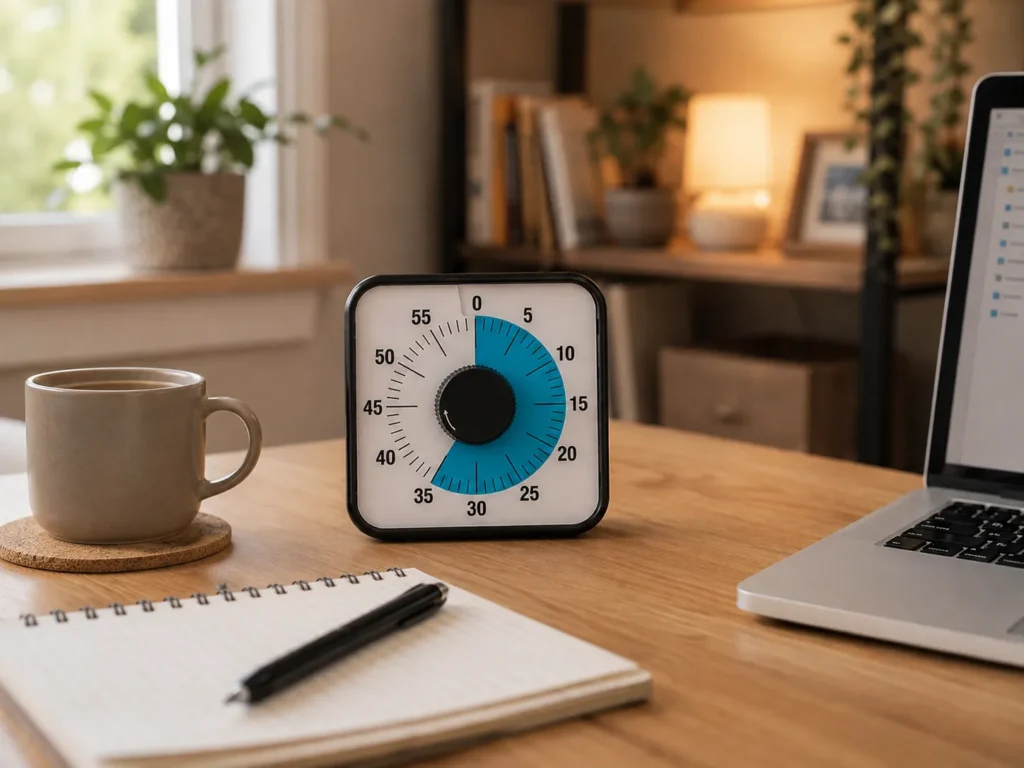
The Secura timer fits best in environments where you can keep it visible. A home office, study desk, kitchen counter, or shared family workspace makes sense. It is less useful if it ends up inside a drawer, behind a laptop, or moved around so often that you forget to use it.
It suits lower-tech focus setups especially well. If your goal is to cut down on screen-checking and keep your workspace simple, this kind of timer fits naturally. It also pairs well with headphones, paper planning, or a basic task list because it adds one clear visual signal without bringing in more digital noise.
If your focus environment already relies heavily on mobile reminders, calendar pings, and wearable nudges, the timer may work more as a supporting tool than your main system. In other words, it is strongest as a visible anchor on a desk, not as a complete productivity system. If you are comparing models, the Time Timer Original and Time Timer MOD are also worth considering.
Real Use Review
The Secura makes the most sense when even setting up a focus session feels like something you could put off. There isn’t much to configure or remember: turn the dial, put it somewhere visible and begin. On a low-energy day, that can matter more than having another timer with extra modes and settings.
The visual countdown is genuinely helpful during short work blocks. Being able to see time rather than calculate it in your head can make a task feel more contained. That is especially useful for boring jobs, because the end point feels visible instead of distant.
The Secura feels particularly well suited to 10- to 30-minute sessions. That is enough time for things like admin, reading, a quick room reset or a focused burst of work without making the session feel enormous before you’ve even started. Longer blocks are still possible, but its simplicity feels most useful when you just need a clear amount of time in front of you and a reason to get moving.
The limitations are fairly obvious too. This is a timer, not a full routine builder. If you ignore it, place it out of sight, or stop trusting it as part of your workflow, it becomes desk furniture. It also will not suit everyone if the sound is too sharp or if the design feels less precise than a digital countdown.
Overall, the product makes the best case for itself when you value visibility and ease over advanced features.
Friction Points to Consider
- It may not suit people who need silent or near-silent use
- It is less flexible than an app for recurring routines and multiple reminders
- Some people may want more precision than a simple visual countdown provides
- It works best when kept in view, which limits portability a little
- If timers tend to become background noise for you, this one may eventually be just as easy to ignore
Practical Reality Check
It is worth keeping expectations realistic. The Secura can make time easier to notice, but it can’t make procrastination, tiredness or overwhelm disappear. There will still be days when you see the timer sitting there and don’t particularly want to start whatever you’ve planned.
Where it can help is in giving structure to moments that otherwise blur together. It is especially useful if you often think you have “just started” only to realise 40 minutes have vanished, or if starting a task feels easier when there is a visible end point.
If that sounds like you, the Secura timer has a strong case. If you need detailed prompting throughout the day, something wearable or app-based may be more useful. The right question is not “Is this good?” but “Does this match the way I actually work?”
Buying Guide
If you’re considering this timer, the useful question is where it would actually live and when you would reach for it. It makes most sense if short work blocks already feel manageable for you, visible countdowns catch your attention, or you deliberately want something that keeps you away from your phone..
Ask yourself whether you need a timer mainly for desk work, study sessions, household routines, or helping children understand time. Also consider whether the alert sound and the physical size fit your environment.
If you want something simple, visible, and quick to start, this style of timer makes sense. If you want a full system with reminders, history, portability, and custom scheduling, you may be happier with a smartwatch or an app instead.
In short, the appeal is that there really isn’t much to learn or configure. If that’s what you want from a timer, the simplicity is a strength rather than a limitation.
Frequently Asked Questions
Is the Secura 60-Minute Visual Timer good for ADHD?
It can be helpful for people who respond well to visible time cues and want a simple tool that does not involve using a phone. It is most useful for short focus blocks, transitions, and routine tasks.
Is a visual timer better than a digital timer?
For some people, yes. A visual timer makes time passing easier to see at a glance, while a digital timer is usually better for precision. The better option depends on whether visibility or exactness matters more to you.
Can this timer replace reminder apps?
Not really. It is better seen as a focus aid rather than a full reminder system. It works well for time blocks but does not replace recurring prompts, calendars, or portable notifications.
Who is this timer best for?
It is likely to suit adults, students and families who want a simple countdown they can leave somewhere visible during work, revision or household routines. If you want lots of reminders or something that follows you around during the day, a phone, smartwatch or app will probably make more sense.
Alternatives to Consider
If you like the idea of a visual timer but want a broader overview first, the strongest starting point is a roundup of the best ADHD timer options available in the UK: Best ADHD Focus Timers (UK Guide).
You may also want to compare visual timers with app-based methods if you are unsure whether you need a physical device on your desk or something more flexible on your phone. In that case, Focus To-Do App offers a different approach, while the Digital Countdown Timer is worth a look if you want something simpler.
If you want to stay with physical visual timers, the Time Timer Original and Time Timer MOD are both useful comparisons depending on your preferred size and setup.
Final Verdict
The Secura is easiest to recommend when the problem isn’t that you need more reminders, but that the time you’re already spending is difficult to feel. The shrinking coloured disk gives that time something physical and visible, without adding another app or screen to check. It isn’t a clever device, and for the right person that’s exactly th
Its biggest strengths are ease, clarity, and low setup effort. Its biggest weakness is that it only does one job. For many people, though, that single job is the one they actually need help with.
If opening your phone to set a timer regularly turns into checking something else, or if an open-ended task feels much harder to start than one with a visible finishing point, the Secura has a clear reason to be on your desk..
A timer can help with one small part of the problem, but it doesn’t need to become an entire productivity system. If you’re trying to work out how timers, planning tools and other supports can fit together without creating even more to manage, the full ADHD productivity tools setup guide looks at the wider picture.