
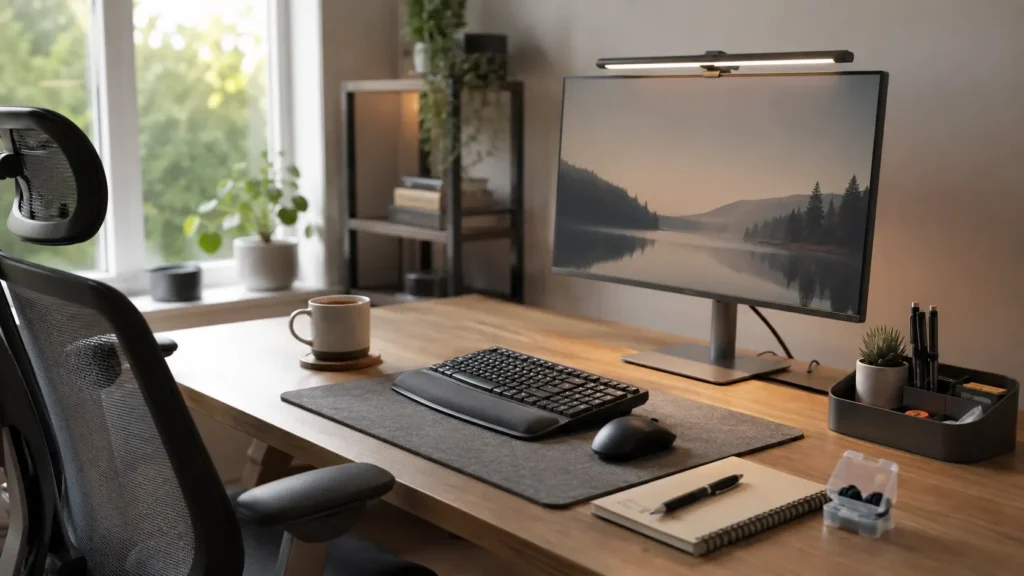
Quick Picks
- Best for calmer desk lighting: BenQ ScreenBar
- Best for comfortable full-size typing: Logitech MX Keys S
- Best for reducing repetitive mouse work: Logitech MX Master 3S
- Best for turning down noise while retaining some awareness: Loop Experience 2 Earplugs
- Best for getting desk clutter off the work surface: Leitz Ergo Pegboard Desk Organiser
Quick Picks by Situation
A desk that already feels visually busy may benefit most from BenQ ScreenBar or the Leitz Ergo Pegboard Desk Organiser. The ScreenBar replaces the footprint of a traditional desk lamp by sitting on the monitor, while the Leitz organiser moves frequently used items into vertical storage rather than leaving everything spread across the desk.
For long stretches of computer-based work, Logitech MX Keys S and Logitech MX Master 3S address a different kind of interruption. The full-size keyboard is aimed at regular typing and multi-device work, while the mouse makes long documents, spreadsheets and repeated navigation easier to move through. Neither will organise your workload, but both may make the equipment itself less distracting once you have started.
Noise is harder to control when you work around other people. Loop Experience 2 Earplugs are the most portable option here and provide 17 dB SNR filtered noise reduction without requiring batteries or another electronic device. Loop primarily designed them for concerts and live events, so they make more sense for turning the environment down than creating a deeply isolated focus space.
Introduction
The best ADHD desk setup tools for focus and productivity aren’t necessarily the products with the longest feature lists. A useful workspace often comes from removing a handful of small annoyances: poor lighting, objects competing for attention, uncomfortable computer controls, background noise or the constant need to hunt around for something you were using five minutes ago.
That also makes this an unusual comparison. A monitor light and a mouse clearly don’t perform the same job, so there isn’t much value in pretending they compete directly. It makes more sense to look at what actually annoys or distracts you during the day and whether one fairly simple change could make that part of your workspace easier to live with.
For some people, that might mean making the physical space calmer. For others, the biggest improvement may come from reducing repetitive computer interactions or having a quieter way to work around everyday background noise. If sound is one of the things that regularly pulls your attention away, Best Noise-Cancelling Headphones for ADHD Adults in the UK looks at options designed for stronger sound reduction than the Loop Experience 2 Earplugs included here.
What stood out to me while comparing these products was how little overlap there actually is between them. That is useful because you don’t need to build an expensive desk full of specialist equipment. You can start with the problem that bothers you most and leave everything else alone.
Who This Guide Is For
- People whose desk feels visually crowded before they have even started working
- Anyone who finds poor lighting or screen glare makes evening work less comfortable
- People who spend large parts of the day typing, scrolling or moving between computer applications
- Anyone working or studying around conversations and other distracting background noise
- People who regularly lose pens, notebooks, headphones or small desk items underneath everything else
- Anyone trying to improve an existing workspace without rebuilding the entire room
Key Takeaways
- Start with the distraction or inconvenience that happens repeatedly rather than buying several desk products at once
- The BenQ ScreenBar and small Leitz pegboard make the strongest changes to the physical layout of the desk
- The Logitech MX Keys S suits regular full-size typing, while the MX Master 3S is more relevant to repeated scrolling and navigation
- Loop Experience 2 Earplugs are portable and screen-free, but their 17 dB SNR reduction turns sound down rather than blocking everything around you
- A simpler workspace can be more useful than a feature-heavy one if it gives you fewer things to manage
How These Products Were Evaluated
This comparison looks at the products as parts of an everyday workspace rather than treating them as five interchangeable productivity gadgets. The important questions are fairly ordinary ones: how much effort does something take to set up, does it add another thing to think about, can you leave it ready to use, and does it actually help with a problem you keep running into during the week?
How something fits into the desk matters as well. An organiser isn’t much help if it simply becomes another place to lose things, just as a clever mouse shortcut has limited value if setting it up turns into a project of its own. Price matters too. If you’re paying noticeably more than you would for a basic alternative, there should be some everyday annoyance that the extra money genuinely makes easier.
ADHD experiences also vary considerably, so there isn’t one workspace that everyone should copy. Resources such as ADDitude cover a wide range of practical ADHD challenges and strategies, but the approach here is deliberately narrower: identifying what gets in the way at your particular desk and choosing tools accordingly.
No formal laboratory testing is being claimed here. Product capabilities and current UK availability have been checked against manufacturer or UK retail information where relevant. BenQ describes the ScreenBar as a monitor-mounted light with asymmetric illumination and automatic dimming. Logitech lists the full-size MX Keys S with smart illumination, multi-device switching and programmable controls, while the MX Master 3S adds MagSpeed scrolling, Quiet Clicks and an 8,000 DPI sensor. Loop positions Experience 2 as 17 dB SNR filtered hearing protection for concerts and events rather than its strongest option for deep focus.
Quick Comparison Table
| Product | Main Problem It Addresses | Setup Effort | Best Fit | Main Trade-Off |
|---|---|---|---|---|
| BenQ ScreenBar | Desk lighting and traditional lamp clutter | Low | Monitor-based home or office desk | Premium price compared with a basic lamp |
| Logitech MX Keys S | Full-size typing and switching between devices | Low to moderate | Regular desk-based typing across one or more computers | Premium price and a larger footprint than compact keyboards |
| Logitech MX Master 3S | Scrolling and repetitive mouse actions | Moderate if customised | Computer-heavy work with lots of navigation | Extra controls can be unnecessary for simple use |
| Loop Experience 2 Earplugs | Moderately loud environments where some awareness is still useful | Low | Events, commuting and occasional use in shared spaces | Designed primarily for filtered live sound rather than deep focus |
| Leitz Ergo Pegboard Desk Organiser | Visible clutter and limited desk space | Moderate | Fixed desks with lots of small items | Needs enough desk space and a suitable mounting position |
Focus Environment Fit
A home office gives you the most control over the environment, which makes the BenQ ScreenBar and Leitz Ergo Pegboard Desk Organiser particularly relevant. One changes how the workspace is lit without taking up much working surface, while the other gives everyday items a more deliberate place to live. That can be useful when a desk slowly becomes a holding area for everything you haven’t dealt with yet.
In a shared office, sound and portability become more important. Loop Experience 2 Earplugs can travel with you and don’t depend on changing the room around you. Their 17 dB SNR filtered reduction is better understood as turning the environment down rather than shutting it out. If clear conversation is the priority, Loop Engage 2 may be the more natural choice; if stronger focus isolation matters more, Quiet 2 or noise-cancelling headphones may suit the situation better.
The Logitech MX Keys S and Logitech MX Master 3S make most sense when the computer itself is where you spend much of the working day. The full-size MX Keys S combines low-profile typing, smart illumination and three-device switching, while the MX Master 3S focuses more on scrolling, navigation and customisable controls. Their benefit is less visually obvious than clearing a desk, but the equipment may interrupt you less once work is underway.
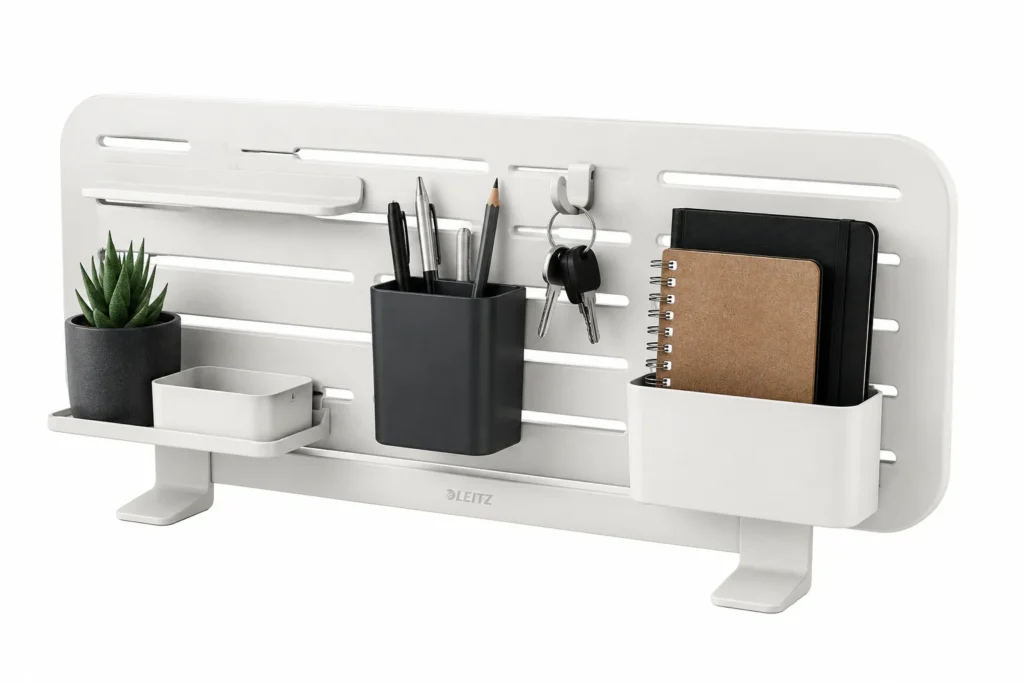
The small Leitz Ergo Pegboard is the least portable option but potentially one of the most noticeable in a permanent workspace. The 42 × 25 cm model includes a notepad holder, pen holder and headset hook, and can be clamped above or underneath a compatible desktop up to 35 mm thick. It does not include the laptop holder supplied with the larger 80 cm Leitz pegboard.
Focus Score Comparison Table
The scores below are simply a way of comparing how each product might fit into an ADHD-friendly workspace. They aren’t clinical measurements and they don’t suggest that any of these products can improve ADHD itself.
| Product | Low-Distraction Design | Ease of Setup | Everyday Usefulness | Workspace Flexibility | Overall Focus Fit |
|---|---|---|---|---|---|
| BenQ ScreenBar | 9/10 | 9/10 | 8/10 | 7/10 | 8.5/10 |
| Logitech MX Keys S | 8/10 | 8/10 | 9/10 | 8/10 | 8.3/10 |
| Logitech MX Master 3S | 8/10 | 7/10 | 9/10 | 8/10 | 8.2/10 |
| Loop Experience 2 Earplugs | 8/10 | 9/10 | 7/10 | 10/10 | 8.1/10 |
| Leitz Ergo Pegboard Desk Organiser | 9/10 | 7/10 | 8/10 | 5/10 | 7.8/10 |
If one of these options matches a problem you repeatedly run into, the individual reviews below look more closely at the trade-offs before you decide whether it deserves space in your setup.
BenQ ScreenBar
Who It May Suit
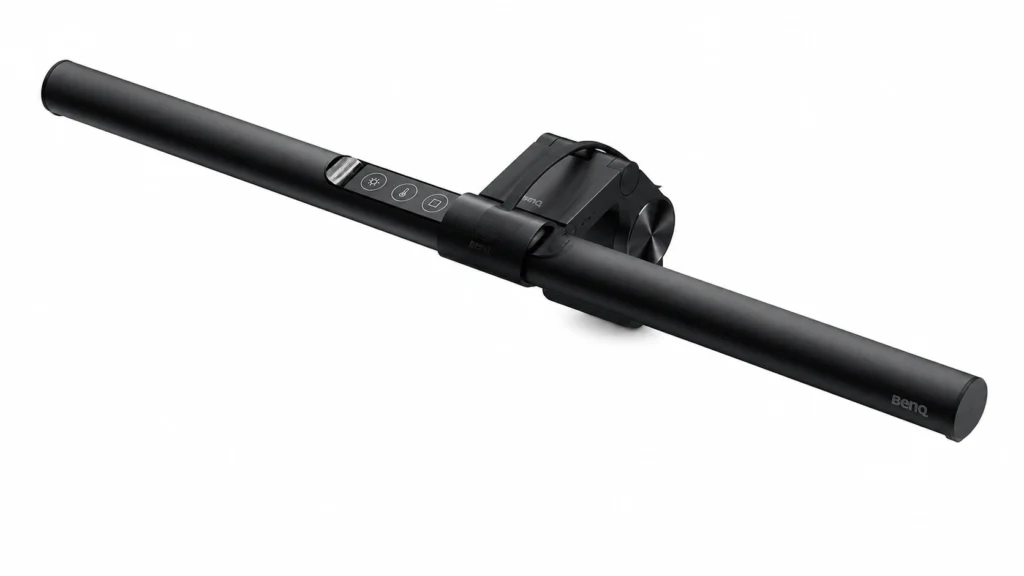
The BenQ ScreenBar makes the most sense when you regularly work at a monitor and want better desk lighting without adding another lamp base, shade and cable to an already limited surface. It is particularly relevant for smaller desks where every object seems to eat into the usable space.
It may also appeal if you tend to work early in the morning or later in the evening and keep adjusting lamps as the surrounding light changes. The original ScreenBar includes automatic dimming and adjustable colour temperature, so there is less need to keep treating the light as another thing that requires attention.
Why It May Help
The interesting part isn’t simply that it produces light. Its asymmetric design directs illumination towards the desk rather than directly at the monitor, while the bar itself attaches above the display rather than occupying the work surface. BenQ also states that its automatic mode responds to ambient lighting.
In practice, that can make the desk feel more deliberate. Your keyboard, notebook and papers have their own lit working area, but you haven’t added another bulky object beside the monitor. For someone who gets distracted when the workspace starts feeling crowded, removing one physical obstacle can matter more than adding clever lighting effects.
Friction Points to Consider
- It costs considerably more than many ordinary desk lamps
- It is mainly useful at a monitor rather than around the whole room
- Monitor shape and thickness should be checked before buying
Practical Reality Check
This is probably one of the easiest products in the roundup to understand before buying. If your current lighting is already comfortable and your lamp isn’t getting in the way, the ScreenBar may solve a problem you don’t really have. There is no reason to pay a premium simply because a monitor light looks tidy.
Where it becomes more convincing is on a desk that is used every day and already feels short on space. BenQ’s current compatibility guidance shows that monitor shape and rear design can matter, so checking your particular screen is more useful than assuming the clamp will fit everything.
For a more detailed look at how the lighting and desk-space trade-offs fit everyday work, see the full BenQ ScreenBar Review for ADHD Focus.
Logitech MX Keys S
Who It May Suit
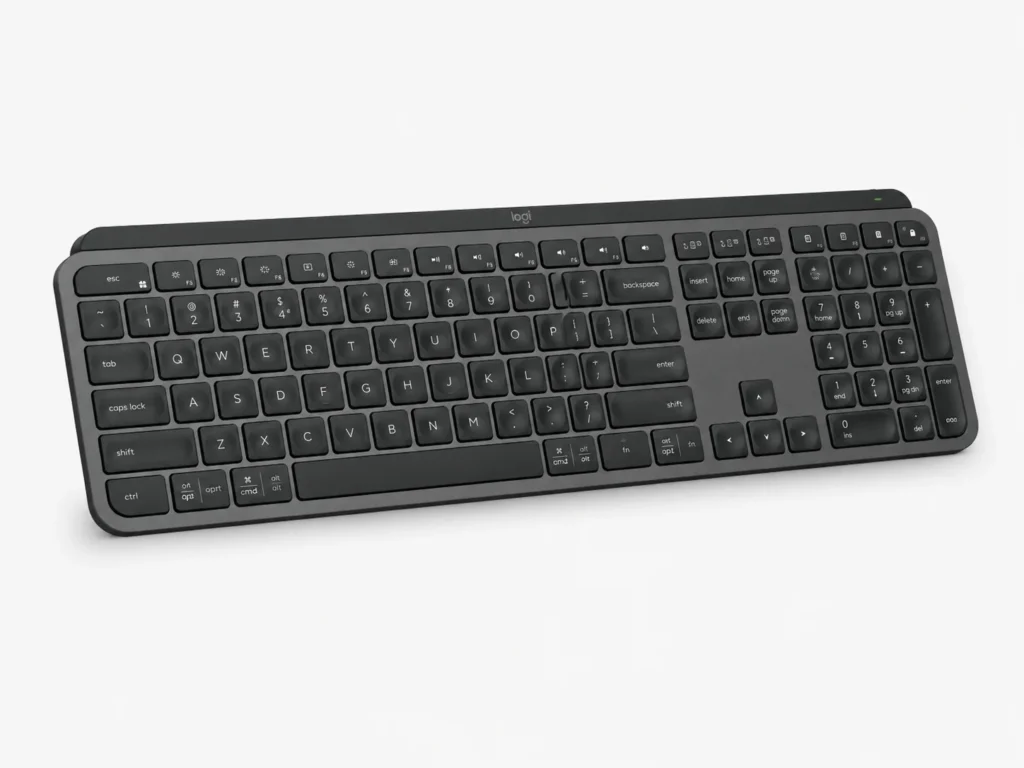
A keyboard isn’t normally the first thing people think about when changing a workspace for focus, but it starts to matter when most of your day involves emails, documents, spreadsheets or writing. The MX Keys S is Logitech’s full-size, low-profile model, with spherically dished scissor keys and a dedicated number pad for people who spend substantial time typing at a fixed desk.
It is also worth considering when you regularly move between compatible computers or want illuminated keys without switching to a gaming-style design. The MX Keys S can remain paired with up to three devices, while its smart illumination activates as your hands approach and responds to the light around the keyboard. Programmable controls and Smart Actions are available through Logi Options+ if you have a clear use for them.
Why It May Help
The value here is mostly about making regular typing feel predictable. The low-profile keys, full-size layout and automatic illumination mean there is less need to search for combined controls, reposition the keyboard or adjust the backlight as the room changes. That isn’t dramatic, but equipment that behaves consistently can be useful precisely because it stops asking for attention once the work starts.
Customisable shortcuts can also remove repeated steps from tasks you do every day. The important word is repeated. Spending an hour building elaborate shortcuts that you never remember is unlikely to make life simpler, whereas assigning one or two genuinely common actions may be worthwhile.
Friction Points to Consider
- It is considerably more expensive than a basic wireless keyboard
- Getting value from custom actions requires some initial setup
- The full-size layout needs more desk width than a compact keyboard
Practical Reality Check
The MX Keys S is easier to justify for someone who types for hours than for someone who mostly uses a computer casually. Its benefits are cumulative rather than immediately transformative. You are paying for a keyboard to feel consistent every day, not for something that suddenly changes how you organise your life.
You also don’t have to configure everything simply because the option exists. It is easy to see how a new keyboard can turn into an evening spent setting up shortcuts you barely use afterwards. Starting with it as an ordinary keyboard and only changing something when a repeated annoyance becomes obvious keeps things much simpler.
The full Logitech MX Keys S Review for ADHD Productivity goes further into whether those everyday conveniences are enough to justify the premium over a simpler keyboard.
Logitech MX Master 3S
Who It May Suit
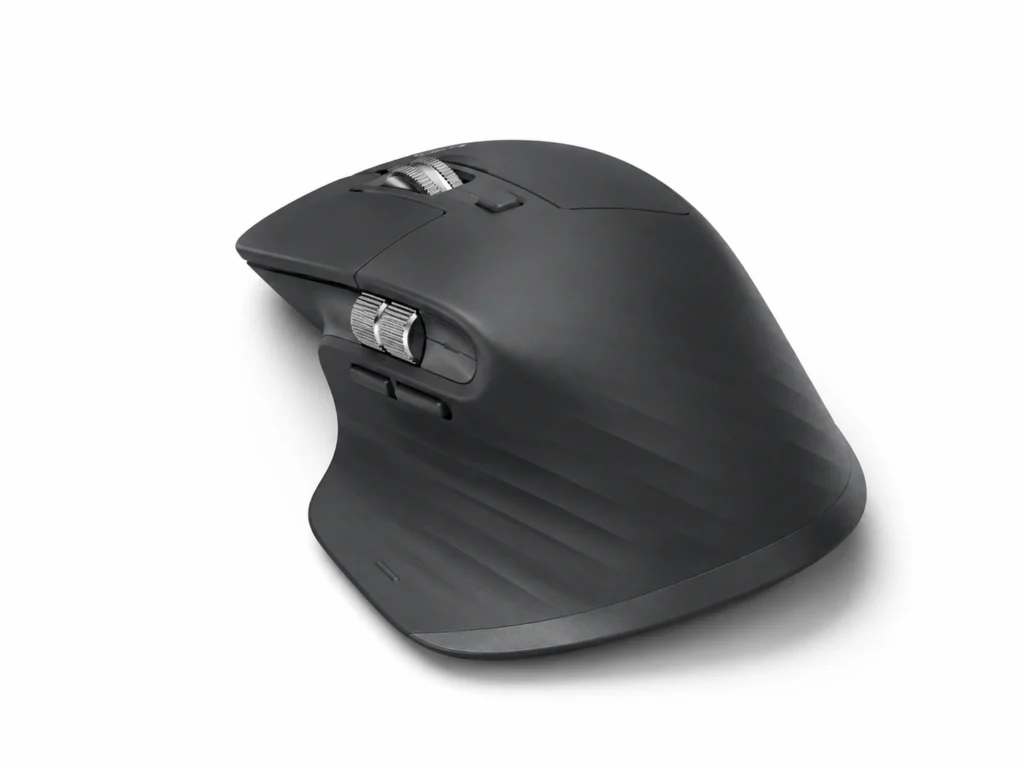
The Logitech MX Master 3S is aimed more at people who spend their working day moving through documents, browsers, creative software or multiple computer tasks than someone who simply needs a mouse for occasional clicking. Its extra controls become relevant when the same navigation actions happen hundreds of times across a week.
The current MX Master 3S, for example, includes an electromagnetic scroll wheel, additional controls and software customisation, while Logitech describes its primary clicks as significantly quieter than the previous MX Master 3.
Why It May Help
A useful mouse shouldn’t become another productivity system to maintain. The better case for the MX Master 3S is that frequently repeated movements can be shortened once you’ve worked out which controls genuinely matter to you. Moving through a long spreadsheet, scrolling a large document or assigning one awkward repeated command to an easier button can make computer work feel less stop-start.
The quieter operation is also worth mentioning in a workspace roundup. Small repetitive noises can become surprisingly irritating on a sensitive day, so a mouse designed around quieter clicks may simply be nicer to live with, especially in a shared room.
Friction Points to Consider
- The shape is larger and more sculpted than a basic mouse, so hand preference matters
- Extra buttons provide little benefit if you never customise or use them
- The price is hard to justify for light or occasional computer use
Practical Reality Check
This is the product here with the greatest temptation to overconfigure. It is easy to imagine building different button layouts for every application and turning a mouse into another project. That rather defeats the point.
Using it normally at first may be enough. After a while, you may notice one particular action that keeps interrupting what you’re doing, and that is where an extra button starts to make sense. It is much easier to remember one shortcut that solves an actual annoyance than a collection of clever controls you configured on the first day and forgot about a week later.
If the additional controls appeal but you’re unsure whether you would actually use them, the Logitech MX Master 3S Review for ADHD Productivity looks more closely at that balance.
Loop Experience 2 Earplugs
Who It May Suit
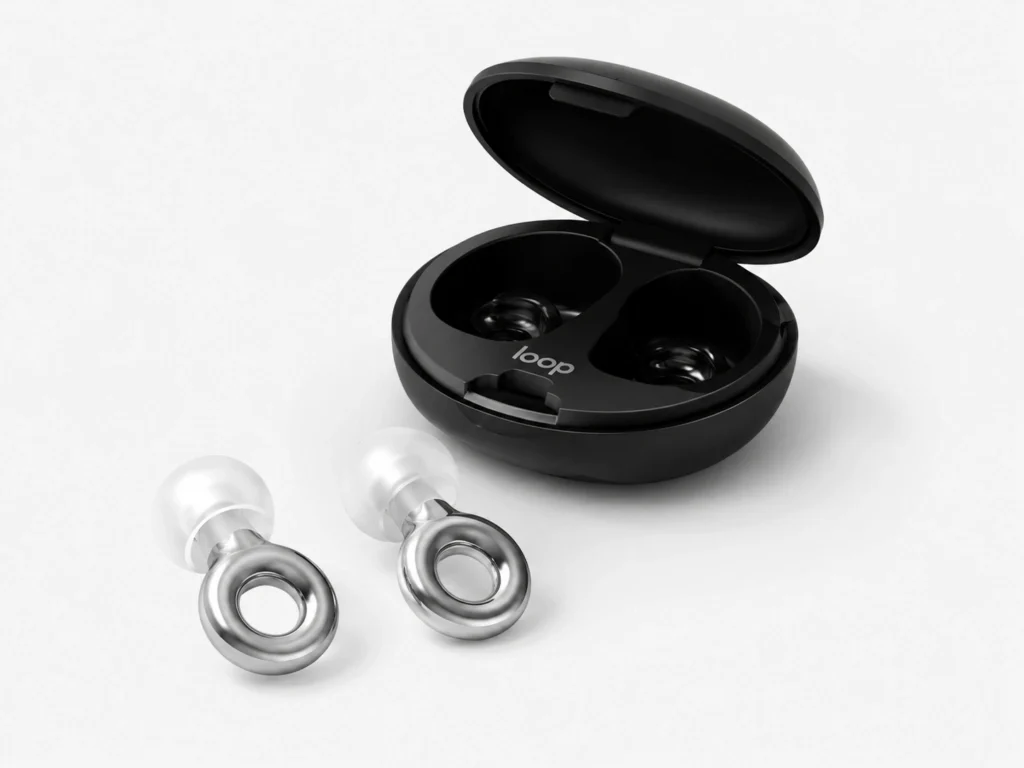
Not every distracting environment can be reorganised. Offices, cafés, trains and shared rooms come with other people’s conversations, movement and general background noise, which makes Loop Experience 2 the most portable product in this comparison.
They are best approached as filtered hearing protection rather than a replacement for active noise-cancelling headphones. Loop primarily designed Experience 2 for concerts, festivals and live events, with 17 dB SNR reduction intended to lower the volume while keeping sound relatively clear. At a desk, that makes them more suitable for softening the environment than creating deep isolation.
Why It May Help
There are situations where complete isolation isn’t practical. Experience 2 leaves more awareness of the environment than stronger passive earplugs or noise-cancelling headphones, while reducing the overall intensity of the sound around you. That may be useful when the room feels too loud but shutting it out completely would create a different problem. They should not, however, be relied upon where missing traffic, announcements or warning sounds could create a safety risk.
They also have almost no digital overhead. There is nothing to pair, charge or update, and you don’t have to open an app before using them. That makes them easy to move between a desk, a commute and another workspace without bringing another electronic device into the routine.
Friction Points to Consider
- The 17 dB SNR reduction turns sound down rather than creating silence
- Loop primarily designed Experience 2 for concerts and events rather than dedicated focus sessions
- Fit and comfort depend on choosing the right option from the four included silicone tip sizes
- Loop Engage 2 may suit conversation-heavy settings better, while Quiet 2 or noise-cancelling headphones provide stronger focus isolation
Practical Reality Check
Loop itself currently positions Experience 2 primarily around concerts and live events, while other models in its range are marketed more directly for deep focus or noise sensitivity. That is worth knowing rather than pretending every Loop model serves the same purpose.
Experience can still make sense at a desk when the aim is to soften an environment while retaining some awareness of it. If your actual goal is maximum sound reduction, however, choosing purely because this model looks discreet would be the wrong priority.
The Loop Experience 2 Earplugs Review for ADHD Focus takes a closer look at where its 17 dB filtered reduction may be useful and when a different Loop model or noise-cancelling headphones would make more sense.
Leitz Ergo Pegboard Desk Organiser
Who It May Suit
Some desks don’t need another productivity device. They need somewhere for the notebook, headphones, phone, pens and small objects that slowly migrate into the working area during the day. The Leitz Ergo Pegboard is aimed at that physical problem by moving storage upwards rather than spreading it across the surface.
The small 42 × 25 cm Leitz Ergo Pegboard includes a notepad holder, pen holder and hanging hook for headphones. It can be mounted above or underneath a compatible desktop up to 35 mm thick, giving a few frequently used items visible homes without using more of the main working surface.
Why It May Help
The main advantage is not that everything becomes perfectly tidy. In fact, hiding every object inside drawers can sometimes create a different problem when you forget where you put it. A pegboard gives important things a defined position while keeping them visible enough to find.
That can create a useful compromise between an empty minimalist desk and one where every frequently used object is competing for space. You can keep the immediate work surface relatively clear without relying entirely on closed storage.
Friction Points to Consider
- It requires a suitable desk edge and enough room for the mounting system
- It is much less portable than the other products in this roundup
- Without some restraint, a pegboard can simply move visual clutter from the desk to the wall above it
Practical Reality Check
The last point is probably the most important. Buying an organiser doesn’t automatically create an organised workspace. Filling every available hole with accessories, stationery and objects can leave you with the same visual noise in a different position.
The pegboard probably becomes more useful when it holds the handful of things that genuinely keep ending up on your desk: your headphones, one notebook, the pens you actually use and perhaps somewhere for your phone. Once every spare space starts getting filled because it is available, the organiser can easily become part of the clutter it was meant to reduce. Current UK listings indicate that it attaches to the desktop without drilling, although desk thickness and dimensions should still be checked before buying.
If visual clutter is the main issue you’re trying to solve, the full Leitz Ergo Pegboard Desk Organiser Review for ADHD Workspaces looks more closely at where this type of vertical storage helps and where it can become clutter of its own.
Buying Guide: Choosing ADHD Desk Setup Tools
Before looking too closely at the products, it helps to think about what actually keeps bothering you while you’re trying to work. Maybe the desk is always covered in things, the lighting irritates you in the evening, background conversations keep pulling your attention away, or the equipment you use all day is simply uncomfortable. A useful purchase should make one of those real problems easier rather than just making the desk look more productive.
Start with the physical desk. When you sit down, do you immediately have to clear objects away? Can you find the few things you use every day? Does a lamp take up a large part of a small desk? Those answers make the BenQ and Leitz options easier to assess because both change the physical workspace rather than the computer itself.
Then look at the equipment you use repeatedly. The full-size MX Keys S makes the most sense when you type for several hours, value a number pad or regularly switch between computers. Its programmable controls are secondary to the everyday typing experience. The same applies to the MX Master 3S: extra buttons are useful when they replace actions you genuinely repeat, not simply because customisation sounds productive.
Noise needs a different decision. Think about whether you want to soften the environment or isolate yourself from it. Earplugs that allow some outside sound through may work well in an office where you still need awareness, whereas stronger passive earplugs or active noise-cancelling headphones may make more sense for concentrated work where outside sound serves no useful purpose.
It is also worth thinking about what happens after the excitement of adding something new has worn off. Every object brings a little bit of upkeep with it, whether that means charging it, putting it away, cleaning it or remembering how you’ve configured it. If two products solve roughly the same problem, the one that asks less from you on an ordinary tired Tuesday may well be the one that stays useful.
Finally, don’t assume an ADHD-friendly desk needs to look minimalist in photographs. The goal is not to remove everything. It is to make the things that matter easy to find while reducing whatever repeatedly pulls you away from the next task. A slightly lived-in desk that works for you is more useful than a perfect one that takes constant effort to maintain.
Frequently Asked Questions
Do I need special desk equipment because I have ADHD?
No, plenty of ordinary desk products can be useful, and there is no single ADHD desk setup everyone needs to copy. If something on your desk repeatedly distracts, annoys or slows you down, that is a much better reason to change it than feeling as though you ought to build a special ADHD workspace.
Should I make my ADHD workspace completely minimalist?
Not necessarily. Removing unnecessary clutter may make a workspace easier to scan, but hiding everything away can also be inconvenient if you rely on visible reminders. A better target is usually deliberate visibility: keep useful things easy to see and give everything else somewhere sensible to go.
Are Loop Experience 2 Earplugs better than noise-cancelling headphones for working?
They serve different situations. Experience 2 Earplugs are smaller, require no charging and provide moderate 17 dB SNR filtered reduction while leaving more awareness of the environment. Noise-cancelling headphones generally suit someone who wants stronger separation from background sound or wants to listen to music or audio while working.
Which desk upgrade should I buy first?
Start with the problem you encounter most often. That might be background noise, poor lighting, a cluttered work surface or repeated frustration with the equipment you use all day. Fixing one obvious source of friction is usually more useful than buying several products simply to create a new-looking setup.
Final Verdict
The best ADHD desk setup tools for focus and productivity are the ones that quietly remove something you currently have to deal with again and again. For a cramped or poorly lit monitor setup, the BenQ ScreenBar is the clearest physical upgrade. When desk clutter is taking over, the Leitz Ergo Pegboard Desk Organiser gives frequently used items somewhere visible without leaving them scattered across the work surface.
People spending most of their day on a computer may get more long-term value from Logitech MX Keys S or Logitech MX Master 3S. The full-size keyboard suits regular typing and multi-device work, while the mouse is more useful for repeated scrolling and navigation. Neither is essential, but the premium becomes easier to justify when you use the equipment for hours and can identify the small annoyances it removes.
Loop Experience 2 Earplugs solve the most portable problem of the five. Their 17 dB SNR filtered reduction can travel with you when the distraction isn’t the desk but the people and noise around it. Their limitation is equally important: Loop primarily designed them for clear, filtered sound at concerts and events, so they turn the environment down rather than creating a silent focus space.
You don’t need all five. In most cases, choosing the one that addresses the most persistent problem in your current environment is the more sensible place to begin. Once that friction has gone, you can see whether anything else actually needs fixing.