
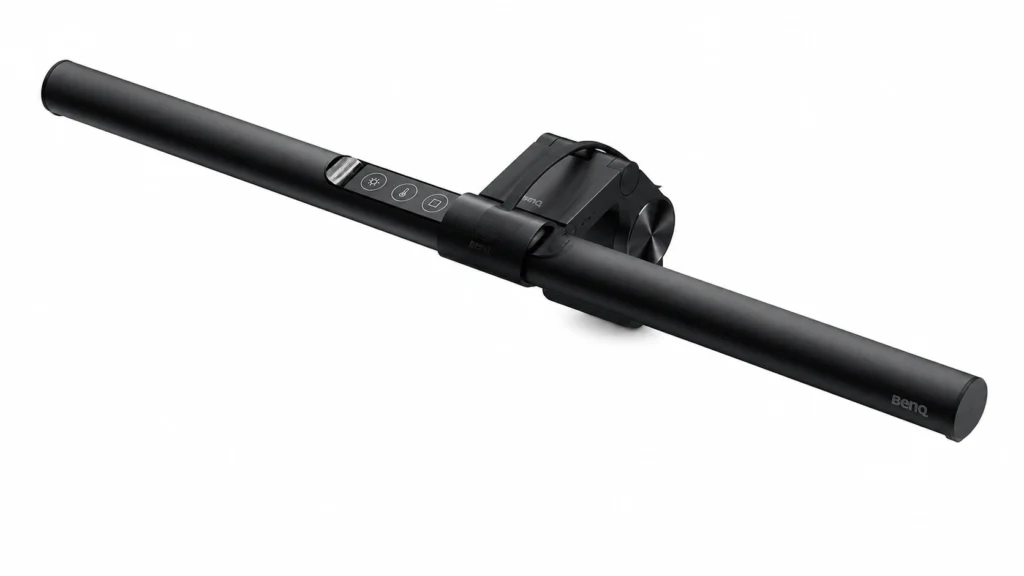
At a Glance
-
- Monitor-mounted desk light that leaves the surface underneath free
- Asymmetrical light designed to illuminate the desk without reflecting directly from the screen
- Adjustable brightness and colour temperature for different working conditions
- Auto-dimming can reduce the need to keep adjusting the light manually
- Makes the most sense for people who regularly work at one monitor rather than moving between different spaces
Introduction
This review looks at something that is easy to overlook when thinking about productivity: the environment directly around your screen. It is possible to spend plenty of time organising apps, calendars and task systems while still working at a desk that feels visually uncomfortable, dim or mentally tiring. If you are trying to create a broader setup rather than relying on one isolated product, the ADHD Productivity Tools UK Guide looks at how different tools can work together as part of a simpler system.
The BenQ ScreenBar takes a different approach from a traditional desk lamp. Instead of sitting beside the monitor and occupying part of the desk, it rests across the top of the screen and directs light down towards the working area. BenQ lists adjustable brightness and colour-temperature settings, USB power and an automatic dimming mode among the ScreenBar’s main features.
That does not make it an ADHD-specific device, and it would be misleading to pretend that changing your desk lighting suddenly fixes concentration. The more interesting question is whether making the workspace more comfortable and reducing one source of visual friction can make it easier to settle into work and stay there. For someone who spends hours at a monitor, that can matter more than another productivity gadget demanding attention.
BenQ ScreenBar Review for ADHD Focus: Key Features
The ScreenBar is designed around a fairly specific problem: lighting the area in front of a monitor without putting another lamp on the desk or shining light back at the screen. It is simpler than setting up smart bulbs or several different light sources, but you can still alter the brightness and colour temperature as the room changes throughout the day.
- Monitor-mounted design that does not require a conventional lamp base
- Asymmetrical beam designed to light the desk while limiting direct screen reflections
- Adjustable brightness levels
- Adjustable warmer and cooler colour-temperature settings
- Automatic dimming using an ambient-light sensor
- USB-powered operation
- 45 cm light bar with lighting focused across the area in front of the monitor
Who This Guide Is For
This guide is most relevant if you spend a large part of the day working or studying at a monitor and find that your desk never quite feels comfortable. Perhaps the overhead light is too harsh, the room becomes gloomy in the afternoon, or a normal desk lamp introduces another object, cable and pool of light competing for space.
It may also appeal if you are intentionally simplifying your workspace. ADHD-friendly desks don’t need to be completely empty, but it is easy for the things around the monitor to start pulling your eyes away from what you meant to be doing. How Visual Clutter Affects ADHD Focus looks more closely at that wider problem. In the ScreenBar’s case, placing the light above the monitor means creating better lighting without giving another object permanent space beside the keyboard.
Key Takeaways
-
- The ScreenBar is primarily an environment tool rather than a productivity system
- Its main practical advantage is providing desk lighting without taking up the space needed by a normal lamp
- Automatic adjustment can reduce another small decision during the working day
- It makes the most sense for people who spend long periods working at one monitor
- It is a premium solution to a problem that a cheaper lamp may already solve for some users
How It Works
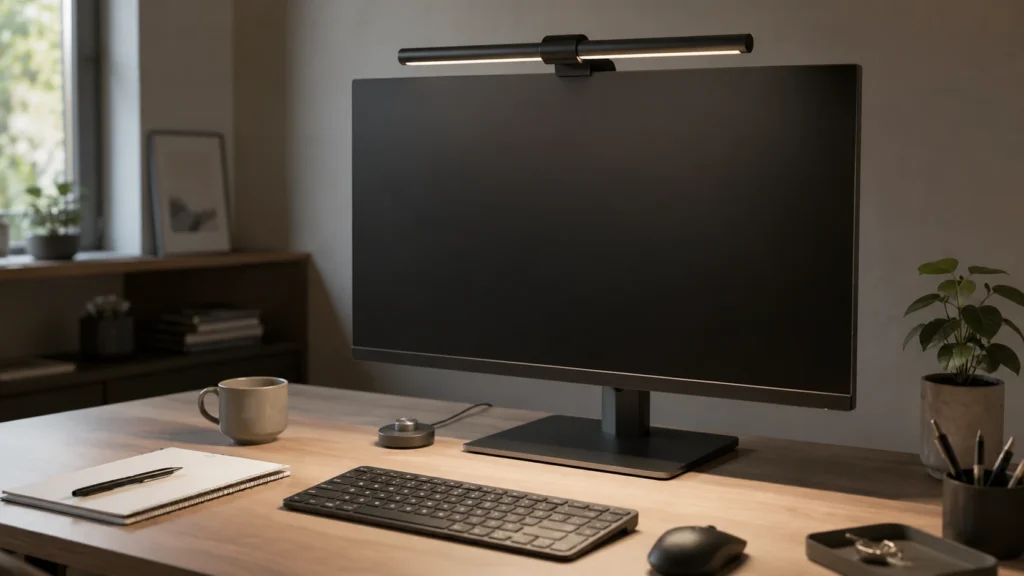
The ScreenBar rests across the top edge of a compatible monitor and directs an asymmetrical beam over the desk. The idea is to light the keyboard, notebook and immediate working area without sending the same light directly towards the screen. That is a more meaningful distinction than simply moving an ordinary lamp from the side of the monitor to the top.
You can alter the brightness and colour temperature manually, while the automatic dimming mode responds to the surrounding light. The standard ScreenBar is USB-powered and measures 45 cm across, so it adds relatively little to the physical footprint of the setup once it is mounted.
In everyday use, the important part is that there is very little to think about once it is positioned. You can find a setting that feels comfortable and largely leave it alone, or use the automatic mode when the daylight in the room changes. That low-maintenance aspect fits the product better than constantly experimenting with every available setting.
Why It May Help (ADHD Context)
A difficult workspace can create dozens of tiny interruptions that are individually easy to dismiss. You shift position because the desk feels dark, notice a reflection, look away from the screen, start adjusting something and then realise you have stopped thinking about the task altogether. None of those moments necessarily feels important, but they can add up when attention is already inconsistent.
Resources such as ADDitude discuss the relationship between ADHD, distraction and the environment around us. The ScreenBar doesn’t treat ADHD or manufacture concentration, but a desk that is evenly lit and easier to look at may feel less tiring to return to. The benefit is modest and practical: there is one less irritating part of the workspace asking to be adjusted.
The automatic dimming feature may be particularly useful if you know that lighting bothers you but rarely remember to adjust it until you are already uncomfortable. It may sound like a small convenience, but it removes one more decision from the working day. If the light can quietly look after itself, you are less likely to stop what you are doing and start fiddling with the desk instead.
Real-World Use Cases
A home office is probably the most natural setting. If you begin work when daylight is good but continue into late afternoon or evening, the quality of the room can change significantly without you really noticing it happening. The ScreenBar gives the desk itself a more consistent source of light, so the space does not suddenly feel completely different simply because the weather has changed outside.
It also makes sense for people who work with notebooks or paperwork beside the keyboard. A monitor is bright on its own, but that does not necessarily mean the desk underneath it is well lit. Having light directed across that immediate working zone can make switching between the screen and physical notes feel more natural.
There is also a useful clutter angle. A conventional desk lamp needs somewhere to live, and on a small desk that usually means sacrificing space beside the monitor. If your working area already contains a keyboard, mouse, notebook, headphones and whatever else has accumulated during the day, putting the lamp above the monitor rather than among those objects can make the desk feel noticeably less busy.
Feature Breakdown Table
| Feature | What It Means in Practice | Why It Matters for ADHD |
|---|---|---|
| Monitor-mounted design | The light sits above the screen instead of using a lamp base on the desk | Leaves more room around the keyboard, notebook and task in front of you |
| Asymmetrical lighting | Light is directed towards the desk rather than straight at the monitor | Can make the working area easier to light without introducing another distracting screen reflection |
| Adjustable brightness | The light can be made stronger or softer as the room changes | Helps avoid abandoning the task to reposition a lamp or change the room lighting |
| Adjustable colour temperature | You can choose warmer or cooler-looking light | Lets you settle on lighting that feels comfortable rather than accepting one fixed setting |
| Automatic dimming | The ambient-light sensor can adjust the brightness for the surrounding conditions | Removes one small adjustment that would otherwise need to be noticed and remembered |
| USB power | The ScreenBar draws power from a suitable USB connection | Avoids putting another large power adaptor around the desk, although a suitable powered USB connection is still needed |
Focus Environment Fit
The ScreenBar’s relevance to ADHD is fairly simple: it changes the space where the work happens rather than asking you to follow another productivity system. If you return to the same desk every day, the light can stay in place and quietly do its job without becoming another routine you need to remember.
The design makes most sense when the area directly in front of the monitor is where the work actually happens. Your notebook, keyboard and current task can stay in that space without sharing it with a lamp base. If objects around the desk easily start competing for your attention, that small amount of breathing room may be more useful than adding a more elaborate lighting system with extra controls and equipment.
Real Use Review
The strongest argument for the ScreenBar is not that the technology is especially exciting. In fact, the opposite is probably true. Once it is installed and adjusted, you should not need to think about it very much. For an ADHD workspace product, that is a surprisingly useful quality because the last thing you need is another gadget becoming a hobby instead of supporting the work you bought it for.
The monitor-mounted position is more useful than it may initially sound. Space disappears quickly on a smaller home-office desk, particularly once a keyboard, mouse, notebook and charging cables are all in place. Moving the light above the monitor leaves the area around the keyboard available for the task rather than asking you to keep working around the base of a lamp.
Where I would keep expectations realistic is the effect on focus itself. If the reason you are avoiding work is that the task is unclear, overwhelming or boring, changing the lighting is unlikely to solve that. What the ScreenBar can do is remove an environmental irritation from the equation. Sometimes taking away one persistent desk annoyance is more useful than expecting a single product to transform your concentration.
Friction Points to Consider
-
- It is considerably more specialised than simply buying a basic desk lamp
- The value is harder to justify if your existing lighting already feels comfortable
- It is primarily useful at a monitor, so it is less flexible than a lamp you can move around the room
- Monitor shape and thickness still need to be considered before buying
- It can make the desk more comfortable, but it won’t make an unclear, overwhelming or boring task easier to start
Practical Reality Check
The biggest question is whether lighting is genuinely one of the weak points in your current desk setup. It is very easy to watch workspace videos, see a neat monitor light and decide that your concentration problems must somehow be hiding inside the lighting system. If you already have a comfortable, uncluttered desk and barely notice your existing lamp, the ScreenBar may be a refinement rather than something that meaningfully changes your working day.
If, on the other hand, you regularly notice that the desk becomes gloomy, dislike overhead lighting, struggle to position a lamp without glare or simply want fewer objects around the monitor, the product has a much clearer purpose. That distinction matters because the ScreenBar is more likely to earn its place if it fixes something that already bothers you, rather than giving you another desk accessory that seemed exciting at first and was forgotten a few weeks later.
Buying Guide
Before buying, check the monitor itself. BenQ lists the standard ScreenBar as suitable for monitors approximately 1–3 cm thick, but the shape of the top and rear casing can still affect how securely the clamp sits. This is worth checking properly, especially if you use an unusually thin screen, a heavily curved monitor or a monitor with a raised section across the back.
Then look at the problem you are trying to solve. If you simply need more light and have plenty of room, a conventional lamp could achieve that for considerably less money. The ScreenBar becomes more attractive when desk space, lighting consistency and keeping the working area visually clean all matter at the same time.
Finally, think about how permanent your workspace is. Someone who works from one monitor for several hours most days is likely to get far more value from it than someone who works from a laptop at the kitchen table, sofa and office interchangeably. This is fundamentally a fixed-workspace upgrade, and it is strongest when it can stay installed and quietly do its job every day.
Frequently Asked Questions
Is the BenQ ScreenBar good for ADHD?
It can be useful as part of an ADHD-friendly workspace if poor lighting or desk clutter regularly distracts you. It is not an ADHD treatment, but it can make a monitor-based workspace easier to keep comfortable and consistent.
Does the BenQ ScreenBar take up desk space?
Very little compared with a traditional lamp because the main light unit sits on top of the monitor rather than using a lamp base on the desk.
Can the brightness be adjusted?
Yes. The ScreenBar provides multiple brightness settings, along with adjustable colour temperature and an automatic dimming mode.
Is it better than a normal desk lamp?
Not automatically. A normal lamp may be the better-value option if desk space is not an issue. The ScreenBar is more compelling when you specifically want monitor-mounted lighting and a cleaner working area.
Will better lighting improve ADHD focus?
Better lighting may remove discomfort or environmental distraction, but it should not be treated as a direct solution to ADHD attention difficulties. Think of it as improving the conditions around focused work rather than creating focus by itself.
Alternatives to Consider
If the ScreenBar feels more specialised than you need, a conventional adjustable desk lamp is the obvious alternative. You lose the monitor-mounted design, but you may gain more flexibility in where the light is positioned and spend considerably less depending on the model you choose.
For a wider workspace rethink, the most useful alternatives may not actually be other lights. Best ADHD Desk Setup Tools for Focus and Productivity (UK Guide) compares the ScreenBar with tools aimed at keyboard comfort, mouse control, visual organisation and background noise. That may be a better starting point if you know the desk feels wrong but haven’t yet worked out which part of it keeps interrupting you.
The best alternative depends on what actually keeps bothering you while you work. If poor lighting regularly makes the desk uncomfortable, it is worth addressing. If lighting barely crosses your mind but noise, clutter or an uncomfortable keyboard interrupts you every day, the same budget will probably be more useful there.
Final Verdict
This BenQ ScreenBar Review for ADHD Focus comes down to whether you want to make your monitor workspace calmer without adding another object to the desk. The ScreenBar combines adjustable lighting, automatic dimming and a monitor-mounted design in a way that feels particularly well suited to people who spend long stretches working at the same computer.
Its ADHD value is indirect but sensible. It won’t make an unclear task interesting or suddenly stop you procrastinating, but it can take away one recurring desk annoyance and make the workspace feel easier to return to. If poor lighting, desk clutter or changing room conditions regularly bother you, that may be enough to justify it. If your existing lighting is already comfortable, the difference will probably feel fairly subtle.
Build a Simple ADHD Productivity System
If you want to bring everything together into one clear setup, this guide shows how tools, apps, and routines can work as one system.