
At a Glance
- Best for: people who want tasks, reminders, lists, and calendar events in one simple app
- Useful for: daily planning, shared household tasks, recurring reminders, and visual scheduling
- Less ideal for: people who want a deep calendar-only app with advanced scheduling controls
- ADHD fit: strong for reducing app switching and keeping daily commitments visible
Introduction
This Any.do review for ADHD planning looks at whether bringing tasks, reminders and calendar events into one app can make the day easier to follow without creating another system to maintain. Most of us have already tried calendars, notebooks, sticky notes and productivity apps at some point; finding one is rarely the difficult part.
The harder question is whether a system stays useful once the novelty wears off. Many planning tools start with good intentions but gradually become another thing to maintain.
This review looks at whether Any.do makes daily planning feel simpler and easier to keep up with, or whether it becomes another app competing for attention. If you are still deciding which type of calendar or planner would suit you, Best Calendar Apps for ADHD Time Management (UK Guide) compares Any.do with Google Calendar, Fantastical, Structured and Motion.
What Stands Out About Any.do
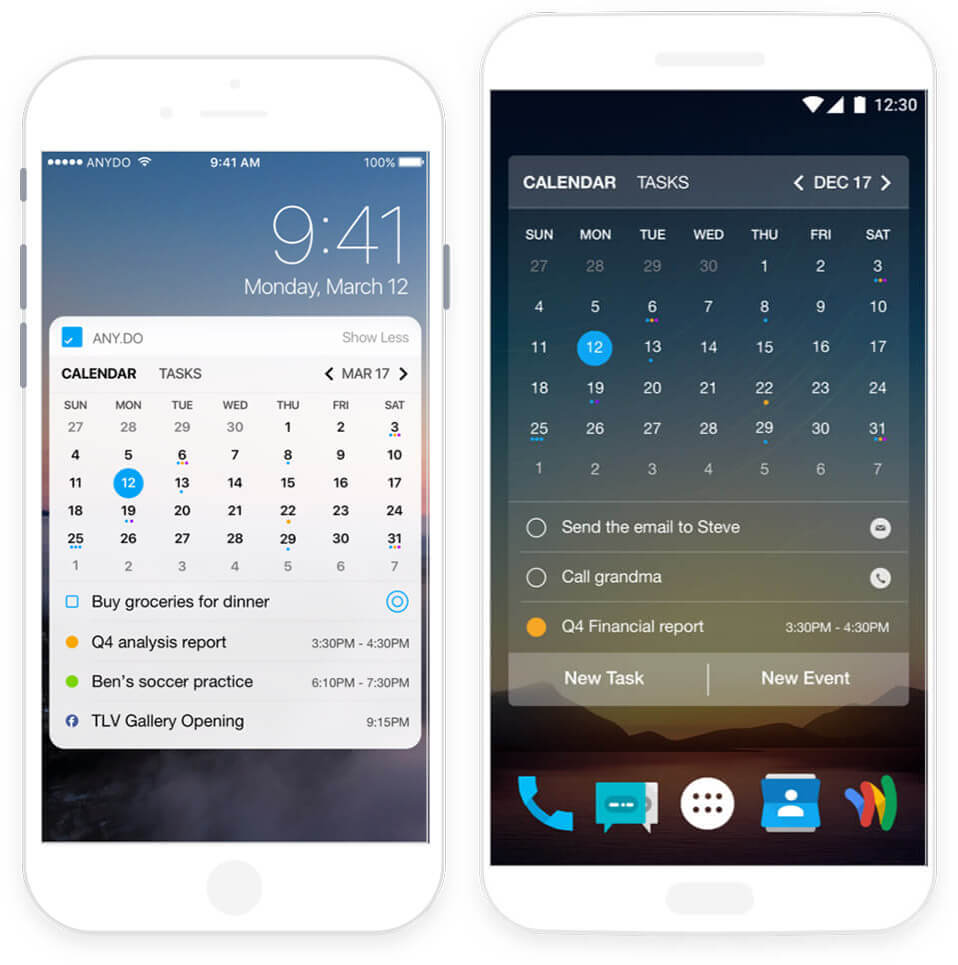
Any.do’s clearest difference is the way its My Day planner brings selected tasks and calendar commitments into a more immediate daily view. Instead of opening the app to face every unfinished task, you can concentrate on what needs attention today.
That can be particularly useful when an appointment is remembered but everything surrounding it is not. The email that needs sending beforehand, the medication that needs collecting afterwards and the shopping that needs fitting in on the way home can sit closer to the event itself.
The combined view is most useful when it replaces other lists rather than sitting alongside them. If tasks continue to be divided between several apps, notes and messages, Any.do may simply become another place that needs checking.
Who This Guide Is For
This guide is for adults with ADHD who find that a normal calendar is not enough on its own. You might already use Google Calendar, Apple Calendar, or Outlook, but still lose track of the small tasks that sit around your appointments. Any.do may suit you if your day often falls apart because the calendar tells you where to be, but not what needs preparing, bringing, sending, checking, or remembering.
It is also worth considering if you share responsibilities with someone else. Shopping lists, household chores, school reminders, family admin, and work follow-ups can quickly become scattered across messages, notes, and memory. Any.do is not magic, but it can give those loose commitments somewhere more visible to live.
Key Takeaways
- Any.do combines tasks, lists, reminders and calendar events without becoming a full project-management system.
- My Day provides a smaller daily view rather than asking you to work from an entire backlog.
- Recurring and location-based reminders may be useful for responsibilities that are easily forgotten until the wrong moment.
- Shared lists make it relevant to household planning as well as individual work tasks.
- It is less suitable for people who want detailed calendar controls, automatic time blocking or advanced project planning.
- Some features and reminder options depend on the selected plan and platform.
How Any.do Works
Tasks can be captured into lists, given dates and reminders, and then brought into My Day when they need attention. Calendar events can appear alongside those tasks, so a fixed appointment and the smaller jobs surrounding it do not need to live in completely separate systems.
Any.do also supports repeated responsibilities through recurring reminders, while location-based reminders can surface a task when you arrive somewhere relevant. Availability may depend on the plan and device, so it is worth checking the current options before subscribing.
Shared lists extend the system beyond personal planning. Shopping, household jobs and family admin can be kept somewhere visible rather than repeatedly passed between messages, scraps of paper and memory.
The app is not designed to schedule every task automatically or provide the depth of a large project-management platform. Its main role is to make a manageable set of everyday commitments easier to capture, see and revisit.
Why Any.do May Help with ADHD Planning
Any.do may help with ADHD because it keeps important tasks visible instead of leaving them buried in memory. Many of us can remember something perfectly one moment and completely lose track of it the next.
That is where the combination of reminders, tasks and planning may be helpful. Instead of relying on a commitment coming back to mind at the right moment, the app gives it somewhere visible to remain. For wider ADHD guidance and practical explanations, ADDitude is also a useful external resource.
The real benefit is not that Any.do makes you perfectly organised. It is more that it gives your future self a clearer set of prompts. When you open the app and see both your appointments and your tasks, there is less mental effort involved in reconstructing the day from memory.
Real-World Use Cases
Any.do is useful for a morning reset, especially if you tend to start the day by reacting to whatever feels loudest. You can open the planner, choose a small number of tasks, and match them against the reality of your calendar before the day gets away from you.
It can also work well for household admin. For example, if you need to order medication, buy food, pay a bill, and remember an appointment, those tasks can sit in one place instead of being scattered across texts, paper notes, and anxious thoughts.
If your planning system depends heavily on a tablet, stylus, or larger visual workspace, the best digital tablets for ADHD productivity UK guide may be a useful cross-cluster comparison, because some people find that planning becomes easier when the screen itself gives them more room to think.
Feature Breakdown Table
| Feature | What It Changes in Practice | Point to Consider |
|---|---|---|
| My Day planner | Creates a smaller view of the tasks and events that matter today | It still needs a brief daily review to remain useful |
| Calendar and task views | Keeps appointments closer to the tasks that need to happen around them | It is less detailed than a specialist calendar or time-blocking app |
| Recurring reminders | Brings repeated responsibilities back without recreating them manually | Too many reminders can gradually become background noise |
| Location-based reminders | Can surface a task when you arrive somewhere relevant | Availability and device permissions need to be checked |
| Shared lists | Keeps household, shopping or family responsibilities visible to other people | Shared lists still need clear ownership if several people are involved |
| Cross-device access | Allows tasks to be captured and checked away from the main computer | Useful only if Any.do becomes one of the places you consistently check |
Focus Environment Fit
Any.do fits best in a calm digital environment where you are not trying to run five productivity apps at once. If your phone is already overloaded with reminders, widgets, notifications, and unfinished systems, adding another app without simplifying anything may just create more noise.
Any.do is likely to feel more manageable when it has a clearly defined role. It could replace a separate task list and reminder app, for example, while continuing to display events from an existing calendar. If it is added without simplifying anything else, the result may be one more source of notifications and unfinished tasks.
What Any.do May Feel Like in Everyday Use
Any.do is likely to be most useful when the day contains fixed appointments alongside smaller jobs that are easy to overlook. A dentist appointment may already be in the calendar, but the form that needs completing, the prescription that needs collecting and the call that needs making afterwards can remain visible beside it.
The simpler interface is part of the appeal, but it does not mean the app takes care of the whole planning process. My Day still needs reviewing, overdue tasks still need deciding on and reminders can become easy to dismiss when there are too many of them.
That makes Any.do a better fit for someone who wants a lighter daily planning space than for somebody seeking detailed project controls or automatic scheduling. The test is not whether the first setup looks organised, but whether the app remains easy to open after a busy day or a few missed tasks.
Friction Points to Consider
- It may feel too limited if you want detailed calendar controls, automatic time blocking or advanced project planning.
- Some reminders, integrations and collaboration features depend on the selected plan or platform.
- Combining calendar events, tasks and repeated reminders can still create a busy screen if too much is added.
- Notifications may gradually become easy to dismiss if every task is treated as equally urgent.
- It can duplicate tools you already use unless you decide what Any.do is replacing.
- My Day still needs reviewing, so the app may become easy to ignore once the initial novelty fades.
Practical Reality Check
Any.do cannot prevent missed deadlines or forgotten tasks by itself. A long backlog can still become uncomfortable to look at, and repeated reminders can still be dismissed without much thought. If the app sits beside several other unfinished planning systems, it may add to the clutter rather than reduce it.
Its value is more straightforward: it gives appointments, reminders and everyday tasks a better chance of remaining visible. That may be enough for someone who generally knows what needs doing but keeps losing track of those commitments as the day fills up.
It is also reasonably easy to restart. After a disrupted day, you can return to My Day and choose what still matters instead of rebuilding an entire productivity system. Whether that feels sustainable will depend on keeping the daily list realistic.
Any.do Free vs Paid: What to Check
Any.do provides a way to begin without immediately committing to its more advanced options, so the free version should be enough to judge whether the basic task, list and daily-planning approach feels comfortable. It is better to discover that first than to pay for extra features before knowing whether you will return to the app.
The paid options become more relevant when you need advanced reminders, additional customisation, collaboration or a wider set of planning features. Plans and prices can change, so check the current comparison carefully and confirm that the specific feature you want is included before subscribing.
It is also worth looking at what Any.do would replace. If it can take the place of a separate reminder app, task list and household list, paying may be easier to justify. If those existing tools already work well, the paid features may simply add another subscription without removing anything.
A normal week will reveal more than an enthusiastic first setup. Add genuine appointments and recurring jobs, allow a few tasks to remain unfinished and notice whether returning to My Day feels straightforward or slightly accusing.
Frequently Asked Questions
Is Any.do free?
Any.do has a free starting option for basic personal planning, although some advanced reminders, customisation and collaboration features require a paid plan. Check the current plan comparison before subscribing because features and prices may change.
Is Any.do good for ADHD time management?
Any.do may be useful if you want tasks, reminders and calendar events to remain visible in one daily planning space. It is less likely to suit somebody who wants automatic scheduling, detailed time blocking or a large project-management system.
Is Any.do better than Google Calendar?
They handle slightly different parts of planning. Google Calendar is primarily built around events and appointments, whereas Any.do places greater emphasis on tasks, lists and reminders alongside the calendar. Some people may connect the two rather than replacing Google Calendar completely.
Does Any.do support recurring and location-based reminders?
Any.do supports recurring reminders for repeated responsibilities and location-based reminders that can appear when you arrive somewhere relevant. Availability may depend on the device and subscription, and location permissions need to be enabled for location reminders to work.
Can Any.do be used for shared household tasks?
Shared lists can give shopping, household jobs and family admin somewhere more visible to live. They are most useful when it is clear who is responsible for each task; otherwise, a shared list can still become a collection of jobs that everybody assumes somebody else will handle.
Alternatives to Consider
Any.do sits somewhere between a traditional calendar and a task manager, which means it will not be the perfect fit for everyone.
If your biggest challenge is capturing and organising tasks, Todoist may be a stronger option. It feels more focused on task management and organising responsibilities than daily scheduling.
If you prefer a simpler Microsoft-based setup, Microsoft To Do keeps things familiar and avoids much of the complexity found in larger productivity systems.
For people who prefer seeing their entire day laid out visually, Structured takes a different approach. The timeline view can make it easier to understand how tasks fit around appointments and commitments throughout the day.
At the other end of the spectrum, Notion offers far more flexibility for planning, notes, and project management. That freedom can be powerful, although some ADHD users may find themselves spending more time building systems than actually using them.
The best choice often comes down to where the friction exists. If the problem is managing tasks, one of these alternatives may be a better fit. If the challenge is seeing tasks, reminders, and appointments together in one place, Any.do still makes a strong case.
Final Verdict
The trade-off is that Any.do still needs checking, its notifications can become easy to ignore and some useful features require a paid plan. If you already have a reliable calendar and task manager, it may not remove enough work to justify another app. If you want something more complete than a basic calendar without building a large productivity system, it is a reasonable option to test.