
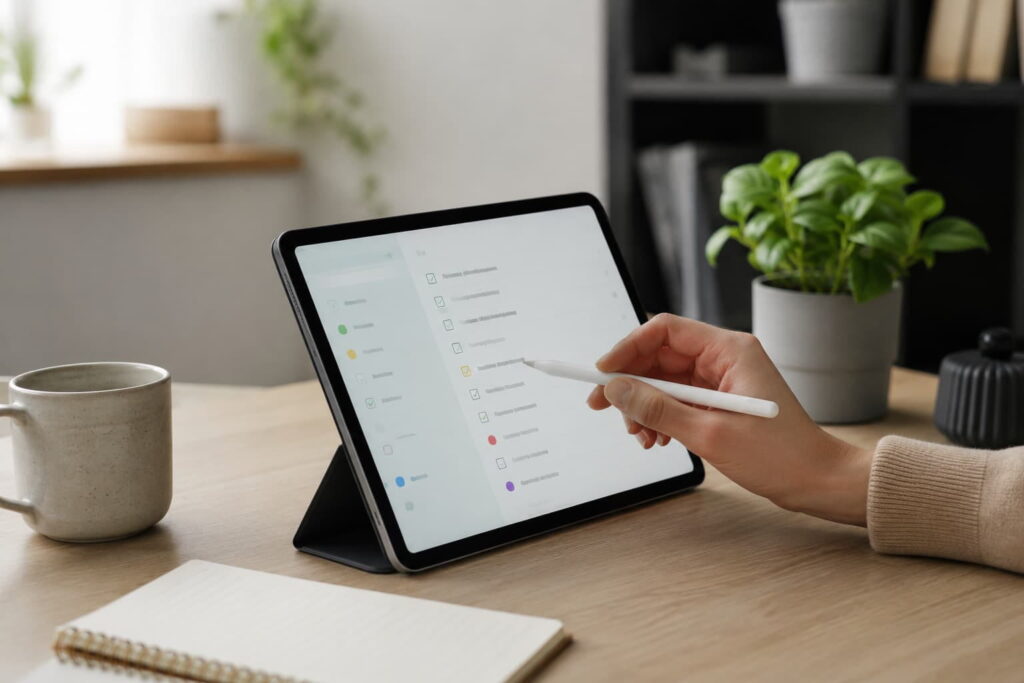
Best Calendar Apps for ADHD Time Management: Quick Picks
-
- Best free starting point: Google Calendar
- Best premium calendar experience: Fantastical
- Best visual daily planner: Structured
- Best for automatic scheduling: Motion
- Best simple calendar and task mix: Any.do Calendar
Quick Picks by Situation
If you want a simple place to begin without paying for another subscription, Google Calendar is probably the easiest starting point because it works across devices, connects naturally with Gmail and Google Tasks, and keeps the basic planning process fairly familiar.
If your main problem is seeing the shape of the day, Structured is likely to feel more calming than a traditional calendar because it turns tasks and events into a visual timeline. For people who already live inside calendar apps and want more power, Fantastical offers a more polished premium experience, while Motion is better suited to people who want the app to actively schedule tasks for them rather than simply display appointments.
Any.do Calendar sits somewhere in the middle. It is not as powerful as Motion or as calendar-focused as Fantastical, but it can work well if you want tasks, reminders, lists, and calendar events in one place without building a complicated system.
Introduction
The Best Calendar Apps for ADHD Time Management are not always the most advanced calendar apps. For ADHD adults, the better choice is usually the one that makes the day easier to see, easier to start, and easier to recover when things inevitably move around. This guide sits within the wider ADHD productivity tools UK structure, where the aim is not to build a perfect system, but to find practical tools that reduce everyday planning stress.
Calendar apps can be genuinely helpful, but they can also become another place to avoid if they are too busy, too rigid, or too easy to overfill. I have found that the calendar itself is rarely the full solution; the real difference comes from whether the app helps you trust what is coming next without making the whole day feel like a spreadsheet.
This comparison looks at five calendar and planning tools that are available to UK users: Google Calendar, Fantastical, Structured, Motion, and Any.do Calendar. Each one approaches time management slightly differently, so the best choice depends on whether you need simplicity, visual structure, automation, or a better link between tasks and time.
Who This Guide Is For
- ADHD adults who forget appointments, underestimate time, or struggle to plan the day realistically.
- People who want a calmer calendar system without overcomplicating their routine.
- Anyone comparing calendar apps before choosing which full review to read next.
- UK readers looking for practical software options rather than medical advice.
- People who already use a task app but need a better way to connect tasks to actual time.
Key Takeaways
- Google Calendar is the easiest free option for most people to test first.
- Structured is useful if a visual timeline feels easier than a traditional calendar grid.
- Fantastical is better for people who already use calendars heavily and want a more polished app.
- Motion is the most automation-focused option, but it can feel too much if you dislike handing control to software.
- Any.do Calendar works best when you want tasks and calendar events in one simpler daily planning space.
How These Products Were Evaluated
These apps were compared based on how useful they are likely to feel in real daily use, not just how many features they offer. For ADHD time management, a long feature list can sometimes make an app harder to stick with, especially if the setup process becomes another unfinished project.
The main comparison points were ease of use, visual clarity, reminders, calendar and task integration, flexibility when plans change, device compatibility, and how much effort the app asks from you each day. I also considered whether the app is likely to support a realistic routine rather than encourage overplanning.
This guide avoids making medical claims. ADHD support needs vary from person to person, and resources such as ADDitude can be useful for broader ADHD education, but this article is focused specifically on practical calendar app choices.
Quick Comparison Table
| App | Best For | Main Strength | Main Trade-Off |
|---|---|---|---|
| Google Calendar | Free everyday planning | Simple, familiar, widely supported | Can become cluttered if not managed carefully |
| Fantastical | Premium calendar users | Polished calendar views and natural language input | May be more than casual users need |
| Structured | Visual daily planning | Clear timeline for tasks and events | Less suited to complex team scheduling |
| Motion | Automatic scheduling | Plans tasks into your calendar for you | Can feel intense if you prefer manual control |
| Any.do Calendar | Simple tasks and calendar mix | Combines lists, reminders, and calendar planning | May feel less specialist than dedicated calendar apps |
Focus Environment Fit
A calendar app works better when it fits the way your day actually unfolds. If you regularly lose track of time between tasks, a visual planner such as Structured may feel easier to follow. If your problem is that tasks never make it into your calendar, Motion or Any.do may be more useful because they connect planning with action. For a wider system around planning, reminders, and work routines, you may also want to link this cluster later to your supporting article on how to build an ADHD calendar system that actually works.
The important thing is not to choose the app that looks most impressive. It is to choose the one you are most likely to open when your head is busy, your plans have changed, or you are already behind.
Focus Score Comparison Table
| App | Visual Clarity | Reminder Support | Task Integration | ADHD-Friendly Simplicity | Overall Fit |
|---|---|---|---|---|---|
| Google Calendar | 8/10 | 8/10 | 7/10 | 8/10 | 8/10 |
| Fantastical | 9/10 | 8/10 | 8/10 | 7/10 | 8/10 |
| Structured | 9/10 | 7/10 | 8/10 | 9/10 | 9/10 |
| Motion | 8/10 | 8/10 | 9/10 | 6/10 | 8/10 |
| Any.do Calendar | 7/10 | 8/10 | 8/10 | 8/10 | 8/10 |
If you want more detail on a specific option, the individual reviews below will help you look more closely at how each one fits real daily use.
Google Calendar
Who It May Suit
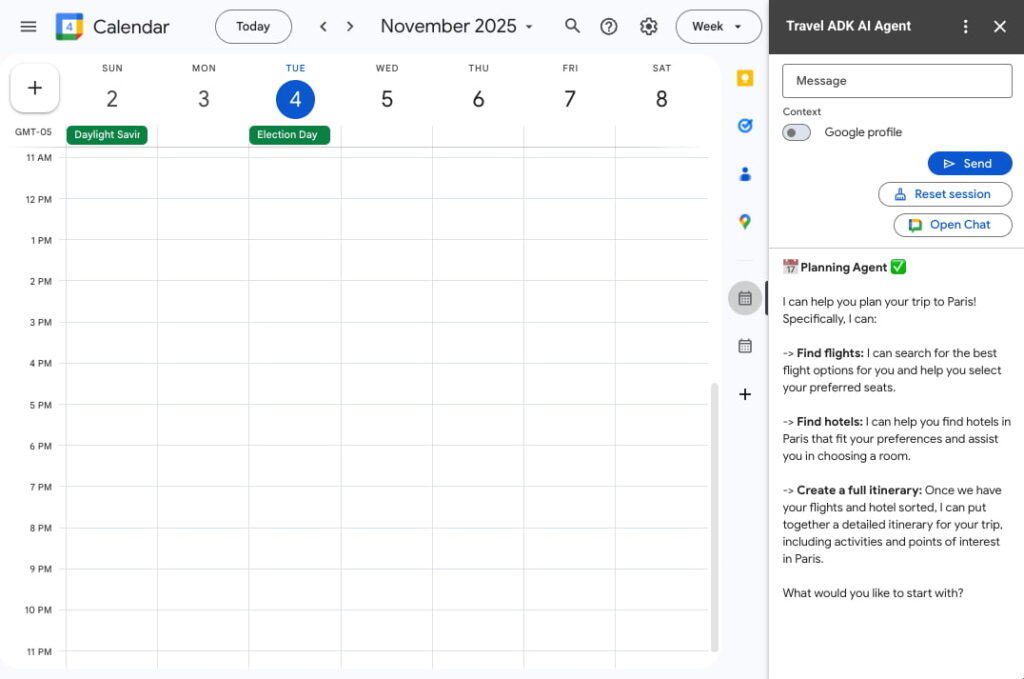
Google Calendar is usually the safest place to begin if you want a calendar system without adding much extra cost or complexity. It is familiar, available across devices, and already connects well with Gmail, Google Tasks, and other Google services, which means there is less pressure to learn an entirely new way of planning.
It is especially useful if your current problem is not that you need advanced features, but that appointments, reminders, and repeated routines are not visible enough during the day. For many ADHD adults, having one simple calendar that shows what is coming next can be more helpful than trying to build a complex productivity dashboard.
Why It May Help
The strength of Google Calendar is that it is easy to keep close to normal life. You can add appointments, recurring reminders, shared calendars, tasks, and colour-coded categories without needing to redesign your whole routine. That makes it a sensible option for work schedules, family commitments, medication reminders, appointments, and repeat tasks.
Where it can help ADHD time management is by giving the day a visible shape. Instead of holding everything in your head, you can see where the fixed points are and then build softer tasks around them. That sounds basic, but in practice it can reduce the “what am I supposed to be doing now?” feeling that often leads to avoidance or drifting.
Friction Points to Consider
- It can become cluttered if every task, reminder, and idea is added without a simple system.
- The standard calendar layout may not feel visual enough for people who need a timeline-style day plan.
- It relies on you checking it regularly, so reminders and widgets matter.
Practical Reality Check
Google Calendar is not the most exciting choice, but that may be exactly why it works for some people. It gives you enough structure to start without making the system feel like a hobby in itself. The risk is that it becomes a dumping ground, so it works best when you keep categories simple and avoid turning every small intention into a calendar event.
If you want a closer look at how this works in everyday use, you can read the full Google Calendar review for ADHD time management.
Fantastical
Who It May Suit
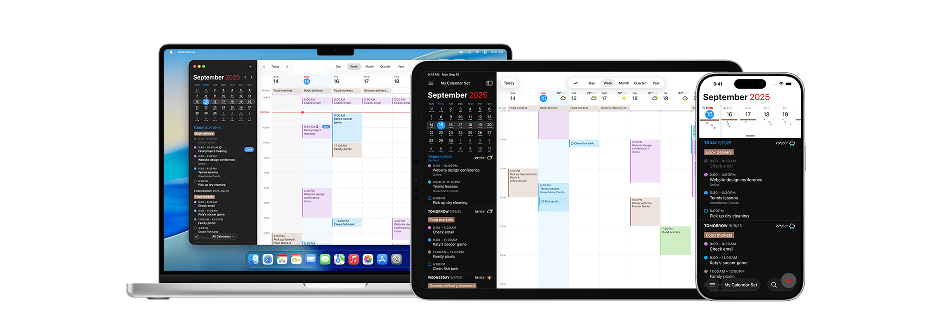
Fantastical is better suited to people who already use a calendar regularly and want the experience to feel smoother, faster, and more polished. It is not the obvious first step if you barely use a calendar at all, but it can make sense if you are already committed to calendar planning and want better views, quicker input, and a more refined daily workflow.
This is the option I would think about for someone who dislikes clunky software but still wants a serious calendar. If visual neatness affects whether you open an app, the feel of Fantastical may matter more than it would for someone who only wants basic reminders.
Why It May Help
Fantastical’s appeal is that it makes calendar management feel more natural and less like admin. Adding events can feel faster because you can type them in the way you would normally think about them, rather than working through multiple menus and settings. The different calendar views also make it easier to move between the details of today and the wider shape of the week or month. For ADHD users, that smoother capture process can matter because any delay between thinking of a task and recording it increases the chance it disappears.
Friction Points to Consider
- It may feel unnecessary if you only need basic event reminders.
- Premium features can add cost compared with free calendar options.
- People who prefer very simple layouts may find the extra power distracting.
Practical Reality Check
Fantastical is best seen as a premium upgrade rather than a magic fix. It can make calendar planning feel more pleasant and efficient, but it will not solve overplanning by itself. If you often create unrealistic days, the app still needs to be paired with a calmer planning routine.
If you want to compare the strengths and limitations in more depth, you can read the full Fantastical review for ADHD time management.
Structured
Who It May Suit
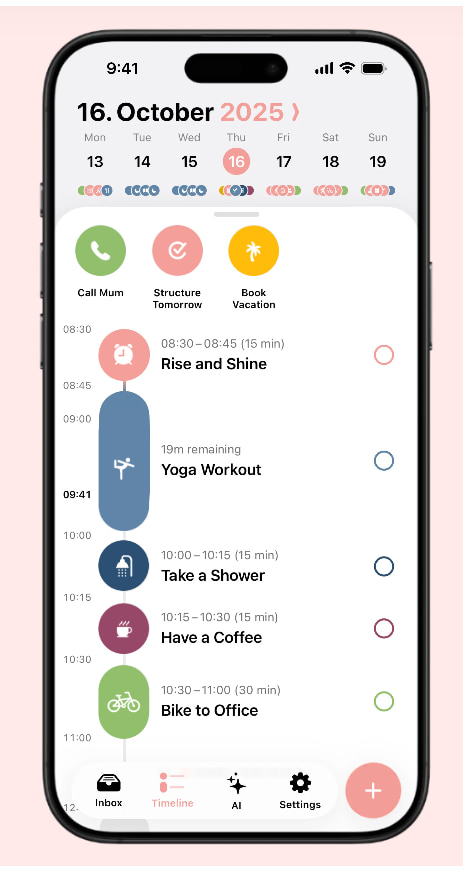
Structured is one of the more ADHD-friendly options if your brain responds better to a visual day plan than a traditional calendar grid. Instead of asking you to interpret blocks of time across a weekly layout, it presents the day as a clearer timeline, which can make the next step easier to understand.
This can be especially useful if you struggle with task transitions. A normal calendar might tell you what time something starts, but Structured can make the whole sequence of the day feel more visible, from morning routines to work blocks, errands, meals, and evening reset tasks.
Why It May Help
The main benefit of Structured is that it turns planning into something more concrete. If your day normally exists as a messy collection of intentions, appointments, and half-remembered tasks, a timeline can help you see where things actually fit. That does not mean you need to fill every minute, but it can make the difference between a vague plan and a usable one.
Structured may also work well for routines that repeat, such as morning starts, medication checks, school runs, work blocks, or evening preparation. Those repeated anchors can make the day feel less like you are constantly rebuilding it from scratch.
Friction Points to Consider
- It may not be powerful enough for complex work scheduling or team calendars.
- Some users may overfill the timeline and then feel behind all day.
- It works best when you keep the plan realistic rather than trying to schedule every thought.
Practical Reality Check
Structured can feel calming because it makes the day easier to see, but it still needs a bit of restraint. If you use it to create a perfect fantasy version of the day, it may become discouraging. If you use it to show the next few anchors and a realistic set of tasks, it can be a very practical support.
If you want to see whether the timeline approach would suit your routine, you can read the full Structured app review for ADHD time management.
Motion
Who It May Suit
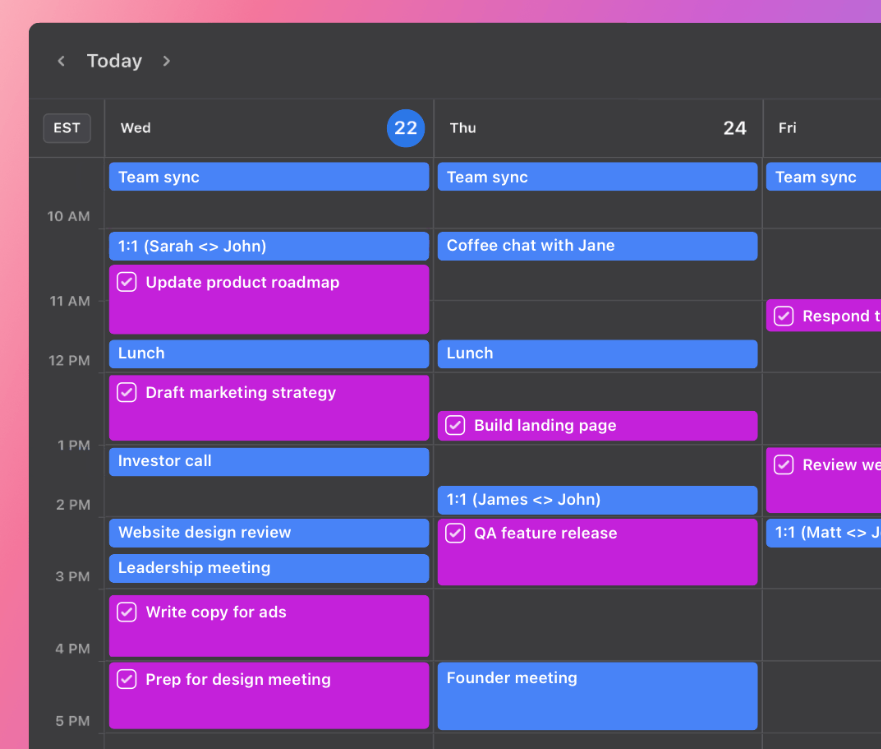
Motion is the most automation-heavy option in this comparison. It is designed for people who want tasks to be scheduled into the calendar rather than sitting in a separate list waiting to be chosen. That can be useful if your biggest difficulty is deciding what to do next, especially when you have several competing tasks and limited energy.
It is more likely to suit work-heavy users, business owners, freelancers, or people managing a lot of deadlines. If you only need basic reminders for appointments and routines, Motion may feel like too much. If your days are full of shifting priorities, however, the automatic scheduling approach could be valuable.
Why It May Help
Motion tries to reduce the decision-making involved in planning. Instead of keeping a task list in one place and a calendar in another, it can place tasks into available time blocks and adjust the schedule when things move. For ADHD users who often feel stuck choosing between tasks, that can make the day feel less open-ended.
The biggest advantage is that it treats tasks as things that need time, not just items on a list. That matters because a task list can look manageable until you realise there is nowhere in the day for the tasks to actually happen.
Friction Points to Consider
- It may feel too intense if you dislike automated planning or strict schedules.
- The cost may be harder to justify for light personal use.
- It works best when tasks and deadlines are entered carefully, which still takes effort.
Practical Reality Check
Motion can be powerful, but it is not the calmest option for everyone. Some people will love the feeling that the app is actively organising the day, while others may feel boxed in by a schedule that keeps moving. It is worth treating Motion as a serious planning tool rather than a casual calendar app.
If you want to understand whether the automation is useful or too much for your routine, you can read the full Motion review for ADHD time management.
Any.do Calendar
Who It May Suit
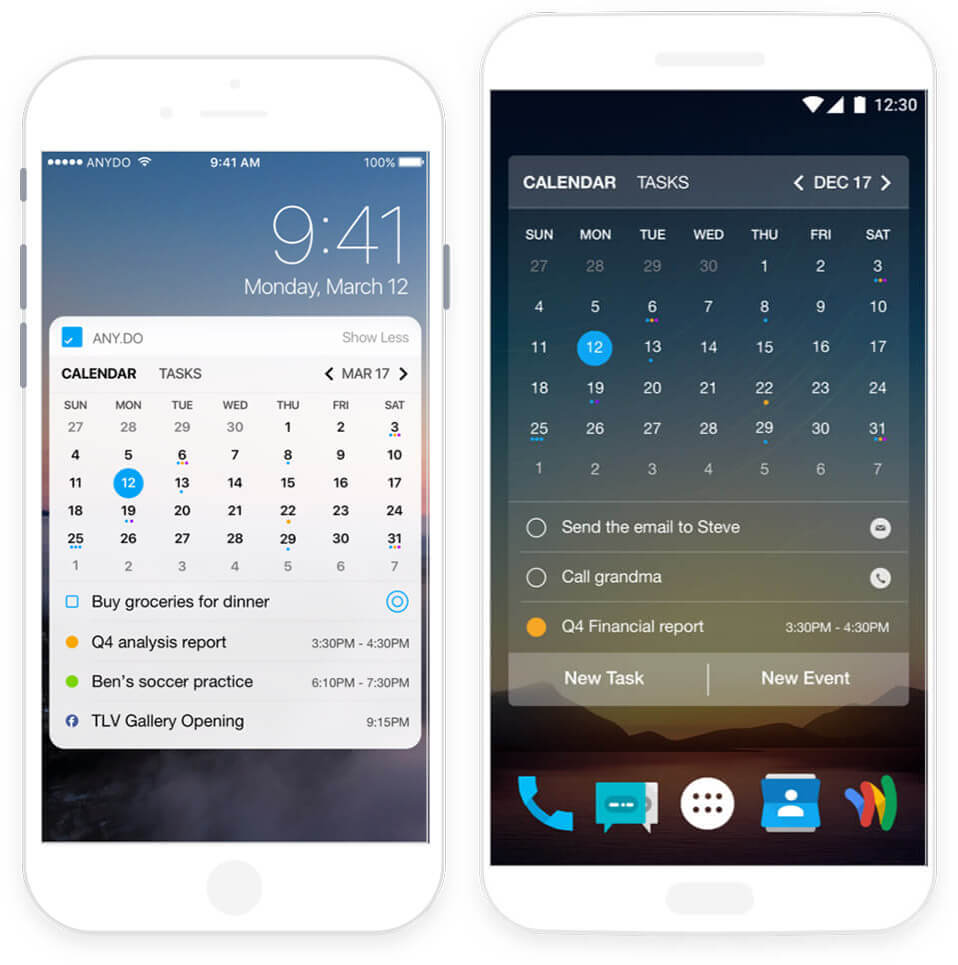
Any.do Calendar is a good fit for people who want their tasks, lists, reminders, and calendar events to live closer together. It does not feel as specialist as Fantastical or as automated as Motion, but that can be a strength if you want one practical place to manage the basics of daily life.
It may suit someone who is tired of switching between a calendar app, a notes app, a reminders app, and a separate task manager. When everything is split across too many places, the system can start creating more effort than it saves.
Why It May Help
The appeal of Any.do is that it connects planning with everyday tasks. You can manage to-dos, reminders, lists, and calendar events in a way that feels less formal than a full productivity system. For ADHD time management, this can be useful because many missed tasks are not major projects; they are small life admin items that never found a reliable place to land.
Any.do can also work well for shared family tasks, shopping lists, simple routines, and personal reminders. It is not only about work planning, which makes it useful if your calendar needs to support home life as much as productivity.
Friction Points to Consider
- It may not satisfy people who want a powerful dedicated calendar app.
- Combining tasks and calendar events can become messy without simple categories.
- Some advanced features may depend on the plan or platform you use.
Practical Reality Check
Any.do Calendar is probably strongest when you want fewer places to check. It will not be the most advanced choice for complex scheduling, but it can make everyday planning feel more joined up. That can be enough if the real problem is not a lack of features, but a lack of one place you trust.
If you want a closer look at how it compares with the other options, you can read the full Any.do Calendar review for ADHD time management.
Buying Guide: Choosing a Calendar App
When choosing between the Best Calendar Apps for ADHD Time Management, it helps to start with the problem you are trying to solve. If you mainly forget appointments, a simple calendar with strong reminders may be enough. If you struggle to see how the day fits together, a visual timeline may matter more. If your task list is always too long, a tool that schedules tasks into time blocks may be more useful than another basic calendar.
Compatibility is one of the first things to check. A calendar app is only useful if it works on the devices you actually use, including your phone, laptop, smartwatch, or tablet. If you use Google services heavily, Google Calendar may fit naturally. If you use Apple devices and want a more premium experience, Fantastical may feel smoother. If you work across several devices, make sure syncing is reliable before committing to the app.
Notification control is also important. Too few reminders can lead to missed appointments, but too many reminders can become background noise. The better setup is usually a small number of meaningful alerts, placed at points where you can actually respond. For example, a reminder ten minutes before leaving the house may be more useful than five reminders that start too early and get ignored.
Battery life matters more for wearable-heavy setups than for desktop planning, but it is still worth thinking about how the app behaves across devices. If an app encourages constant checking, it can become another distraction. If it quietly supports the day without demanding too much attention, it is more likely to last.
Ease of use is probably the biggest factor. A calendar app should make the day easier to understand, not become another system to maintain. The best choice is the one you can return to after a messy day without feeling like you have failed.
Frequently Asked Questions
What is the best calendar app for ADHD adults?
There is no single best calendar app for every ADHD adult. Google Calendar is the easiest free starting point, Structured is strong for visual daily planning, Fantastical suits people who want a premium calendar, Motion is useful for automatic scheduling, and Any.do Calendar works well for combining tasks and reminders.
Are calendar apps better than paper planners for ADHD?
Calendar apps are better for reminders, recurring events, syncing across devices, and moving plans around quickly. Paper planners can feel calmer and more physical, especially for people who think better by writing things down. Many people do best with a hybrid system where the calendar holds fixed times and the paper planner helps with daily thinking.
Can calendar apps help with time blindness?
Calendar apps can help with time blindness by making time more visible, especially when they use reminders, time blocks, widgets, or timeline views. They will not remove time blindness completely, but they can make it easier to see what is coming next and how much space is realistically available.
Should I use one calendar app for everything?
Using one main calendar is usually easier than spreading appointments across several apps, but it still needs simple categories. Work, family, health, routines, and personal tasks can all live in one calendar system if the layout stays clear and you avoid adding too much detail.
Final Verdict
The Best Calendar Apps for ADHD Time Management depend on what kind of planning problem you are trying to solve. Google Calendar is the best free starting point, Fantastical is the most polished calendar-focused option, Structured is the strongest visual daily planner, Motion is best for automatic scheduling, and Any.do Calendar is useful if you want tasks and calendar events in one simpler place.
For most people, I would not start with the most complicated option. I would start with the app that matches the part of the day that currently falls apart most often. If you miss appointments, focus on reminders. If you lose the shape of the day, focus on visual planning. If tasks never get scheduled, choose a tool that connects tasks to time.
If you are still deciding, the full product reviews can help you look more closely at the strengths and trade-offs of each option before you build the rest of your calendar system.