
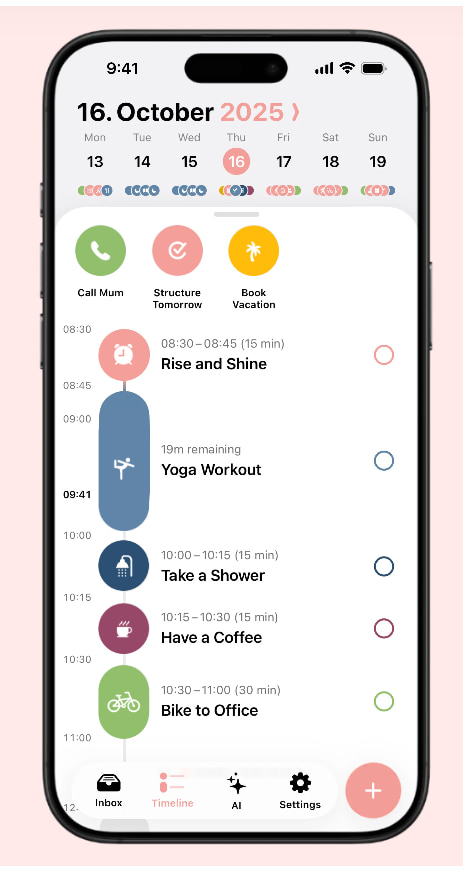
At a Glance
- Best for: ADHD adults who prefer a visual daily timeline rather than a traditional calendar grid.
- Main strength: Turns tasks, routines, and events into a clear day plan that is easier to follow.
- Main limitation: It can become discouraging if you overfill the timeline with too many tasks.
- Best used for: Daily routines, time blocking, transitions, morning planning, and visual structure.
- Overall verdict: A strong ADHD-friendly planning app for people who need to see the shape of the day more clearly.
Introduction
This Structured App Review for ADHD Time Management looks at whether Structured is a useful option for ADHD adults who find traditional calendar layouts too abstract, too cluttered, or too easy to ignore. It is part of the wider ADHD productivity tools UK structure, where the focus is on practical tools that make planning feel more manageable in real daily life.
Structured is different from a standard calendar because it presents the day as a visual timeline. Instead of looking at a blank calendar grid and trying to work out where everything fits, you can build a clearer sequence of what is happening, what needs doing, and what comes next.
For ADHD time management, that visual approach can matter. When the day feels vague, tasks can either disappear completely or all feel urgent at once. A timeline does not solve that by itself, but it can make the day easier to understand at a glance.
Structured App Review for ADHD Time Management: Key Features
What stood out most during use was not any individual feature. It was the way Structured turns a day that feels vague into something you can actually see. Rather than trying to become a powerful project management tool or a feature-heavy calendar, it focuses on helping you understand what happens next. For ADHD adults who often struggle to visualise time, that simplicity may actually be the most valuable part of the experience.
- Visual daily timeline for tasks, routines, and calendar events.
- Simple task entry for planning the day in order.
- Calendar integration for connecting fixed appointments with flexible tasks.
- Recurring tasks for routines that happen daily or weekly.
- Notifications and reminders for transitions and planned activities.
- Clear layout that can make the day easier to scan quickly.
- Useful for morning routines, work blocks, household tasks, and evening resets.
Who This Guide Is For
This guide is for ADHD adults who struggle to turn a normal to-do list into an actual day. A list can show what needs doing, but it does not always show when those things will happen, how long they might take, or whether the plan is realistic.
Structured may also suit people who find calendar grids difficult to use. A weekly calendar can be useful for appointments, but it can still leave you with a vague sense of the day itself. Structured narrows the view and helps you think in sequence, which can be easier when your brain feels busy.
This review is not medical advice, and Structured is not a treatment for ADHD. It is simply a planning tool that may support routines, transitions, and time awareness if the visual timeline format fits the way you think.
Key Takeaways
- Structured is strongest as a visual daily planner rather than a full calendar replacement.
- It may suit ADHD adults who need to see tasks and appointments in order.
- The timeline layout can make routines and transitions feel clearer.
- It works best when the day plan is realistic, not packed with every possible task.
- It may be less suitable for complex team scheduling or heavy work calendar management.
- It can pair well with a main calendar app if you want one place for fixed events and another for daily flow.
How It Works
The experience of using Structured feels quite different from opening a traditional calendar. Rather than looking at dates, boxes, and appointments, you are looking at the shape of the day itself. You can add tasks, events, routines, and reminders, then view them in the order they are supposed to happen. This makes it different from a standard to-do list, where everything can sit in one pile and compete for attention.
For example, instead of writing a list that says shower, breakfast, email, work task, appointment, food shop, and tidy kitchen, you can place those items into the shape of the day. That makes it easier to notice whether the plan is realistic before you are already halfway through it.
The app is especially useful for daily planning. You can use it in the morning to decide what the day needs to look like, or the night before if mornings are usually rushed. The value is not that the plan will go perfectly, but that there is a visible structure to return to when the day starts to drift.
Why It May Help (ADHD Context)
Structured may help ADHD time management because it makes time and sequence easier to see. Many ADHD planning difficulties are not about laziness or lack of intention; they often come from holding too much in your head, underestimating how long things take, or struggling to move from one task to the next.
Resources such as ADDitude often discuss the importance of external supports for ADHD, and Structured fits that idea in a practical way. It gives the day an outside shape, so you are not relying entirely on memory, motivation, or a vague sense of what should happen next.
The timeline layout may also help with transitions. When you can see that one task ends and another begins, the day feels less like a series of disconnected demands. That does not make switching tasks effortless, but it can reduce the mental work of constantly deciding what comes next.
Real-World Use Cases
The moments where Structured feels most useful tend to be the moments where ADHD planning normally starts to break down.
Structured is useful for morning routines because it lets you see the sequence of small steps that often get underestimated. Getting washed, dressed, having breakfast, checking medication, packing a bag, and leaving the house can look simple from the outside, but each step still needs time and attention.
It can also work well for work-from-home days, study sessions, or admin blocks. If you have a few important things to do but no clear order, the timeline can turn a vague day into a more usable plan. You can add breaks, meals, and reset points as part of the plan rather than treating them as interruptions.
For evening routines, Structured may be helpful because evenings can easily disappear into tiredness, scrolling, or decision fatigue. A simple timeline for dinner, washing up, preparing for tomorrow, and winding down can make the evening feel less like another open-ended task list.
Feature Breakdown Table
| Feature | ADHD Use Case | Practical Value |
|---|---|---|
| Visual timeline | Seeing the day in order | Useful when calendar grids or task lists feel too abstract |
| Task planning | Turning intentions into a daily sequence | Helps tasks feel less like a loose pile |
| Recurring tasks | Repeating routines and regular reminders | Helpful for morning, evening, health, and admin routines |
| Calendar integration | Combining fixed events with flexible tasks | Useful for planning around appointments and commitments |
| Notifications | Prompting transitions | Helpful when reminders are limited and well timed |
| Simple layout | Reducing visual overwhelm | Works well if you need a calmer planning view |
Focus Environment Fit
Structured fits best into a planning environment where the main problem is seeing what the day is supposed to look like. It is less about managing a complex schedule and more about making daily flow visible, especially when tasks and routines tend to blur together.
It can work particularly well with a tablet-based setup because the larger screen gives you more space to review the day, adjust the timeline, and use it alongside notes or planning tools. If you are building a broader visual planning system, the best digital tablets for ADHD productivity UK guide may be useful as a related cross-cluster resource.
The best fit is someone who wants a simple daily map rather than a powerful calendar command centre. If you already have Google Calendar or another calendar for appointments, Structured can sit alongside it as the tool that turns those commitments into a more understandable day plan.
Real Use Review
In real use, Structured feels strongest when you are trying to reduce the gap between having a plan and actually following it. A traditional calendar might show that you have an appointment at 2pm, but Structured can help you build the surrounding parts of the day so that the appointment does not suddenly appear as a surprise.
What stood out for me is that the timeline makes planning feel less like organising a database and more like arranging the day in a way you can actually see. That can be helpful when your head is full, because you are not trying to translate a list of tasks into time every time you look at it.
The risk is overplanning. Structured makes it tempting to create a neat version of the day where everything fits perfectly, but real days rarely behave like that. It works better when you use it to create a rough structure with enough space for delays, tiredness, and tasks taking longer than expected.
Friction Points to Consider
- Structured may feel too simple if you need advanced calendar management or team scheduling.
- The visual timeline can become stressful if you fill every part of the day with tasks.
- It still relies on you checking and updating the plan, especially when the day changes.
- Some users may prefer a traditional calendar view for weekly or monthly planning.
- It may work better alongside another calendar app rather than replacing one completely.
Practical Reality Check
Structured is most useful when you treat it as a daily guide, not a strict contract. The timeline is there to make the day easier to follow, but it should still leave room for real life. If something overruns, the plan needs to be adjusted rather than treated as a failure.
For ADHD time management, this matters because an overfilled planner can quickly become another source of pressure. Structured can make the day clearer, but it cannot make a crowded day realistic. The app works best when you use it to choose fewer things more deliberately.
It is also worth remembering that Structured is not trying to be everything. If you need heavy calendar features, Fantastical or Google Calendar may be better. If you want automatic scheduling, Motion is more suitable. Structured’s real value is the way it makes the next part of the day easier to see.
Who Structured Fits Best
Structured feels most useful for people who already know that seeing the day is more important than managing a complicated calendar. If traditional planners leave you staring at a list of tasks without any sense of how the day actually unfolds, Structured may feel much easier to engage with.
Compatibility is also important. Structured works best when it fits the devices you naturally check during the day. If your phone is always with you, mobile reminders may matter most. If you plan better on a larger screen, a tablet or desktop view may make the app feel more useful.
The biggest buying question is whether you need clarity or automation. Structured is strong for clarity. It helps you see the plan. It does not take over the planning in the same way an automatic scheduling app might. That makes it calmer for some users, but less powerful for people who want software to decide where tasks should go.
If you want to compare Structured against the wider cluster, the full best calendar apps for ADHD time management roundup will be the best place to connect this review once the article is live.
Frequently Asked Questions
Is Structured good for ADHD time management?
Structured can be good for ADHD time management if you find visual timelines easier than standard calendar grids or task lists. It is especially useful for seeing the order of the day, building routines, and planning around fixed commitments.
Is Structured better than Google Calendar for ADHD?
Structured is better if you need a visual daily timeline, while Google Calendar is better for appointments, shared calendars, and broader scheduling. Some people may use both, with Google Calendar holding fixed events and Structured helping with the daily flow.
Can Structured help with routines?
Structured can help with routines because it lets you place repeated tasks into a visible sequence. This can be useful for morning routines, evening resets, admin blocks, meal planning, or any routine where the order of steps matters.
Is Structured suitable for work planning?
Structured can support work planning if you need to organise tasks into blocks of time. It may be less suitable as a full work calendar replacement if you manage lots of meetings, shared calendars, or team scheduling.
Alternatives to Consider
If Structured feels too focused on the daily timeline, Google Calendar may be a better all-round option. Once your full Google Calendar review for ADHD time management is available, it will be useful for comparing a free calendar foundation against a more visual daily planner.
If you want a more polished calendar experience with stronger calendar views, Fantastical may be worth considering. The full Fantastical review for ADHD time management can help readers compare a premium calendar app against Structured’s simpler timeline approach.
If you want the app to automatically schedule tasks rather than simply help you arrange them visually, Motion is the more powerful alternative, this Motion review for ADHD time management will be useful for deciding whether automation feels helpful or too rigid.
Final Verdict
This Structured App Review for ADHD Time Management shows that Structured is a strong option for ADHD adults who need the day to feel more visible, more ordered, and less vague. Its timeline approach can make routines, appointments, and tasks easier to understand because everything is placed into a clearer daily sequence.
It is not the best choice for everyone. If you need a full calendar system, Google Calendar or Fantastical may suit you better. If you want automatic scheduling, Motion is more powerful. But if your main difficulty is turning a loose task list into a day you can actually follow, Structured is one of the more practical options in this cluster.
The best way to use it is gently. Build a realistic day, leave space for things taking longer than expected, and treat the timeline as a guide rather than a test. Used that way, Structured can support ADHD time management without making planning feel heavier than it needs to be.
Build a Simple ADHD Productivity System
If you want to bring everything together into one clear setup, this guide shows how tools, apps, and routines can work as one system.