
At a Glance
- Best for people who want tasks placed directly into their calendar.
- Useful if normal to-do lists become overwhelming or easy to ignore.
- Strongest feature is automatic scheduling and rescheduling.
- May feel too structured if you prefer flexible, low-pressure planning.
- Better suited to work, study, projects, deadlines, and busy routines than casual reminders.
Introduction
This Motion Review for ADHD Time Management looks at whether Motion is genuinely useful for ADHD adults who struggle with planning, time blindness, task switching, and overloaded to-do lists. Many productivity apps ask you to create a list and then rely on you to decide when everything should happen, which can be the exact part that becomes mentally exhausting. Motion takes a different approach by combining tasks, calendar time blocks, deadlines, and automatic rescheduling into one planning system. If you are building a wider setup, it can sit alongside the wider ADHD productivity tools UK framework rather than acting as a standalone magic fix.
The appeal of Motion is that it tries to answer the question many ADHD adults ask several times a day: what should I be doing now? Instead of leaving every task floating in a list, it attempts to place work into your calendar based on available time, priority, deadlines, and meetings. That sounds ideal on paper, but the real question is whether that structure reduces cognitive load or simply creates another system that needs maintaining.
Motion Review for ADHD Time Management: Key Features
Motion stands out because it tries to remove one of the most draining parts of ADHD planning: deciding when work will actually happen. Instead of storing tasks in another list that can be ignored, the system attempts to turn intentions into visible time on the calendar. The features below matter less because they are impressive technology and more because they reduce some of the mental effort involved in constantly rebuilding plans.
- AI-powered task scheduling
- Automatic rescheduling when plans change
- Calendar and task management in one place
- Deadline and priority-based planning
- Meeting scheduler and booking links
- Project task organisation
- Daily planning view
- Desktop and mobile access
Who This Guide Is For
This guide is for ADHD adults who already know that a normal to-do list is not always enough. You may write tasks down, feel briefly reassured, and then find that the list becomes another source of background pressure because nothing has been given a clear time or place. Motion may be worth considering if your main difficulty is not knowing what to do next, underestimating how long tasks will take, or repeatedly pushing important work into the vague space of “later”.
It may also suit people who work with deadlines, client tasks, study blocks, admin, or multiple ongoing projects. If your week contains lots of moving parts, Motion’s automatic rescheduling could reduce some of the decision fatigue that comes from rebuilding your plan every time something overruns. However, if you prefer a very gentle planning system or you feel stressed when your calendar looks full, Motion may feel intense at first.
Key Takeaways
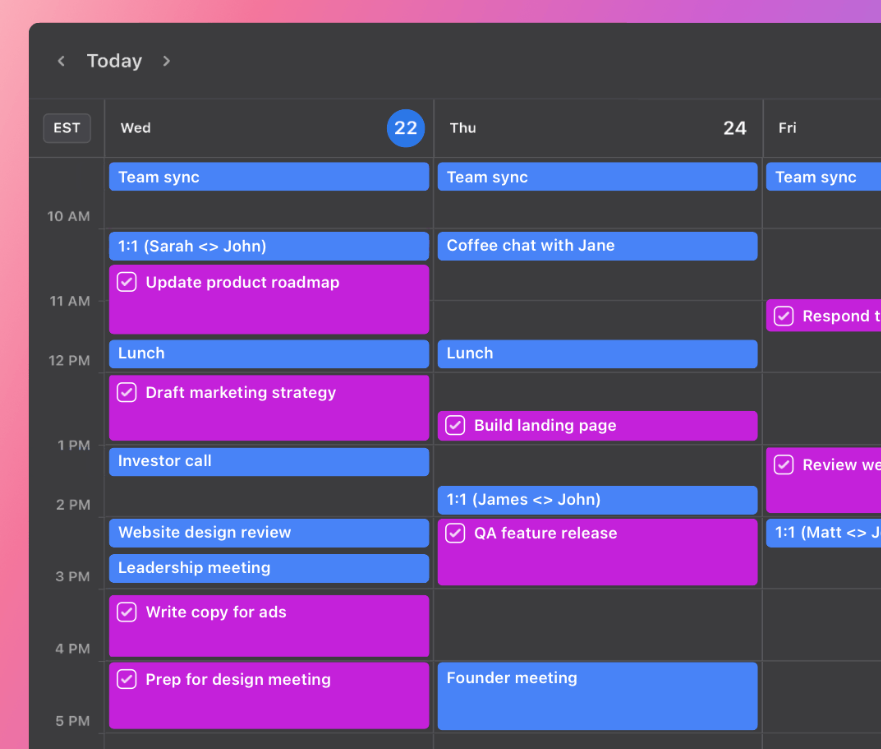
Motion is strongest when you need your tasks to become visible in time. For ADHD, that matters because a task list can look manageable while still hiding the real problem: there may not be enough realistic space in the day to complete everything. By placing tasks into calendar blocks, Motion makes the shape of the day more concrete.
The biggest benefit is not that Motion makes productivity effortless. It is that it reduces the number of times you have to stop and manually rebuild your plan. The biggest drawback is that you still need to enter tasks properly, estimate durations, and trust the system enough to follow it. If you ignore the schedule completely, Motion becomes another expensive list rather than a useful support.
How It Works
What stood out most during use was how little time was spent deciding what should happen next. Many ADHD planning systems fall apart because every task requires another decision. Motion tries to absorb some of that decision-making by placing work directly into the calendar and adjusting plans when circumstances change.
The gap between knowing something matters and actually finding time for it is where many ADHD systems start to struggle. Motion focuses heavily on that gap. Rather than leaving tasks floating in a list, it attempts to give them a place in the day before they become forgotten, avoided, or endlessly postponed.
In practice, the app works best when you use it honestly. A task that will take ninety minutes needs to be entered as ninety minutes, not twenty. A deadline needs to be real. If everything is marked as urgent, the system has less meaningful information to work with. For ADHD users, that setup stage can feel slightly demanding, but it is also where the app becomes useful.
Why It May Help (ADHD Context)
For ADHD adults, the difficulty is often not a lack of care or motivation. It is the friction between remembering, prioritising, starting, switching, and finishing. Resources such as ADDitude often discuss ADHD in relation to executive function, and Motion is interesting because it targets some of those executive function pressure points directly.
One of the most relevant areas is time blindness. A normal task list can hide time because every item takes up the same amount of visual space. “Reply to email” and “finish project proposal” may sit next to each other, even though one could take five minutes and the other could take half a day. Motion makes that difference more visible by forcing tasks into the calendar, where limited time becomes harder to ignore.
Another useful part is automatic rescheduling. Many ADHD adults can plan a day reasonably well in the morning, but once one thing overruns, the whole structure can collapse. Motion’s rescheduling feature may reduce the emotional drop that comes from feeling as though the day is ruined. Instead of manually rebuilding everything, you can see the plan shift around the remaining time.
Real-World Use Cases
Motion felt most useful when the day contained several competing priorities. On busy days, it reduced the familiar ADHD habit of repeatedly scanning a task list, wondering what should happen first, and then losing time deciding. Having work already placed into the day removed some of that friction.
One thing Motion handles reasonably well is protecting larger pieces of work from being crowded out by smaller tasks. ADHD brains often gravitate toward quick wins because they provide immediate completion. Motion makes larger commitments more visible before the day fills with reactive work.
For someone using several ADHD productivity tools, Motion may sit in the planning layer rather than the capture layer. You might still use a quick notes app, a reminder device, or a tablet for rough thinking, but Motion becomes the place where committed work is scheduled. If visual planning works better for you, a device from the best digital tablets for ADHD productivity UK guide may pair naturally with a calendar-first system like this.
Feature Breakdown Table
| Feature | ADHD Benefit | Possible Limitation |
|---|---|---|
| AI scheduling | Turns tasks into time blocks | Needs accurate task input |
| Automatic rescheduling | Reduces planning collapse when days change | Can feel controlling if you dislike rigid plans |
| Calendar integration | Keeps tasks and appointments together | May look visually busy |
| Priority settings | Helps important work get protected | Only works if priorities are used realistically |
| Project planning | Breaks bigger goals into scheduled actions | May be more than some users need |
| Meeting scheduler | Reduces back-and-forth planning | More useful for work than personal routines |
Focus Environment Fit
Motion seemed most effective when the calendar remained visible throughout the day. When the schedule stayed in sight, it became easier to trust the system and follow the next step rather than constantly renegotiating priorities. When the calendar disappeared into the background, much of the benefit disappeared with it.
This is one reason the app may appeal more to ADHD users who already enjoy visual planning. The clearer the day becomes, the less mental energy is spent repeatedly asking what should happen next.
Real Use Review
In real use, Motion feels best when your day has enough structure for automatic planning to be helpful. If you have meetings, deadlines, admin, projects, and focused work blocks, it can reduce the constant mental negotiation of what should happen next. The app is particularly useful when you are prone to spending too long planning your day instead of starting it.
The experience is less ideal if your days are very unpredictable or if you often resist calendar-based structure. Some ADHD users may find it reassuring to see tasks placed clearly into the day, while others may feel boxed in by a calendar that appears to account for every available gap. This is why Motion is not simply “good for ADHD” or “bad for ADHD”; it depends on whether structure calms your brain or triggers resistance.
Friction Points to Consider
- Motion may feel expensive compared with simpler task apps.
- The setup process requires accurate task entry and realistic time estimates.
- Some users may find automatic scheduling too rigid or visually intense.
- It is less useful if you do not consistently check your calendar.
- It may be more powerful than needed for very simple daily reminders.
Practical Reality Check
The practical reality is that Motion will not remove the need to make choices. It can organise your choices, but it still needs you to decide what matters, enter tasks clearly, and respond when the plan changes. For ADHD, that distinction is important because no app can fully outsource executive function.
Where Motion may genuinely help is in reducing repeated planning decisions. Instead of rewriting a list every morning, moving tasks manually, and trying to remember what is urgent, you can let the system carry more of that structure. The trade-off is that the system only helps when it remains visible and believable. If the schedule starts feeling unrealistic, many ADHD users will naturally stop engaging with it altogether.
Is Motion the Right Fit?
Motion is not really solving a task problem. It is solving a planning problem.
If tasks already live somewhere reliable but regularly fail to become action, Motion may feel surprisingly helpful because it focuses on turning intentions into scheduled time. For some ADHD adults, that missing planning layer is where most of the friction exists.
The bigger question is whether calendar structure feels supportive or restrictive. Some people experience relief when the day becomes visible. Others experience resistance. Motion tends to work best for the first group.
Frequently Asked Questions
Is Motion good for ADHD time management?
Motion may be good for ADHD time management if your main difficulty is turning tasks into realistic time blocks. It is especially useful for people who struggle with prioritising, rescheduling, and knowing what to work on next.
Does Motion replace a normal to-do list?
Motion can replace a normal to-do list for some users because it does not just store tasks; it schedules them. However, some people may still prefer a separate quick-capture tool for rough notes and ideas before moving committed tasks into Motion.
Is Motion too complicated for ADHD?
Motion may feel complicated at first because it asks for task details, durations, deadlines, and priorities. For some ADHD users, that setup creates useful structure, while for others it may feel like too much system maintenance.
Who should avoid Motion?
Motion may not be the best fit if you only need simple reminders, dislike calendar blocking, or feel stressed when your day is heavily scheduled. In that case, a lighter planning app may be easier to maintain.
Alternatives to Consider
If Motion feels too structured, Todoist may be a better option for straightforward task capture and simple organisation. It is less automated, but that can be a benefit if you want more control and less calendar pressure. You can compare broader options in the best productivity apps for ADHD adults UK guide.
TickTick may suit users who want tasks, habits, reminders, and calendar features in one place without going as heavily into automatic scheduling. It can feel more flexible than Motion, especially if you like choosing your own focus blocks rather than having the system build them for you.
Structured is another alternative if you want a visual day planner that feels simple and calming. It is not as powerful as Motion, but for some ADHD users that is exactly the point. A lighter system is often easier to use consistently than a powerful system that feels too demanding.
Final Verdict
Motion feels less like a traditional task app and more like an attempt to carry some of the planning burden for you. For ADHD adults who regularly feel overwhelmed by deciding what should happen next, that can be surprisingly valuable. It will not remove executive function challenges entirely, but it may reduce the number of planning decisions required throughout the day. If floating task lists regularly create guilt, pressure, or avoidance, Motion offers a different approach that many ADHD users may find easier to sustain.
Build a Simple ADHD Productivity System
If you want to bring everything together into one clear setup, this guide shows how tools, apps, and routines can work as one system.