
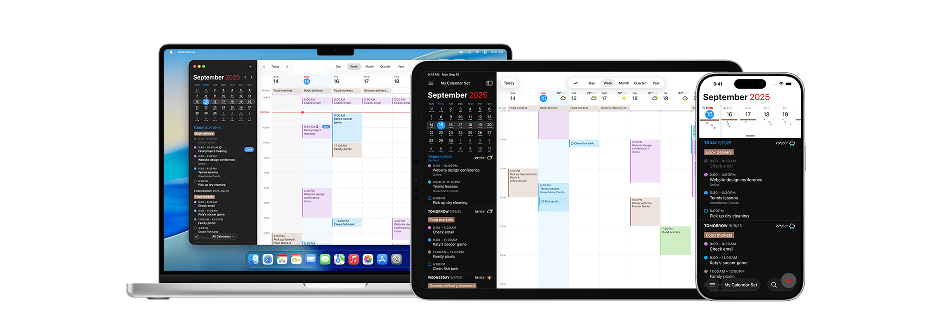
At a Glance
- Best for: ADHD adults who already use a calendar and want a smoother, more polished planning experience.
- Main strength: Clean calendar views, quick event entry, task integration, and a premium feel across devices.
- Main limitation: It may be more than you need if you only want basic reminders and appointments.
- Best used for: Weekly planning, calendar-heavy routines, work schedules, family commitments, and time blocking.
- Overall verdict: A strong premium calendar option for ADHD time management if you already know you will use it consistently.
Introduction
This Fantastical Review for ADHD Time Management looks at whether Fantastical is worth considering if you want a more polished calendar system than the basic free options. It is part of the wider ADHD productivity tools UK structure, where the aim is to find tools that make planning feel easier rather than more complicated.
Fantastical is not the calendar app I would usually suggest as the very first step for someone who never uses a calendar. It is better suited to people who already understand that calendar planning helps them, but who find their current setup clunky, visually messy, or too slow to keep updated.
For ADHD time management, that distinction matters. A premium calendar app only helps if it reduces effort in the moments where planning normally breaks down, such as adding events quickly, checking what comes next, or seeing whether the week is already too full.
Fantastical Review for ADHD Time Management: Key Features
The key features in this Fantastical Review for ADHD Time Management are most useful when they make calendar use quicker, clearer, and easier to return to after a messy day. The app is not just about storing appointments; it is about whether the experience feels smooth enough that you actually keep using it.
- Multiple calendar views for daily, weekly, monthly, and schedule-based planning.
- Quick event entry for adding appointments and reminders with less effort.
- Task and calendar integration for managing commitments in one clearer place.
- Support for multiple calendars across work, personal, family, and routine planning.
- Clean visual layout that can make busy weeks easier to scan.
- Cross-device use for people who plan across phone, tablet, and desktop.
- Useful for time blocking, recurring routines, and calendar-based planning systems.
Who This Guide Is For
This guide is for ADHD adults who already know that calendars help, but who find basic calendar apps frustrating or visually flat. Fantastical is more appealing when you are using your calendar regularly enough that the quality of the experience actually matters.
It may also suit people who manage several areas of life at once. Work appointments, family plans, school dates, health appointments, personal routines, and recurring admin can easily blur together if they are held across messages, reminders, scraps of paper, and memory. A clearer calendar can make those commitments easier to see before they collide.
This is not a medical recommendation or a claim that Fantastical treats ADHD. It is a practical review of whether the app can support planning habits, reduce the effort of checking your schedule, and make time feel a little less abstract.
Key Takeaways
- Fantastical is best for people who already use calendars and want a better experience.
- It is more polished than basic calendar apps, but that extra polish comes with more cost and more features.
- The clean views and quick event entry can be useful if adding events usually feels like too much effort.
- It works best when paired with a simple planning routine rather than used as a place to overfill every hour.
- It may be less suitable for people who only need occasional appointment reminders.
- For ADHD adults who like calendar-based systems, Fantastical can feel smoother and easier to trust than a basic setup.
How It Works
Fantastical feels like a calendar app that has spent a lot of time trying to remove small frustrations. On the surface it is still a calendar, but day-to-day use feels smoother than many of the free alternatives, particularly if you spend a lot of time adding, moving, and managing events.
One thing I liked was how quickly you can add events. Instead of tapping through multiple menus and fields, you can often type what you want in a simple sentence and let the app do the rest. That may sound like a small detail, but ADHD planning systems often succeed or fail in those tiny moments between remembering something and actually capturing it. The less effort required, the more likely the task gets recorded before it disappears again.
I also liked how easy it felt to move between different views of the calendar. Some days you need to focus only on what is happening next, while at other times you need to step back and see whether the week is already becoming overloaded. Fantastical handles that shift well, which makes it feel less like an appointment diary and more like a tool for understanding how your time is actually being used.
That is probably where Fantastical feels strongest. It does not completely change the way you plan, but it removes enough friction from the process that using a calendar can feel easier and more natural over the long term.
Why It May Help (ADHD Context)
Fantastical may help ADHD time management when the problem is not a lack of intention, but the effort involved in keeping the calendar updated. If adding an event feels slow, checking the week feels visually unpleasant, or switching between calendars becomes annoying, the system can quietly stop being used.
Resources such as ADDitude often highlight the value of external structure for ADHD, and a calendar is one of the simplest ways to make time visible. Fantastical takes that basic idea and makes the experience more polished, which can matter if visual clarity and speed affect whether you engage with the system.
The real benefit is not that Fantastical magically makes you organised. It is that it can reduce some of the small points of effort that make calendar use easy to avoid. If your day already contains enough switching between tasks, decisions, messages, and reminders, even a smoother planning interface can make a difference.
Real-World Use Cases
Fantastical feels particularly useful when different parts of life start competing for the same space. Work commitments, family plans, appointments, reminders, and personal routines can quickly become difficult to keep track of when they are spread across different systems. What I liked about Fantastical is that it makes those commitments feel easier to see together without the calendar becoming cluttered.
During busier weeks, that clearer overview becomes more valuable. It is often easier to spot when too much has been squeezed into a few days or when important tasks are likely to be forgotten because they are hidden between other commitments. The app gives a stronger sense of how the week actually looks, rather than simply presenting a list of events.
I also found that Fantastical encourages more intentional planning. The layout makes it easier to see where time is already committed and where there is realistically space for something else. That does not mean planning every hour of the day, but it can help bridge the gap between what you hope to get done and the time that is actually available.
For ADHD users, that visibility may be one of the biggest benefits. When time becomes easier to see, it often becomes easier to make decisions about it as well.
Feature Breakdown Table
| Feature | ADHD Use Case | Practical Value |
|---|---|---|
| Quick event entry | Adding events quickly before they are forgotten | Useful if slow input stops you updating your calendar |
| Multiple calendar views | Checking today, the week, and the wider month | Helpful for moving between detail and overview |
| Task integration | Connecting tasks with calendar planning | Useful if you want fewer places to check |
| Calendar sets | Separating work, personal, and family commitments | Can reduce visual clutter when used carefully |
| Recurring events | Building routines and repeated reminders | Helpful for weekly reviews, admin, and regular commitments |
| Cross-device support | Planning from phone, tablet, or desktop | Useful if you need your calendar visible throughout the day |
Focus Environment Fit
Fantastical feels most worthwhile if your calendar already plays an important role in your day. If you only check it occasionally, some of the extra features may go unnoticed. However, if your calendar is something you rely on for appointments, routines, work commitments, and planning ahead, the smoother experience becomes easier to appreciate.
What stood out to me was not that Fantastical does anything radically different. It is that many of the small interactions feel more polished and less frustrating. Looking ahead, moving events, checking upcoming commitments, and keeping track of a busy week all feel a little easier than they do in many standard calendar apps.
That makes Fantastical a good fit for people who already know they benefit from using a calendar but want something that feels more refined. It offers more flexibility and polish than basic calendar apps without taking over your schedule or trying to make decisions on your behalf.
Real Use Review
In real use, Fantastical feels strongest when the calendar is already part of your routine. The app does not need to convince you that planning matters; it assumes you are ready to use a calendar and then makes the process feel smoother. That is why it is better seen as an upgrade rather than a beginner tool.
What stood out for me is that small reductions in effort can matter more than they look on paper. If adding an appointment is quicker, checking the week is easier, and the layout feels less irritating, you are more likely to keep using Fantastical when your head is busy.
The possible downside is that Fantastical does not solve the underlying challenges of planning. The app can make organising time feel smoother, but it cannot make an unrealistic schedule realistic. If your calendar is already overloaded, a better interface will not necessarily reduce that pressure. What Fantastical does well is remove friction from the planning process itself, which can make it easier to stick with over the long term.
Friction Points to Consider
- Fantastical may be more powerful than you need if your calendar use is very basic.
- The premium features may be harder to justify if you are still testing whether calendar planning works for you.
- It can still become cluttered if you add too many calendars, categories, and recurring events.
- People who prefer very simple apps may find the extra options distracting.
- It works best when paired with a realistic planning routine, not a packed ideal version of the week.
Practical Reality Check
Fantastical is a strong option when the calendar is already important enough that a better experience is worth paying for. If your current system works but feels clunky, slow, or unpleasant to use, Fantastical may remove enough effort to make planning feel more natural.
It is not the best choice if you are still at the stage of trying to remember to check any calendar at all. In that situation, Google Calendar may be the better first step because it is free, familiar, and easier to test without pressure.
The practical question is whether Fantastical solves a real problem in your current routine. If the problem is that planning feels visually messy or awkward, it could be a good fit. If the problem is that you avoid planning completely, the app alone will not create the habit for you.
Before Choosing Fantastical
Before choosing Fantastical, think about how often you use your calendar and whether the premium experience would genuinely make the day easier. If you are opening your calendar several times a day, a smoother layout and quicker event entry may be worth more than another feature list suggests.
Compatibility is important. Fantastical is strongest when it fits naturally into the devices and calendars you already use. If you work across phone, tablet, and desktop, check whether the app supports the way you actually plan, rather than only looking at the most impressive features.
It is also worth thinking about how you use reminders. Too many alerts can become background noise, but a smaller number of well-timed prompts can help with transitions. Fantastical works best when reminders are chosen deliberately, rather than added to every event just because the option is there.
If you want to see how it compares with other ADHD-friendly calendar apps, the full Best Calendar Apps for ADHD Time Management guide will be the best place to start once the article is live.
Frequently Asked Questions
Is Fantastical good for ADHD time management?
Fantastical can be good for ADHD time management if you already use calendars and want a clearer, quicker, more polished planning experience. It is most useful when visual clarity and fast event entry make you more likely to keep your calendar updated.
Is Fantastical better than Google Calendar for ADHD?
Fantastical may feel better than Google Calendar if you want a premium interface, smoother event entry, and more advanced calendar handling. Google Calendar is still the better first choice if you want a free and simple starting point.
Can Fantastical help with time blocking?
Fantastical can support time blocking because it makes it easier to view your day and week clearly. It works best when time blocks are realistic and flexible, rather than used to pack the calendar with too many tasks.
Is Fantastical worth paying for?
Fantastical is more likely to be worth paying for if your calendar is already central to your routine. If you only need occasional reminders, the free options may be enough, but if your schedule is busy and you value a smoother planning experience, it may be worth considering.
Alternatives to Consider
If Fantastical feels like more than you need, Google Calendar is the simpler alternative. It lacks some of the polish and convenience features, but it handles appointments, reminders, and recurring events well enough for many people. For someone building their first calendar system, that simplicity can actually be an advantage.
Structured takes a different approach. Rather than focusing on a traditional calendar view, it presents the day in a more visual timeline format. For ADHD users who struggle to picture how the day fits together, that approach can sometimes feel more intuitive than a standard calendar layout.
Motion sits at the opposite end of the spectrum. Instead of helping you manage your schedule manually, it takes a much more active role in organising tasks and deciding when work should happen. Some people find that level of automation helpful, while others prefer to keep more control over their calendar.
Final Verdict
This Fantastical Review for ADHD Time Management shows that Fantastical is a calendar app focused on reducing friction. It is not the cheapest option, and it does not completely change the way you plan, but it makes many of the small interactions involved in managing a calendar feel smoother and less frustrating.
What stood out to me is that those small improvements can matter more than they first appear. If adding appointments is quicker, reviewing the week feels clearer, and keeping track of commitments takes less effort, you are more likely to keep returning to the system when life becomes busy.
Fantastical is likely to appeal most to people who already rely on a calendar and want a more polished experience than the standard options provide. It feels less like a tool for building a planning habit from scratch and more like an upgrade for a system that is already part of your routine.
If your current calendar feels awkward enough that you avoid using it, Fantastical may be worth considering. If the challenge is remembering to check a calendar at all, a simpler starting point may be the better first step.
Build a Simple ADHD Productivity System
If you want to bring everything together into one clear setup, this guide shows how tools, apps, and routines can work as one system.