
RescueTime App Review ADHD (UK Guide)
At a Glance
- Automatic time tracking reduces manual logging
- Focus sessions can help cut off distraction loops
- Reports are useful for spotting hidden time drift
- Better for awareness and structure than motivation alone
- Can feel a bit exposing if you dislike constant tracking
Introduction
RescueTime App Review ADHD (UK Guide) looks at whether this tool is genuinely useful for adults who want clearer feedback about where their time goes and a more deliberate way to protect focus. For many people, the hardest part of productivity is not planning in theory but noticing when attention has quietly drifted into tabs, apps, or task switching. If you have already read my Best Distraction-Blocking Apps for ADHD Adults (UK-Compatible) guide, this review goes deeper into how RescueTime fits into a more realistic day-to-day setup.
RescueTime is not really a “magic focus button”. It is better understood as a visibility tool with added focus controls. That matters in an ADHD context because a lot of friction comes from losing track of time rather than consciously deciding to waste it. The app is designed to run quietly in the background, track digital activity automatically, and show patterns that are easy to miss when you are in the middle of work, context switching, or procrastination.
RescueTime App Review ADHD (UK Guide): Key Features
The main appeal of RescueTime is that it combines passive awareness with active focus support. Instead of relying only on willpower, it gives you a record of what actually happened during the day and lets you build sessions that reduce digital interruptions.
- Automatic tracking of app and website use
- Focus sessions for blocking distracting sites and interruptions
- Reports that show patterns by category and activity type
- Goals, alerts, and summaries for routine feedback
- Useful daily visibility without manual timers
Who This Guide Is For
- Adults who lose time to browser drift and task switching
- Remote workers who want a clearer picture of their workday
- Students who need help spotting distraction patterns
- People who like data but still need practical focus tools
- Anyone trying to build a more repeatable digital routine
Key Takeaways
- RescueTime is strongest when used for awareness plus light behaviour changes
- It may help more with time blindness than with raw motivation
- The tracking is useful because it removes the need to remember timers
- Focus sessions are practical, but only if you set them up in advance
- It suits people who want feedback, not just hard blocking
How It Works
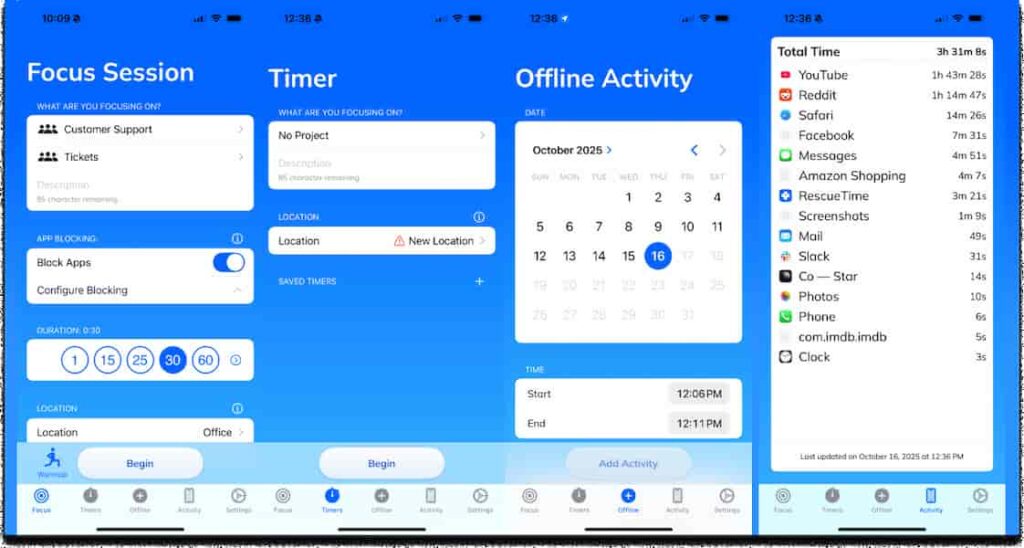
Setup is fairly straightforward. You install the app on the devices you actually use, allow the relevant permissions, and let it begin tracking your activity in the background. The benefit here is that you do not need to start and stop a timer every time you switch tasks. For ADHD users, that matters because manual systems often fail at the exact point you need them most: when you are already distracted.
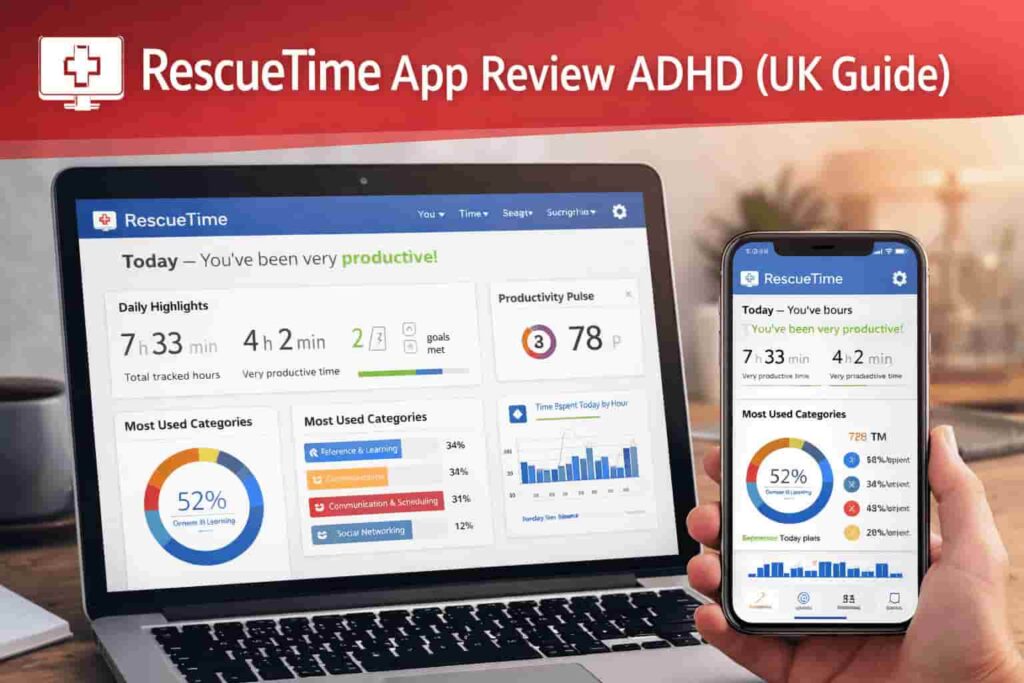
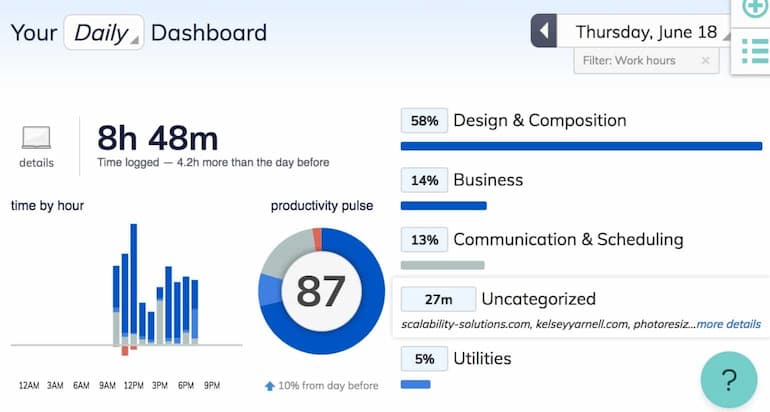
Once it is running, the app begins building a picture of your day. Websites, desktop apps, and digital activity are grouped into categories, so over time you start to see whether your day is mostly focused work, admin, meetings, browsing, or fragmented switching. That alone can be surprisingly useful. A day that felt “busy” can turn out to be mostly reactive activity.
During a focus session, the behaviour changes. Instead of simply recording what you did, RescueTime becomes more active. You start a session or use a planned schedule, and distracting websites can be blocked while you work. This is important because the interruption usually happens in a split second: one tab opens, one message gets checked, and the whole block of concentration disappears. When those common escape routes are blocked, there is more friction between impulse and action.
If you try to drift during one of those sessions, the system pushes back. That can be genuinely helpful in the moment because it reduces the “just for a second” behaviour that turns five minutes into forty. The scheduling side matters too. If focus periods happen automatically at the same time each day, the app starts shaping expectations around your environment. Instead of asking yourself whether you feel ready to focus, the system quietly makes focus the default.
That routine effect is one of the stronger parts of the product. When scheduled well, RescueTime shifts some decisions out of the moment and into planning time, which is often a better trade for ADHD brains than relying on repeated self-control.
Why It May Help (ADHD Context)
One reason digital work feels slippery is that distraction rarely arrives as one obvious event. It tends to show up as micro-shifts: checking an email, clicking a recommended video, searching something unrelated, or moving between tabs without finishing the original task. RescueTime may help because it makes those patterns visible rather than vague.
That visibility can reduce decision fatigue. Instead of repeatedly asking, “Am I focusing well enough?” you have an external record. You do not need to reconstruct the day from memory. You can see what happened and adjust from there. In practice, that makes it easier to notice whether the problem is boredom, overwhelm, poor task definition, or just a digital environment with too many open doors.
Environment control also matters. RescueTime will not remove every source of distraction, but it can reduce the most common digital leaks. From my own experience, that matters because once I have broken concentration, starting again often feels much harder than the original task deserved. A small amount of friction at the right moment can save a much larger loss of momentum later.
It is also useful for people who underestimate how much context switching drains them. A day full of “quick checks” can feel normal until you see the reports. That kind of feedback is not medical or diagnostic, but it can be practical. It helps you build a more honest relationship with your actual attention patterns.
For general ADHD-friendly productivity reading, it is also worth keeping an eye on ADDitude for broader articles on distraction, planning, and executive function.
Real-World Use Cases
Working from home: RescueTime is useful when home working becomes blurred by household interruptions, open messaging tools, and browser drift. You can review where time is going, set a defined focus block in the morning, and use the reports to spot whether your best work happens earlier or later in the day.
Study sessions: For revision or coursework, the app can be helpful because it creates clearer edges around a session. Instead of vaguely “trying to study”, you can block common distraction sites, run a timed work period, and later review whether the session was actually spent on the intended material.
Deep work blocks: If you do writing, coding, planning, or another cognitively demanding task, RescueTime works best when the task is already defined and the digital environment is the main risk. In that situation, focus sessions and automatic tracking can protect the block without creating extra admin.
Evening routine: Some people find the app useful later in the day when fatigue leads to endless low-value browsing. It can help create a cleaner cut-off point between deliberate screen use and default scrolling, especially if you schedule a protected work block before switching into downtime.
Feature Breakdown Table
| Feature | What It Does | Why It Matters |
|---|---|---|
| Automatic tracking | Records app and website activity in the background | Reduces reliance on manual timers |
| Focus sessions | Blocks selected distractions during planned work | Adds friction to impulsive checking |
| Reports | Shows patterns across categories and time periods | Helps reveal where attention drifts |
| Goals and alerts | Lets you set targets and receive feedback | Useful for routine reinforcement |
| Weekly summaries | Provides a broader view of your habits | Helps with reflection and adjustment |
Focus Environment Fit
RescueTime fits best in a layered setup rather than as a standalone answer. It works well if you already know that digital distraction is one of your main problems and you want a more measurable way to manage it. If your bigger issue is remembering tasks rather than staying on them, a reminder-focused tool may matter more first. That is why I would see RescueTime as one part of a broader system alongside something like my How to Choose Productivity Tools for ADHD style framework or a simpler blocking app when you need stricter boundaries.
It especially suits laptop-heavy work. If most of your distraction happens through desktop browsing, open tabs, email checking, and task drift, the app feels relevant. If your challenges are mostly offline, paper-based, or driven by low energy rather than digital noise, the value may feel less obvious.
Real Use Review
In a realistic full-day pattern, RescueTime tends to work best when you open your laptop, review your priorities quickly, and start the first meaningful block before the day becomes reactive. A morning focus session can reduce aimless browsing while the tracking runs quietly in the background. By midday, the app is already giving you a clearer sense of whether your attention has held up or fragmented.
That is where the product feels strongest: it quietly reduces self-deception. A day that feels full can still be scattered, and RescueTime makes that harder to ignore. I think that is useful because ADHD productivity problems are often partly measurement problems. If the feedback is vague, the adjustment is vague too.
Where it works well is during defined work that already has a clear next step. Writing, admin clearing, planning a project, editing, or studying all fit nicely. Where it feels weaker is when the problem is emotional resistance, exhaustion, or task ambiguity. In those moments, the data can show the drift, but it cannot solve the reason behind it.
It can also feel restrictive if you over-configure it. Too many alerts, categories, or expectations can turn a helpful tool into another layer of self-monitoring. I would keep the setup simple at first. The more complicated the system becomes, the more likely it is to become background noise rather than support.
Friction Points to Consider
- The tracking style may feel uncomfortable if you dislike being measured all day
- It is less useful when the task itself is unclear or emotionally avoidant
- Over-customising categories and alerts can create unnecessary friction
- People wanting very strict blocking may prefer a more lock-heavy app
Practical Reality Check
RescueTime is not likely to transform productivity by itself. What it can do is make your patterns easier to see and your work blocks easier to protect. That is a worthwhile difference, but it is still a difference built on behaviour, not magic. If you expect it to create motivation from nowhere, you may be disappointed. If you expect it to reduce digital leakage and give you more honest feedback, it makes more sense.
The strongest users are usually the ones who treat it as a gentle accountability layer. They review the data, adjust their environment, and use focus sessions for the parts of the day that usually go off track.
Buying Guide
When deciding whether RescueTime suits you, think about four things. First is compatibility: does it cover the devices and workflow you actually use? Second is notification control: do you need lightweight feedback, stronger blocking, or both? Third is ease of use: if setup feels too fiddly, you may stop checking it. Fourth is routine fit: RescueTime App Review ADHD (UK Guide) only really makes sense if you will use it regularly enough for the reports and sessions to mean something.
If you want insight plus focus support, it is a sensible option. If you mainly want a hard wall against distractions, a dedicated blocker may be the better buy.
Frequently Asked Questions
Is RescueTime mainly a blocker or a tracker?
It is better described as a tracker first with focus features built around it. The tracking side gives you visibility, while focus sessions add a more active way to reduce distraction.
Can RescueTime help with ADHD time blindness?
It may help indirectly because it creates a record of what actually happened during the day. That can be useful if your own sense of time and task duration is often inaccurate.
Does RescueTime feel too strict?
It depends on how you set it up. A light-touch setup can feel supportive, while an over-configured one may feel intrusive. Starting simple is usually the better approach.
Is RescueTime good for deep work?
Yes, especially when the task is already defined and your biggest risk is digital drift. It is less effective when the main challenge is low motivation or uncertainty about where to start.
Alternatives to Consider
If RescueTime feels too data-heavy, Forest App Review for ADHD Focus (UK Guide) may suit you better if you prefer a lighter and more visual way to protect short sessions.
If you want stronger blocking across more devices, Freedom App Review for ADHD (UK Guide) is worth a look because it leans more directly into distraction control.
If you prefer a stricter, more forceful approach on desktop, Cold Turkey Blocker Review ADHD (UK Guide) may be the better fit for heavier boundary-setting.
Final Verdict
RescueTime App Review ADHD (UK Guide) comes out as a solid option for adults who want a clearer view of their attention patterns and a practical way to protect work sessions without relying entirely on memory or willpower. It suits people who benefit from external feedback, routine reinforcement, and a more measurable digital environment.
It may not suit someone who wants a simple, aggressive blocker with very little analysis, or someone who finds constant tracking demotivating. Used well, though, it can be a realistic part of an ADHD-friendly productivity setup: not a cure, not a miracle, but a genuinely useful layer of awareness and structure.
This may be a good fit depending on how you work, but most people find better results when a few tools support different parts of their routine. If you want to see how that can look in practice, take a look at how to build a complete ADHD-friendly productivity setup.