
Cold Turkey Blocker Review ADHD (UK)
At a Glance
- Desktop-based distraction blocking tool
- Strong website and app blocking control
- Locked sessions prevent bypassing blocks
- Custom schedules for routine building
- One-time payment option available
Introduction
Cold Turkey Blocker Review ADHD (UK) explores a distraction blocking tool designed to reduce online interruptions by locking access to websites and apps during focus sessions.
If you’ve already explored broader tools in our best distraction blocking apps for ADHD (UK) guide, this review focuses specifically on how Cold Turkey works in real day-to-day use.
Rather than relying on willpower alone, the app removes access entirely, which can be particularly useful when attention drifts toward habitual distractions. Instead of constantly negotiating with yourself, the environment is simplified so distraction is no longer an option.
That shift can feel quite different compared to softer reminder-based tools, and it’s worth understanding how that plays out in real use before deciding if it fits your routine.
Cold Turkey Blocker Review ADHD (UK): Key Features
Cold Turkey focuses on strict blocking and reducing decision-making during work sessions. It’s built to remove temptation rather than gently discourage it.
- Website and app blocking across desktop
- Locked sessions that cannot be undone mid-use
- Custom schedules for recurring routines
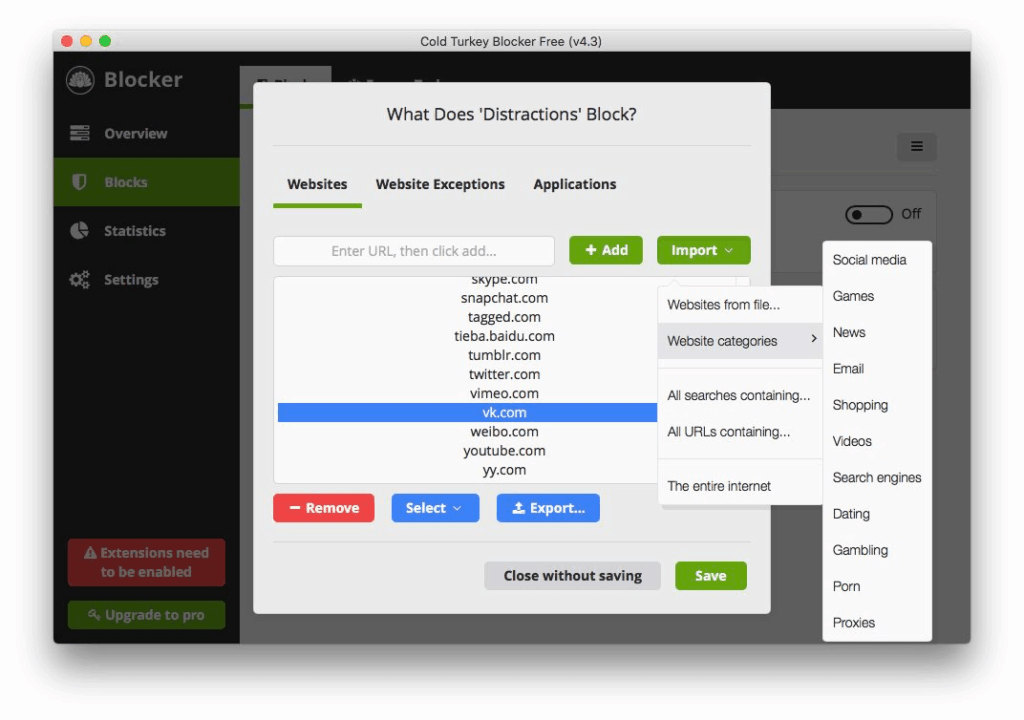
- Whitelist and blacklist flexibility
- “Frozen” mode to prevent system changes
Who This Guide Is For
- People who struggle with online distraction loops
- Those working primarily on desktop or laptop
- Users who benefit from strict boundaries
- Anyone building structured work routines
Key Takeaways
- Cold Turkey prioritises control over flexibility
- It removes access rather than relying on reminders
- Best suited for deep work sessions
- Less useful for mobile-first workflows
How It Works
Cold Turkey Blocker allows you to create lists of websites or apps that are inaccessible during a session. Once a block is active, access is restricted entirely.
You can schedule sessions in advance or start them manually. The key difference is that once a session begins, it cannot easily be stopped, which removes the temptation to “just check something quickly”.
This creates a more controlled environment where focus becomes the default rather than a repeated decision.
In practical terms, you’re setting boundaries ahead of time rather than relying on motivation in the moment. For example, you might block social media and news sites during a 2-hour work block so they simply aren’t available.
Over time, this can help reduce the mental load of constantly switching between “work mode” and “distraction mode”.
Why It May Help (ADHD Context)
For many people with attention challenges, distraction isn’t just about lack of effort — it’s about friction and impulse loops.
Cold Turkey reduces the number of decisions you need to make. Instead of constantly choosing whether to stay focused, the decision is made before the session starts.
From my own experience, having something physically block access can sometimes feel more reliable than relying on willpower, especially during low-energy periods or when focus is already slipping.
It can also help interrupt “just one quick check” behaviour, which often leads to longer distractions. By removing access entirely, you reduce the chance of falling into that loop.
For further reading on attention and distraction patterns, see ADDitude.
Feature Breakdown Table
| Feature | Details |
|---|---|
| Platform | Windows / macOS |
| Blocking Strength | Very high (locked sessions) |
| Scheduling | Custom recurring schedules |
| App Blocking | Yes (desktop applications) |
| Payment Model | Free + one-time Pro upgrade |
Focus Environment Fit
Cold Turkey works best in structured environments where you sit down for defined work blocks.
It pairs well with tools covered in our ADHD focus timers UK guide, especially if you’re using time-based work sessions.
For example, you might run a 45-minute timer alongside a Cold Turkey block, creating a clear start and end point for focused work.
However, it’s less suited to flexible or mobile-heavy setups, where switching between tasks is more frequent or where you need quick access to different tools throughout the day.
Real Use Review
In practical use, Cold Turkey feels quite strict compared to many alternatives.
Once a session is active, you’re effectively committed. This can be helpful during deep work but can feel restrictive if your work requires quick access to blocked tools.
It tends to work best when you clearly define your work window in advance, rather than using it casually.
For example, during a focused writing session, it can be useful to block everything except your document and research tools. This removes the temptation to switch tabs repeatedly.
On the other hand, if your work involves frequent context switching (emails, messaging, research), it can feel slightly too rigid.
From experience, it works best when used intentionally rather than all day. Short, defined sessions tend to feel more sustainable than trying to block distractions continuously.
Friction Points to Consider
- Cannot easily override sessions once started, which can be frustrating if you genuinely need access
- No mobile app support, limiting use to desktop environments
- Can feel too restrictive for flexible workflows or creative tasks
- Initial setup may take time to configure properly
- Requires planning ahead rather than spontaneous use
Practical Reality Check
Cold Turkey Blocker is not a productivity solution on its own. It doesn’t organise tasks or manage priorities — it simply removes distractions.
That means it works best as part of a wider system rather than a standalone tool.
For example, combining it with a task manager or a simple written plan can make the sessions more effective, as you already know what you’re working on before you start.
Without that structure, it’s possible to block distractions but still feel unsure about what to do next.
Buying Guide
When considering Cold Turkey Blocker Review ADHD (UK), think about how it fits into your routine:
- Compatibility: Works on desktop only (Windows/macOS)
- Notification control: Removes access rather than sending alerts
- Ease of use: Simple once configured, but requires initial setup
- Routine fit: Best for structured work blocks rather than flexible schedules
Frequently Asked Questions
Is Cold Turkey Blocker good for ADHD?
It may support focus by removing distractions rather than relying on reminders, which can reduce decision fatigue and limit impulsive switching.
Can you override Cold Turkey once it starts?
No, most sessions are locked, which is part of its design to prevent impulsive interruptions. This can be helpful, but also restrictive in some situations.
Does Cold Turkey work on mobile?
No, it is designed for desktop use only, which may limit how it fits into some routines.
Is the paid version necessary?
The free version offers basic features, but the Pro version unlocks more control, scheduling, and stronger blocking options.
Can it replace other productivity tools?
No, it works best alongside other tools such as task managers or timers rather than replacing them.
Alternatives to Consider
- Freedom App Review ADHD (UK) – more flexible cross-device blocking and easier to adjust mid-session
- Forest App Review ADHD (UK) – uses a visual approach which may feel less restrictive for some users
- RescueTime Review ADHD (UK) – combines tracking with optional blocking for a more flexible setup
Final Verdict
Cold Turkey Blocker Review ADHD (UK) shows that this tool is best suited for people who need strong boundaries around distraction.
It may work particularly well for deep work sessions where access control is more helpful than reminders.
However, if your workflow requires flexibility or mobile access, it may feel too restrictive.
Overall, it’s a practical tool for reducing distraction, but it works best when combined with a wider productivity system.
If you prefer clear structure and firm limits, it can be very effective. If you prefer flexibility, you may find it harder to stick with long term.