
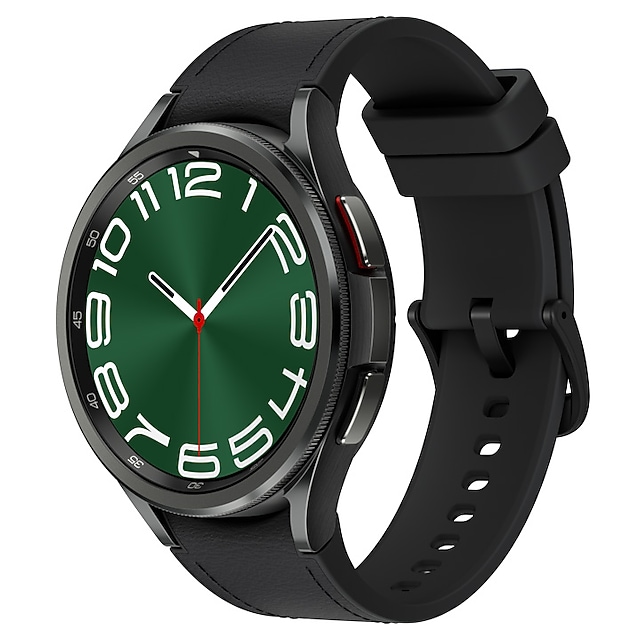
Check Current Price & Availability
View the latest price and see whether the Samsung Galaxy Watch 6 fits your reminder setup.
At a Glance
- Premium smartwatch with strong notification and reminder system
- Seamless integration with Android phones and Google apps
- Customisable alerts ideal for routine building
- Health tracking features can support energy awareness
- Higher price point compared to basic reminder devices
View the Samsung Galaxy Watch 6 on Amazon
Introduction
The Samsung Galaxy Watch 6 for ADHD Task Reminders is a premium wearable designed to help manage daily tasks, routines, and time awareness. For many adults with ADHD, remembering what to do — and when to do it — can be one of the biggest daily challenges. This is where wearable reminders can become genuinely useful.
If you’re comparing different smartwatches for ADHD task reminders, it can help to look at how simpler devices approach notifications and habit prompts. For example, the Fitbit Versa 4 for ADHD Task Reminders offers a more streamlined, distraction-light experience, which can suit users who prefer less complexity.
The Samsung Galaxy Watch 6 is one of the most effective smartwatch options for ADHD reminders, especially for users who need wearable prompts throughout the day and want deeper control over notifications, apps, and scheduling.
In this review, we will look at how the Samsung Galaxy Watch 6 for ADHD Task Reminders actually performs in real-world use — including where it works well, where it can feel overwhelming, and how it fits into a consistent daily routine.
Samsung Galaxy Watch 6 for ADHD Task Reminders: Key Features
The Samsung Galaxy Watch 6 focuses heavily on notifications, scheduling, and integration — all of which are critical for ADHD support when used correctly.
- Customisable vibration and notification alerts
- Google Calendar and reminder app integration
- Voice assistant for quick task capture
- Health tracking (sleep, activity, heart rate)
- Daily scheduling and habit tracking support
Who This Guide Is For
- Adults with ADHD who struggle with time awareness
- People who miss tasks or forget appointments
- Users already using Android or Samsung devices
- Those looking for wearable reminders rather than phone-only solutions
- Individuals building structured daily routines
Key Takeaways
- Strong for routine prompts and scheduled reminders
- Works best when paired with structured systems
- Can reduce reliance on checking your phone constantly
- Not ideal if you want a very simple or distraction-free device
- Requires setup to avoid notification overload
How It Works
Using the Samsung Galaxy Watch 6 for ADHD Task Reminders is less about the device itself and more about how you set it up.
Step 1: Initial Setup
You connect the watch to your Android phone via the Galaxy Wearable app. From there, you sync your calendar, reminders, and notifications. This is where most of the power comes from — the watch mirrors your digital life.
Step 2: Creating Task Prompts
You can set reminders through Google Calendar, Samsung Reminders, or voice commands. For example, you might say, “Remind me to start work at 9am,” and the watch will trigger a vibration alert.
Step 3: During a Task
When a reminder triggers, the watch vibrates on your wrist. This is important — it cuts through distractions more effectively than phone notifications, which are easy to ignore.
Step 4: Handling Distractions
If you attempt to ignore the alert, the watch still remains visible on your wrist, acting as a passive reminder. This is subtly powerful for ADHD, where “out of sight” often means “out of mind.”
Step 5: Scheduling Behaviour
Over time, consistent alerts help build routine patterns. For example, you may begin associating a certain vibration pattern with starting work or taking breaks.
Why It May Help (ADHD Context)
The Samsung Galaxy Watch 6 for ADHD Task Reminders targets several common ADHD challenges.
One of the biggest issues is time blindness — the tendency to lose track of time or underestimate how long tasks take. Regular wrist-based alerts can act as anchors throughout the day.
Another factor is decision fatigue. When you rely on memory alone, you are constantly deciding what to do next. With scheduled reminders, those decisions are externalised — you simply respond to prompts.
Environment control also plays a role. Unlike a phone, which contains endless distractions, a smartwatch delivers a single, focused notification. This reduces the chance of falling into a distraction loop.
I personally found that having a reminder physically on my wrist felt harder to ignore than a phone notification. It creates a subtle sense of accountability without being overwhelming.
For broader ADHD strategies and behavioural insights, resources like ADDitude provide useful guidance on managing routines and focus.
Samsung Galaxy Watch 6 for ADHD Task Reminders: Real-World Use Cases
Working From Home
The watch can prompt you to start tasks, attend meetings, or take breaks. This is particularly useful if your home environment lacks structure.
Study Sessions
Students can use timed reminders to begin and end study blocks. The vibration alert avoids the need to constantly check the time.
Deep Work Blocks
You can schedule uninterrupted work periods and receive alerts when to start and stop. This works especially well if you prefer a more feature-rich setup than the Amazfit Bip 5 for ADHD Task Reminders.
Evening Routine
Simple reminders like “start winding down” or “prepare for tomorrow” can help create consistency, which is often difficult with ADHD.
Feature Breakdown Table
| Feature | Details |
|---|---|
| Notifications | Custom alerts with vibration and sound |
| Reminder System | Syncs with Google Calendar and Samsung Reminders |
| Battery Life | Typically 1–2 days depending on usage |
| Compatibility | Best with Android and Samsung phones |
| Ease of Use | Moderate setup required |
Focus Environment Fit
The Samsung Galaxy Watch 6 for ADHD Task Reminders works best in structured environments where you are trying to reduce reliance on your phone.
For example, if you are comparing smartwatch setups, the Apple Watch Series 9 for ADHD Task Reminders shows how a different premium wearable handles reminders, app access, and routine prompts.
It fits particularly well into systems where tasks are pre-planned rather than decided in the moment.
Real Use Review
Using the Samsung Galaxy Watch 6 across a full day highlights both its strengths and limitations.
In the morning, reminders to start tasks or leave the house are clear and effective. The vibration is noticeable without being intrusive.
During work blocks, the watch helps maintain structure. You can rely on it to prompt breaks, meetings, or transitions between tasks.
However, if too many notifications are enabled, it can become overwhelming. This is where setup becomes critical — filtering notifications is essential.
In the evening, reminders for winding down or preparing for the next day are helpful, especially if you tend to lose track of time.
One challenge is that the watch still connects to your phone ecosystem. If not managed carefully, it can mirror distractions rather than reduce them.
Friction Points to Consider
- Requires careful setup to avoid notification overload
- Battery life may need daily charging
- Less effective if you ignore alerts consistently
- Works best within an existing routine, not as a standalone fix
Practical Reality Check
The Samsung Galaxy Watch 6 for ADHD Task Reminders is not a magic solution. It will not automatically fix time management or focus issues.
However, when used as part of a structured system, it can significantly reduce missed tasks and improve consistency.
The key is to keep reminders simple, predictable, and aligned with your daily routine rather than overloading the system with too many alerts.
Buying Guide
Compatibility
Works best with Android devices, especially Samsung phones.
Notification Control
You must be willing to customise alerts to avoid overwhelm.
Ease of Use
Moderate setup required, but manageable once configured.
Routine Fit
The watch works best if you already have a basic routine or are willing to build one.
Frequently Asked Questions
Is the Samsung Galaxy Watch 6 good for ADHD reminders?
Yes, particularly for time-based prompts and routine building, but it requires proper setup.
Can it replace my phone for reminders?
It complements your phone rather than replacing it, acting as a more immediate alert system.
Is it too distracting?
It can be if notifications are not managed carefully. Filtering is essential.
Does it work with all phones?
It works best with Android devices and may have limited functionality on other platforms.
What is the best smartwatch for ADHD task reminders?
The Samsung Galaxy Watch 6 is one of the best options due to its customisable alerts, strong integration with Android apps, and reliable reminder system.
Samsung Galaxy Watch 6 vs Other ADHD Reminder Tools
Compared to simpler smartwatch options, the Samsung Galaxy Watch 6 provides more immediate customisation, stronger app integration, and deeper scheduling support. Devices like the Fitbit Versa 4 for ADHD Task Reminders take a more streamlined approach, while the Galaxy Watch 6 is better suited to users who want more control.
Alternatives to Consider
If the Samsung Galaxy Watch 6 for ADHD Task Reminders feels too complex or expensive, there are other smartwatch options you can explore.
Fitbit Versa 4 for ADHD Task Reminders offers a simpler, lower-friction experience.
Amazfit Bip 5 for ADHD Task Reminders is useful if you want a more budget-friendly, stripped-back reminder system.
Apple Watch Series 9 for ADHD Task Reminders works well if you want another premium smartwatch option with strong app support.
Final Verdict
The Samsung Galaxy Watch 6 for ADHD Task Reminders is a powerful tool for building structure, improving time awareness, and reducing missed tasks.
It suits users who are willing to set up and manage their notification system carefully. It may not suit those looking for a very simple or distraction-free solution.
Used correctly, it can become a reliable external reminder system — which is often exactly what ADHD requires.
If you are still comparing options, you can view all recommended models in the 5 Best Smart Watches for ADHD Task Reminders (UK), which breaks down the key differences to help you choose.
If you want to explore how smartwatches, apps, and other tools can work together, you can read the full Digital Productivity Tools for ADHD (UK Guide), which covers building a complete system.